web
You’re offline. This is a read only version of the page.
close
Skip to main content

Notifications

Announcements

No record found.

Community site session details

Community site session details

Session Id :
Microsoft Dynamics CRM (Archived)

How to export a solution (customization) and import it on another CRM.

(0) ShareShare
ReportReport
Posted on by

Hi,


I have customized a service and I want to export it and import it into a brand new CRM Instance.

The reason: 5 users are too much and the company will buy hosting services from Microsoft Partner instead of buying it from Microsoft. And The solution has been fully customized during the 30 days trial offered by Microsoft.


The customization includes: custom fields, custom views, custom entitites, business rules, workflows, relationships.

My question is: which of the following check-boxes should I check when Exporting the Solution (From Settings-Customization-Customize the system)


And please tell me if this is not the right way of doing it. I really need to export the customization because the trial expires really soon.
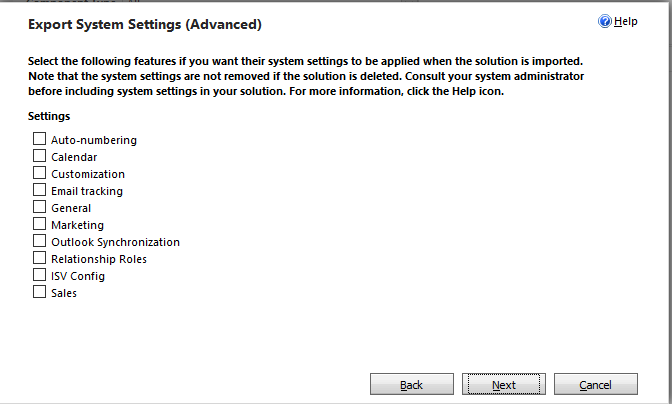
Default-Solution-_2D00_-Microsoft-Dynamics-CRM.png

*This post is locked for comments

I have the same question (0)
  • Suggested answer
    nghieppham Profile Picture
    4,755 on at

    Hi Adrian,

    You can export your solution without checking any check box.

    All the check box here is just about the current setting of user. It is not effected to your customization.

    You should choose unmanaged solution when you export your solution because managed solution will not allow you continue customize when you import it to other system.

    Regards,

  • Adrian Suteu Profile Picture
    on at

    Thank you. But where am I supposed to choose unmanaged solution?

    I don't see such an option when exporting.

    I go to Settings-Customizations-Customize the system and I click on Export Solution (the button on the top). Then it says to make sure that I published the latest customizations, I click Next, the window from the print screen published here appears, with the check-boxes. I click Next again and the it gets exported.

    THERE IS NO OPTION TO CHOOSE BETWEEN MANAGED/UNMANAGED.

    Please help me.

    Thanks,

    Adrian

  • Suggested answer
    nghieppham Profile Picture
    4,755 on at

    Hi Adrian,

    You continue clicking next at your step, you will see this step as following image.

    0602.solution.png

  • Adrian Suteu Profile Picture
    on at

    No, unfortunately I don't get this window.

    It starts downloading after the window with the check-boxes.

    I use MS Dynamics version 2016.

    Do I have to select entities or anything else before clicking on Export Solution button? Am I missing something here?

    Thanks,

    Adrian

  • nghieppham Profile Picture
    4,755 on at

    Hi Adrian,

    can you give me the name of your solution?

    Regards,

  • Adrian Suteu Profile Picture
    on at

    I am sorry but I don't understand what name to give to you.

    It is not a custom solution that I have imported in MS Dynamics. There are just customizations made by me.

    I click on this button (EXPORT SOLUTION) to export the default solution:

    Default-Solution-_2D00_-Microsoft-Dynamics-CRM2.png

  • Suggested answer
    Jharana Baliyar Singh Profile Picture
    2,667 on at

    Hi Adrian,

    Yes Pham said correctly here no need to check these options while exporting but must check with before export publish all customizations.If further customization you need then export with unmanaged solution.

  • Suggested answer
    nghieppham Profile Picture
    4,755 on at

    Hi Adrian,

    In this case, you should create your solution, add all components which you customized and then export it.

    Regards,

  • Suggested answer
    Community Member Profile Picture
    on at

    Hi, Adrian

    I've read all discussions done. Let me give you all the steps for exporting a solution.

    1. Click "Export Solution" button that is highlighted by you in image posted by you in your last post.

    2. Click "Publish All Customization" button and then Next

    3. A window will appear naming "Export System Settings(Advanced)" , dont check anything in it and just click Next

    4. Now you will have Package Type window in which you need to specify whether you want to export solution as 'Managed" or "Unmanaged" , Select anyone and Click Export button and you are done with exporting.

    You will have a file with .zip extension downloaded and that will contain your solution.

    This zip file will have to be imported to another instance.

  • Suggested answer
    Jharana Baliyar Singh Profile Picture
    2,667 on at

    Hi Adrian,

    In 2016 online you can't export default solution.I have tried to export but it seems its opening export wizard but not happening anything .Check this :community.dynamics.com/.../154678

    You can create your own solution & through Add existing you can transfer all customizations what you have done along with system things to your solution.Then export with unmanaged & import to other instance.

    5270.Screenshot_5F00_6.png

    3113.Screenshot_5F00_4.png

    7827.Screenshot_5F00_5.png

    5270.Screenshot_5F00_6.png

Under review

Thank you for your reply! To ensure a great experience for everyone, your content is awaiting approval by our Community Managers. Please check back later.

Helpful resources

Quick Links

Responsible AI policies

As AI tools become more common, we’re introducing a Responsible AI Use…

Neeraj Kumar – Community Spotlight

We are honored to recognize Neeraj Kumar as our Community Spotlight honoree for…

Leaderboard > 🔒一 Microsoft Dynamics CRM (Archived)

#1
SA-08121319-0 Profile Picture

SA-08121319-0 4

#1
Calum MacFarlane Profile Picture

Calum MacFarlane 4

#3
Alex Fun Wei Jie Profile Picture

Alex Fun Wei Jie 2

Last 30 days Overall leaderboard

Featured topics

Product updates

Dynamics 365 release plans



