web
You’re offline. This is a read only version of the page.
close
Skip to main content

Notifications

Announcements

No record found.

Community site session details

Community site session details

Session Id :
Microsoft Dynamics CRM (Archived)

Copy the fuction of create Invoice Buttom to Quotes.

(0) ShareShare
ReportReport
Posted on by

Partners,
Can anyone help me in copy the function of the button "create Invoice" in salesOrder to Quotes ?
I am using ribbon work bench by Scott and i know how add a new button and put a command in it, but i cant see how add a javascript function, besides its name and library, and I can't find/see either the javascript code of Create Invoice button and neither where is to write something.

In general words, i want to create a invoice from Quotes. Because I will use invoice as different entity to keep the proposal from my quotes .

Thanks in advance.

*This post is locked for comments

I have the same question (0)
  • Suggested answer
    Mahadeo Matre Profile Picture
    17,021 on at

    Hi Rafael,

    To write / Add JavaScript function.. either you need to create JavaScript web resource.. and your code in that JavaScript web resource and call that function from ribbon button.

    Or

    You can go to order form in ribbon work bench, on form you will see Create Invoice button.. right click on it and select Customize command..

    once you customize command you will able to see which script library CRM is using to create invoice from sales order.

    Copy same functionality in Quote custom button..

    Hope this will help.. 

  • Suggested answer
    Mithilesh Kumar Profile Picture
    10,047 on at

    Hi Rrocha,

    1. Open the Entity in RibbonWorkbench.

    2. Right click on the button whose function you want to copy.

    3. Click on Customize Command

    4. A new entry for command will appear in the Solutions Element section

    5. From here you can see the JScript, Function and Parameters being referenced

    6. Use the same function in you Custom Button.

    Assuming that you have all attributes defined for the function to use, otherwise there may be error popping up.

    Hope that helps

    Thanks

  • Aileen Gusni Profile Picture
    44,524 on at

    Hi Rafael, Yes using Ribbon Workbench is smart decision.

    You can get the library name and function name through this step:

    go to salesorder entity (make sure you have it in the solution component), right click, customize command.
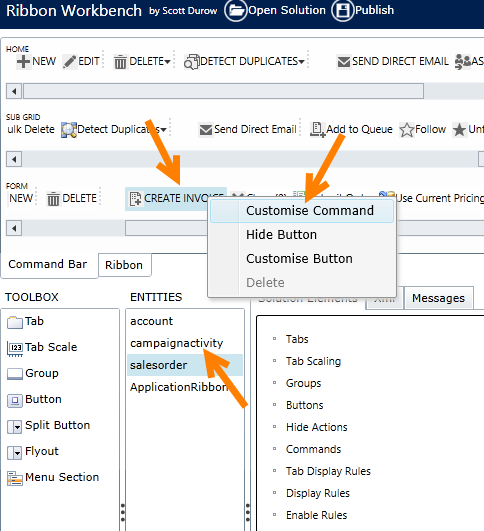
    0272.copybutton2.png

    Then you will see 'Commands', expand its area
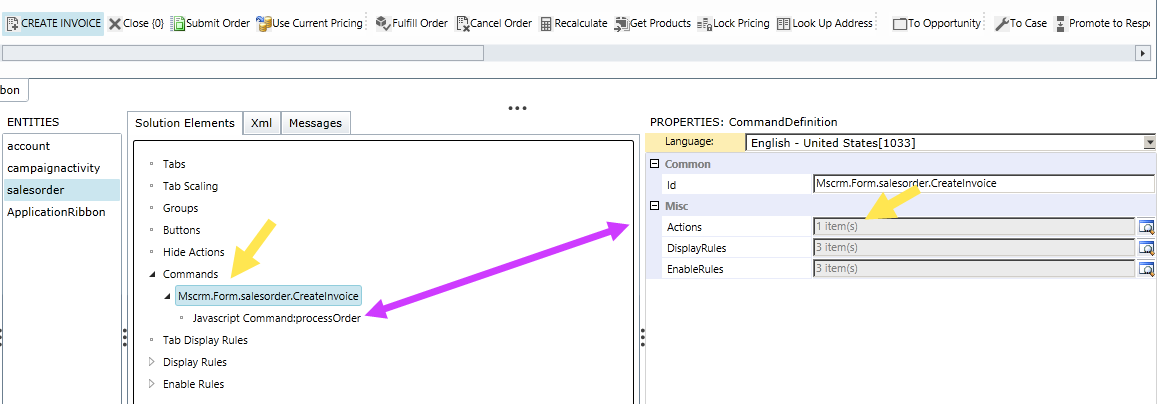
    copybutton3.png

    After that you can see in the Actions (lookup) or just click the javascript function under the section Commands that you have expanded.
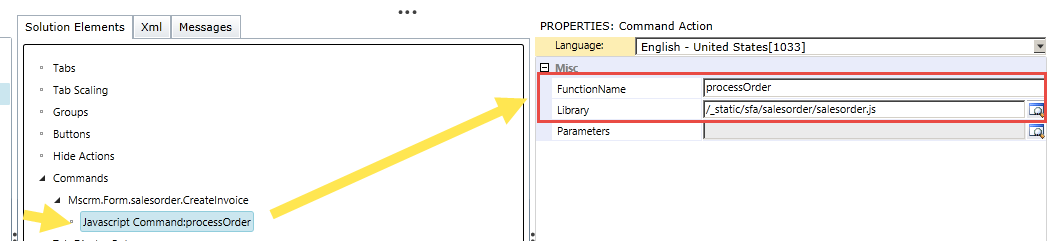
    Then you will find the function name.

    But based on your question, I think you already had its name and library just cannot find the code itself inside the function name? And your concern here is to get the code, Right or not?

    You need to Debug and maybe using like IE Developer Tool.

    If you are using onPremise then you can access this script using this path:

    C:\Program Files\Microsoft Dynamics CRM\CRMWeb\_static\SFA\salesorder\salesorder.js

    It's unsupported way to modify its physical file. So this is not recommended, but your case you only want to copy.

    Okay, but I think you are using CRM Online so you cannot access through physical folder but you can use debugger to this library:

    \_static\SFA\salesorder\salesorder.js

    Anyway, I help you to paste the code I got here from my CRM:

    function processOrder() {
    	Mscrm.RefreshPageCommandHandler.executeCommand(Mscrm.InlineCommands.OrderProcessOrder, null)
    }

    Another problem is the Mscrm.InlineCommands.OrderProcessOrder function.
    Which is you can set a debugging point in your custom code if you have this code.

    Has posted before here:

    https://community.dynamics.com/crm/f/117/t/146349.aspx

    But I think you can set a debugging there from your custom code then you can use F11 to move to the insider code.

    Hope this helps you.

    Thank you.


  • Community Member Profile Picture
    on at

    Hi guys,
    I really appreciated the help this time.
    I was able to copy the function and the Display and Enable Rules i just didn't copy the enable rule called Mscrm.salesorder.IsOrderActiveOrFulfilled, I doble checked that everything is ''equal'' to the original one, but i am getting a error when i click the new button in quotes.

    Here's is the log, that doesn't look helpful for me.

    Unhandled Exception: System.ServiceModel.FaultException`1[[Microsoft.Xrm.Sdk.OrganizationServiceFault, Microsoft.Xrm.Sdk, Version=7.0.0.0, Culture=neutral, PublicKeyToken=31bf3856ad364e35]]: System.NotImplementedException: Microsoft Dynamics CRM has experienced an error. Reference number for administrators or support: #0B2D4C22Detail:
    <OrganizationServiceFault xmlns:i="http://www.w3.org/2001/XMLSchema-instance" xmlns="http://schemas.microsoft.com/xrm/2011/Contracts">
      <ErrorCode>-2147220970</ErrorCode>
      <ErrorDetails xmlns:d2p1="http://schemas.datacontract.org/2004/07/System.Collections.Generic" />
      <Message>System.NotImplementedException: Microsoft Dynamics CRM has experienced an error. Reference number for administrators or support: #0B2D4C22</Message>
      <Timestamp>2015-02-09T13:32:21.2860874Z</Timestamp>
      <InnerFault i:nil="true" />
      <TraceText i:nil="true" />
    </OrganizationServiceFault>

    Here the photos of my buttoneight.gif

    two.gif

    tree.giffour.gifsix.gifseven.gif

    What do you recommends ?

  • Aileen Gusni Profile Picture
    44,524 on at

    Hi Rrocha,

    I think the parameter here is different from Quote and Order and the internal process and logic from this code:

    function processOrder() {

    Mscrm.RefreshPageCommandHandler.executeCommand(Mscrm.InlineCommands.OrderProcessOrder, null)

    }

    Especially the Mscrm.InlineCommands.OrderProcessOrder is not suitable for Quote so that you found an error, unexpected and the log is not helping at all because not expected.

    May I recommend/suggest you to create your own, instead of reliable to copy button?

    Maybe you can create dialog, workflow, or custom button then call a javascript function store a field that can trigger a plugin, or use the custom action when you click the button you call the custom action.

    Are you using Opportunity?

    If yes, then it will good for you:

    community.dynamics.com/.../generate-an-invoice-from-an-opportunity-using-net-or-jscript-in-microsoft-dynamics-crm-2011.aspx

    Otherwise, you can use CreateRequest to create the Invoice programmatically.

    Hope this helps.

    Thanks.

  • Community Member Profile Picture
    on at

    Aileen,

    I am using quotes. I really just want to have a button with a function "copy" or duplicate the record and create it in invoice.
    It is really like the create invoice button from order, when you click it open the new create record with the same information of quotes.
    I saw the post about create in opportunity, can you give a starting page to do it ? Like what i do if a have a code ?
    By the way, I dont know if i really need javascript ou C#, for me the simple better.
    If i can create it with a workflow or a dialog i think this is easier.

  • Suggested answer
    Aileen Gusni Profile Picture
    44,524 on at

    Hi Rafael,

    Copying button wont help because as mentioned earlier, it will call the internal process function that need Order ID as parameter, not Quote Id.

    So, in this case, I recommend you to create a plugin, you can create custom action, but for beginning I think using Plugin is easier.

    You cannot use Workflow because Workflow cannot be used to retrieve the related Quote Products to create Invoice Products using standard workflow or dialog.

    Maybe the concept here is you create a custom button.

    Then from that custom button, having javascript that can trigger a plugin, for example you have a flag = Create invoice = Yes/No.

    If yes, then trigger a plugin.

    From the Plugin, if in your Quote you have Opportunity, then you can use the method I mentioned in the link before, generate invoice from Opp.

    If not, then you can just retrieve the Quote Detail then create Invoice and get all retrieved Quote Product to create Invoice Products.

    That's is the concept.

    The starting page here is you create first the button that can change the field that can trigger plugin, then you create plugin like I mentioned in the previous paragraph.

    Hope this helps.

    Thank you.

  • Community Member Profile Picture
    on at

    Okey, these tasks were tricky, but i got that.
    I have now a custom button with a javascript script function that can change a field of 2 options set. Like you said a ''flag'' field.
    I did download microsoft visual studio, and set-up the CRM solution, i can connect to my organization and i have here a plugin.cs with a default arrangement.
    So i need now, to write the plugin, and start it when my field isribbonbuttonclicked change to true.

    Is that correct ?

    This is my actual scenario. I have in my quotes, a custom button who can change a custom field in quotes to true.

    My quotes are in USD dollar and my opportunities in BRL currency, so i cant make a connection between them.

    Now i need to create a new invoce record with the same informations(-quotes Id) of this quotes.

    How can i  accomplish this ?


    Thanks.

Under review

Thank you for your reply! To ensure a great experience for everyone, your content is awaiting approval by our Community Managers. Please check back later.

Helpful resources

Quick Links

Responsible AI policies

As AI tools become more common, we’re introducing a Responsible AI Use…

Neeraj Kumar – Community Spotlight

We are honored to recognize Neeraj Kumar as our Community Spotlight honoree for…

Leaderboard > 🔒一 Microsoft Dynamics CRM (Archived)

#1
SA-08121319-0 Profile Picture

SA-08121319-0 4

#1
Calum MacFarlane Profile Picture

Calum MacFarlane 4

#3
Alex Fun Wei Jie Profile Picture

Alex Fun Wei Jie 2

Last 30 days Overall leaderboard

Featured topics

Product updates

Dynamics 365 release plans



