web
You’re offline. This is a read only version of the page.
close
Skip to main content

Announcements

No record found.

News and Announcements icon
Community site session details

Community site session details

Session Id :
Microsoft Dynamics 365 | Integration, Dataverse...
Suggested Answer

Export to excel XRM Tools does not load entities

(0) ShareShare
ReportReport
Posted on by 10

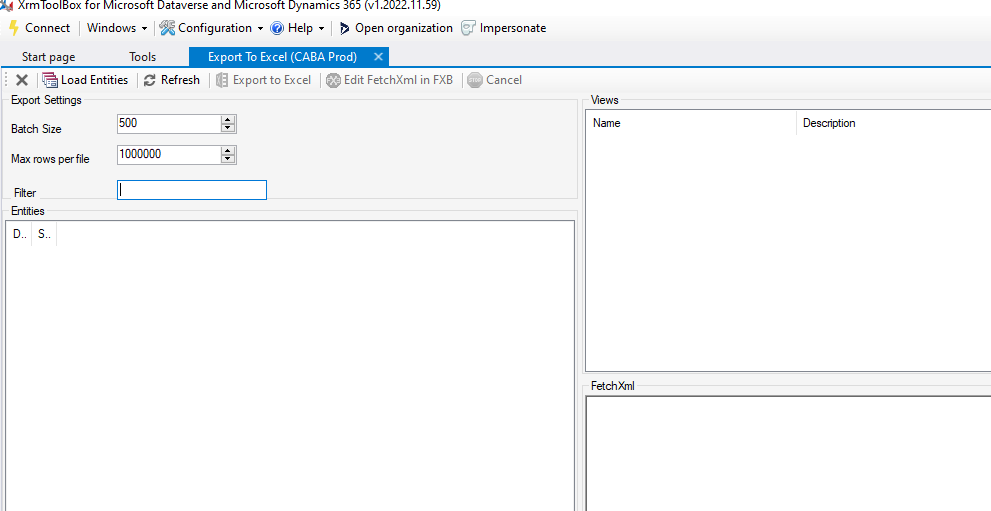
Hello, since I changed my computer for a new one, I cant use anymore the tool of export to excel simply cause it never shows any entity whatsover. 
pastedimage1672144480980v1.png

Has anybody had this problem before or know how to fix it? Its happening with another collegues that also changed their computer...

I have the same question (0)
  • a33ik Profile Picture
    84,331 Most Valuable Professional on at

    Hello,

    You should check the following guide - www.xrmtoolbox.com/.../

    Good luck.

  • Suggested answer
    Leah Ju Profile Picture
    Microsoft Employee on at

    Hi Victor,

    Have you tried to reconnect to current environment to test again? 

    Or you can refer to the following link to reset XrmToolBox installation:

    https://www.xrmtoolbox.com/documentation/for-users/reset-xrmtoolbox-installation/ 

    First thing to understand is where XrmToolBox store its files. There are two locations:

    • Location where is XrmToolBox.exe file. This location contains only system files that don't change. That means that if something goes wrong suddenly (ie. not after an update), it seems unrelevant to check for a cause in this folder.
    • Location where XrmToolBox stores settings, tools, connections, etc. This location is by default C:\users\appData\your_login\Roaming\MscrmTools\XrmToolBox (see this page for changing default storage location)

    So, if your XrmToolBox application does not work anymore, I recommand to:

    • Backup your connections folder in C:\users\appData\your_login\Roaming\MscrmTools\XrmToolBox
    • Backup your settings folder in C:\users\appData\your_login\Roaming\MscrmTools\XrmToolBox
    • Delete content of folder C:\users\appData\your_login\Roaming\MscrmTools\XrmToolBox
    • Start XrmToolBox again. There shouldn't be error/problem anymore
    • Install tools from Tool Library
  • Suggested answer
    Mohamed GRAIB Profile Picture
    2,504 Moderator on at

    Hi,

    Have you installed the updates of XRMTOOLBOX.

    Try to install all updates, then try again.

    If you cannot load entities, delete it and re-download the tool.

    Hope that's helpful for you.

  • Victor Lobo Profile Picture
    10 on at

    the XRM works fine except for this particular application called "Export to excel" that doesnw want to load the entities. The rest do it fine so I cant think what it can be.

  • Suggested answer
    a33ik Profile Picture
    84,331 Most Valuable Professional on at

    Here is the page of this plugin - www.xrmtoolbox.com/.../

    You could reach out to the person who developed it and try to get some help.

  • Harikrishnan23 Profile Picture
    32 on at

    Hi, Victor lobo

    Why because of

    Insufficient Permissions If you do not have sufficient permissions to access the entities, the export to Excel function will not work.

    Dynamics 365 must be configured properly for the export to Excel function to work. If there are any issues with the configuration, the export may not work.

    Kindly, get proper access from Dynamics 365 and try again.

    www.xrmtoolbox.com/.../

    If it is helped you mark it as Verified.

Under review

Thank you for your reply! To ensure a great experience for everyone, your content is awaiting approval by our Community Managers. Please check back later.

Helpful resources

Quick Links

Introducing the 2026 Season 1 community Super Users

Congratulations to our 2026 Super Stars!

Congratulations to our 2025 Community Spotlights

Thanks to all of our 2025 Community Spotlight stars!

Leaderboard > Microsoft Dynamics 365 | Integration, Dataverse, and general topics

#1
Pallavi Phade Profile Picture

Pallavi Phade 102 Super User 2026 Season 1

#2
Abhilash Warrier Profile Picture

Abhilash Warrier 55 Super User 2026 Season 1

#3
André Arnaud de Calavon Profile Picture

André Arnaud de Cal... 48 Super User 2026 Season 1

Last 30 days Overall leaderboard

Product updates

Dynamics 365 release plans
