web
You’re offline. This is a read only version of the page.
close
Skip to main content

Notifications

Announcements

No record found.

Community site session details

Community site session details

Session Id :
Small and medium business | Business Central, N...
Suggested Answer

last logon date in BC Cloud?

(0) ShareShare
ReportReport
Posted on by 5

Is it possible to list users last logon date in BC Cloud?

I have the same question (0)
  • Suggested answer
    JAngle Profile Picture
    133 on at

    General ledger setup has a “Register Time” feature. If you need it for specific users then set it from the user setup page instead. You can then search the list which is generated. You may find something from the azure portal if you can’t wait for data to be collected for future logins

  • Suggested answer
    raelhefn Profile Picture
    on at

    in Business Central there is an option to register the amount of time that each user works with a company in the database. To register user time, use the User Setup page in the client. To see the time use that has been registered, search for the Time Registers page.

    docs.microsoft.com/.../user-security                                                                                                                                        

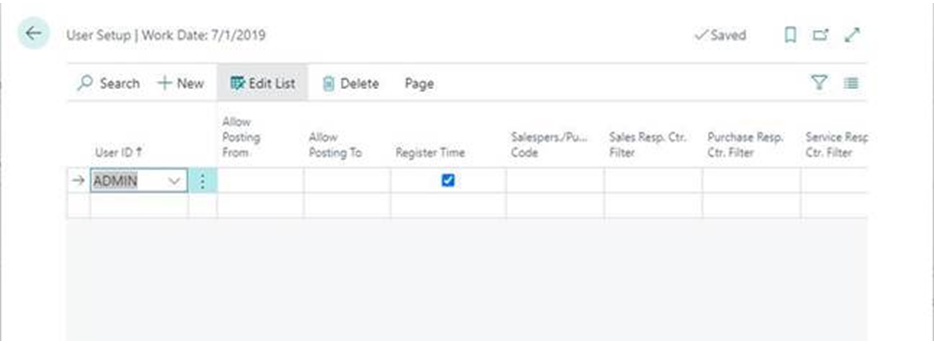
    To activate This option from user setup page enable Register Time option per users.
    pastedimage1616352988797v1.png

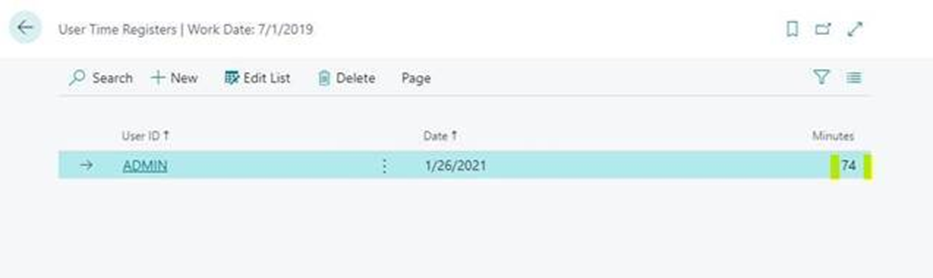
    You use the User Time Register window to have the program register how much time an individual user works on the accounts.

    The User Time Register page  is useful for accounting firms that want to register the amount of time spent working on each company. You may also want to see who has worked on the companies and in which period the work was carried out. The window contains a line for each registered use of the company. The line contains information about the user and the date and hours worked in the company.
    pastedimage1616353048948v2.png

  • YUN ZHU Profile Picture
    95,548 Super User 2025 Season 2 on at

    You can also do a simple customization.

    Hope this will help: How to get your last login info (Penultimate login DateTime)

    https://yzhums.com/9571/

  • kerr Profile Picture
    21 on at

    Hi Yun,

    Thank you for sharing.

    When accessing ?table=9008 I got "Your license does not grant you the following permissions on TableData User Login: Read." with premium license and Effective Permissions page told me that this limitation comes from Entitlement. Do I need to setup something else? Please advise, thank you.

    Best regards,

    Kerr  

  • Damjan Zakojc Profile Picture
    443 on at

    Hi, I got that issue with table permission, too.

    I addes T9008 into the custom permission sets, and still don't have access to the table, but managed to do the customized functionality of time tracking using panultimate time procedure as suggested by yzhums 

Under review

Thank you for your reply! To ensure a great experience for everyone, your content is awaiting approval by our Community Managers. Please check back later.

Helpful resources

Quick Links

Responsible AI policies

As AI tools become more common, we’re introducing a Responsible AI Use…

Neeraj Kumar – Community Spotlight

We are honored to recognize Neeraj Kumar as our Community Spotlight honoree for…

Leaderboard > Small and medium business | Business Central, NAV, RMS

#1
OussamaSabbouh Profile Picture

OussamaSabbouh 3,151

#2
Jainam M. Kothari Profile Picture

Jainam M. Kothari 1,443 Super User 2025 Season 2

#3
YUN ZHU Profile Picture

YUN ZHU 1,092 Super User 2025 Season 2

Last 30 days Overall leaderboard

Featured topics

Product updates

Dynamics 365 release plans
