web
You’re offline. This is a read only version of the page.
close
Skip to main content

Notifications

Announcements

No record found.

Community site session details

Community site session details

Session Id :
Microsoft Dynamics CRM (Archived)

Related Documents Grid Scrollbar and paging not shown IE

(0) ShareShare
ReportReport
Posted on by

Guys I am having issue with Document Location grid that if we reduce the size of browser its scrollbar and paging not get shown up on Internet explorer but on Chrome it working fine. 

Here is I capture the document location grid from opportunity which not showing scroll bar and paging. So user not able to see all documents as it get hidden under.
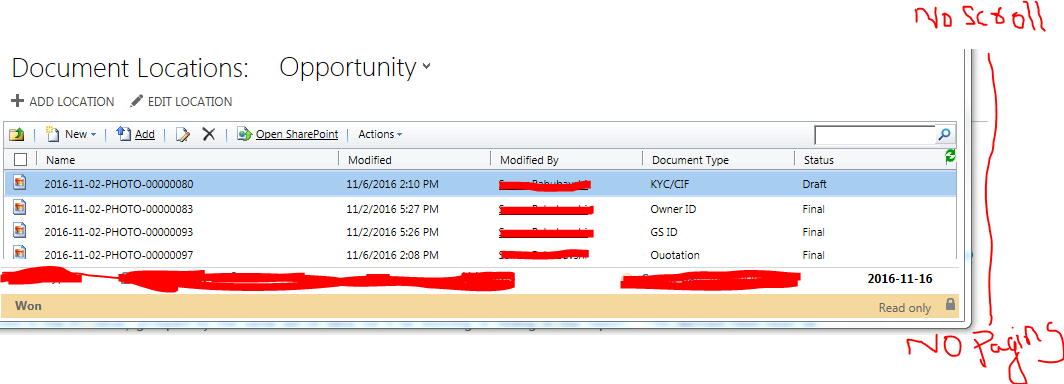
3835.Capture1.PNG

but in Chrome it working fine and scroll is getting display with paging if we reduce the size of page.
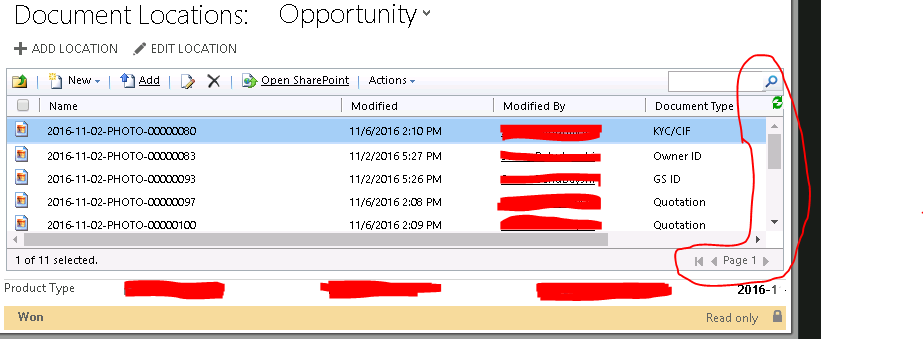
ChromeCapture.PNG

any help ? 

Thank you.

*This post is locked for comments

I have the same question (0)
  • Suggested answer
    Drew Poggemann Profile Picture
    4 on at

    Hi Waqar,

    This problem appears to be an issue that is identified in Edge, see this page:  support.microsoft.com/.../3133963.  You are using IE, not Edge right?

    "The horizontal scrollbar is visible, but the vertical scrollbar is hidden on the Tier 2 dashboard using the Edge browser."

    Are you running on premise?   I can verify in my instance online but wanted to know if you were on premise or online...

    Thanks,

  • Waqar Sohail Profile Picture
    on at

    Thanks Drew for you reply,

    this issue is with IE 11, I didn't test it on Edge.

    Yes it not showing the vertical scroll and I am facing this issue only for related documents location.

    Yes CRM is on premise not Online.

    Regards

  • Verified answer
    Drew Poggemann Profile Picture
    4 on at

    Hi Waqar,

    I would suggest you update to latest IE level (if you haven't) already and you have the latest CRM environment patch and see if still happens, if so open case with MSFT.  Sorry I can't be anymore help as I do not have a on premise 2016 environment in place.

    Thanks,

Under review

Thank you for your reply! To ensure a great experience for everyone, your content is awaiting approval by our Community Managers. Please check back later.

Helpful resources

Quick Links

Responsible AI policies

As AI tools become more common, we’re introducing a Responsible AI Use…

Neeraj Kumar – Community Spotlight

We are honored to recognize Neeraj Kumar as our Community Spotlight honoree for…

Leaderboard > 🔒一 Microsoft Dynamics CRM (Archived)

#1
SA-08121319-0 Profile Picture

SA-08121319-0 4

#1
Calum MacFarlane Profile Picture

Calum MacFarlane 4

#3
Alex Fun Wei Jie Profile Picture

Alex Fun Wei Jie 2

Last 30 days Overall leaderboard

Featured topics

Product updates

Dynamics 365 release plans



