web
You’re offline. This is a read only version of the page.
close
Skip to main content

Notifications

Announcements

No record found.

Community site session details

Community site session details

Session Id :
Microsoft Dynamics GP (Archived)

eConnect 2010 installation error. Identity reference could not be translated.

(0) ShareShare
ReportReport
Posted on by 65,271

When trying to install eConnect on GP 2010, I receive the following error: Some or all identity references could not be translated.
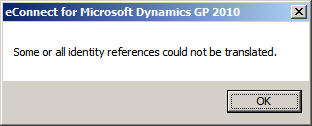
A little history about this server,

This machine is the SQL Server, and is running GP. It is named MSDYN, but it used to be off-domain. It was added to the domain AFTER SQL server was installed and GP was up and running. The machine is still named MSDYN, but now, of course, it has a domain in front of it. The system has been running as is without any problems, but when I try to install eConnect the error above is returned.

The MSSQL Service account has been set as Local System and also as the Local Admin with the same results. However, if the MSSQL Service account is set to Network service, the error returned is "Unable to add user to SQL"

What do you think is wrong, and how can I fix it?

Kind regards,

Leslie

Here are the versions involved:

Microsoft Dynamics GP 2010 build 11.00.2106

eConnect  11.00.2111.00

Microsoft SQL Server Management Studio  10.50.1617.0

Microsoft Analysis Services Client Tools 10.50.1617.0

Microsoft Data Access Components (MDAC)  6.0.6002.18005

Microsoft MSXML     3.0 4.0 5.0 6.0

Microsoft Internet Explorer   9.0.8112.16421

Microsoft .NET Framework   2.0.50727.4241

Operating System    6.0.6002 (Windows Server 2008 R2)

I think the info below is the relevant part from the windows installer log:

System.Security.Principal.IdentityNotMappedException: Some or all identity references could not be translated.

  at System.Security.Principal.SecurityIdentifier.Translate(IdentityReferenceCollection sourceSids, Type targetType, Boolean forceSuccess)

  at System.Security.Principal.SecurityIdentifier.Translate(Type targetType)

  at Microsoft.Dynamics.GP.Deployment.AccountSidTranslator.NameFromId(String id)

  at Microsoft.Dynamics.GP.Deployment.Networking.HttpApiSddlManager.AccountEntriesFromSids(IEnumerable`1 aceSidEntries)

  at Microsoft.Dynamics.GP.Deployment.Networking.HttpApiSddlManager.GetSddlStringAccounts(String sddl)

  at Microsoft.Dynamics.GP.Deployment.Networking.UrlReservationManager.ReservationExists(UrlReservation reservation)

  at Microsoft.Dynamics.GP.Deployment.Networking.UrlReservationManager.AddReservation(UrlReservation reservation, Boolean overwrite)

  at Microsoft.Dynamics.eConnect.CustomActions.Internal.AddUrlReservation.Immediate()

  at Microsoft.Dynamics.Deployment.WindowsInstaller.CustomAction.Begin()

MSI (s) (80!98) [23:37:53:030]: Product: eConnect for Microsoft Dynamics GP 2010 -- Some or all identity references could not be translated.

MSI (s) (80!98) [23:37:53:034]: Closing MSIHANDLE (22) of type 790531 for thread 7064

MSI (s) (80:4C) [23:37:53:060]: Closing MSIHANDLE (17) of type 790542 for thread 6724

MSI (c) (F0:14) [23:37:48:671]: Creating MSIHANDLE (145) of type 790531 for thread 5140

MSI (c) (F0:14) [23:37:53:030]: Closing MSIHANDLE (145) of type 790531 for thread 5140

Some or all identity references could not be translated.

MSI (s) (80:44) [23:37:53:062]: Transforming table InstallExecuteSequence.

MSI (s) (80:44) [23:37:53:062]: Transforming table InstallExecuteSequence.

MSI (s) (80:44) [23:37:53:062]: Note: 1: 2262 2: InstallExecuteSequence 3: -2147287038

Action ended 23:37:53: CA_ConfigureURL. Return value 3.

Action ended 23:37:53: INSTALL. Return value 3.

Property(S): UpgradeCode = {D82ECCB0-F60C-4FDF-BC10-F05D4E7880A6}

Property(S): PATCH = C:\DynamicsVail\MDGP2010_DVD_withHotfixKB2731285_ENUS\AdProd\eConnect\x64\Updates\MicrosoftDynamicsGP11-eConnect-x64-KB2769070-ENU.msp

Property(S): NETFRAMEWORK35 = #1

Here is the list of registered SPNs. I got this from executing:

setspn -L MSDYN

Registered ServicePrincipalNames for CN=MSDYN,CN=Computers,DC=ck,DC=proaudio,DC=com:

MSSQLSvc/MSDYN.ck.proaudio.com

MSSQLSvc/MSDYN.ck.proaudio.com:1433

TERMSRV/MSDYN

TERMSRV/MSDYN.ck.proaudio.com

WSMAN/MSDYN.ck.proaudio.com

WSMAN/MSDYN

RestrictedKrbHost/MSDYN

HOST/MSDYN

RestrictedKrbHost/MSDYN.ck.proaudio.com

HOST/MSDYN.ck.proaudio.com

*This post is locked for comments

I have the same question (0)
  • Verified answer
    Community Member Profile Picture
    on at

    Just curious to know if you have already check on this

    1.Start Component Services.

    2.Click Start, and then click Run.

    3.Type dcomcnfg, and then click OK.

    4. Expand Component Services, expand Computers, expand My Computer, and then expand Com+ Applications.

    5. Right-click eConnect 10 for Microsoft Dynamics GP, and then click Properties.

    6. Click the Identity tab, and then click to select This User.

    7. Enter the domain administrator user ID and the domain password.

    8.Click Apply.

    9.Click OK to close the window.

    10.Stop the eConnect 10 for Microsoft Dynamics GP COM+ component.

    11.Start the eConnect 10 for Microsoft Dynamics GP COM+ component.

    12.Run the integration


    The above step to configure identity of com objects assumes there were installed in first place. 

    Read this article, it is more applicable to your error -  "off the domain" - "unable to add user to SQL"

    http://support.microsoft.com/kb/2534520

    Cheers!
    Sanjay


  • L Vail Profile Picture
    65,271 on at

    Hi Sanjay

    Thank you for your response. As you noted, the dcomcnfg tool only works if the eConnect service is already installed.  I cannot get it installed, so that will not work for me.

    The article support.microsoft.com/.../2534520 does not apply because the machine is currently on domain. I went through the steps anyway, before submitting my initial plea for help.

    I ran the installation using a new domain account set up to be the eConnect service account and the installation failed with the error message

    "Some or all identity references could not be translated"

    Any other ideas??

    Kind regards,

    Leslie

  • Community Member Profile Picture
    on at

    Leslie,

    Some times event viewer provide more accurate information, by any chance you can post it here ?

    Cheers!

    Sanjay

  • Suggested answer
    Community Member Profile Picture
    on at

    Collected instances or your errors, it is all over the place ..

    knowledgebase.solarwinds.com/.../Installation+Error%3A+Some+or+all+of+the+identity+references+could+not+be+translated

    The service account you specify during the installation cannot have the same name as the server.

    For example, the service account cannot be DOMAIN\SWPatch if the server name is SWPatch.


    coolsubhash-tech.blogspot.com/.../some-or-all-identity-references-could.html

    This utility is amazing, it resides under c:\program\files\common files\microsoft shared\web server extensions\12\bin.

    We executed following command "stsadm.exe -o updatefarmcredentials -userlogin -password


    http://support.microsoft.com/kb/941209

    Add the localized network service account to the recently created "Network Service" group.


    If SQL Server  is installed on AD read this.

    http://blog.blumshapiro.com/2010/08/mds-configuration-error-some-or-all-identity-references-could-not-be-translated/


    Cheers!

  • L Vail Profile Picture
    65,271 on at

    Thank you Sanjay for your time and attention. Your help pointed me in the right direction. I had two orphaned SIDs that resulted in  bad URL reservations.  Here is one of them, I didn't copy the other one.

    Reserved URL            : http://+:80/Microsoft/Dynamics/GP/eConnect/

    Can't lookup sid, Error: 1332

                SDDL: D:(A;;GX;;;S-1-5-21-2674974317-789524367-896260736-1009)

    Problem solved!

    Leslie

  • Steven Vallarian Profile Picture
    394 on at

    To follow up on this posting, 3 years later, as I ran into the same issue with eConnect GP2015 this last weekend.

    use netsh to remove the bad URL reservation

    netsh http del URLACL http://+:80/Microsoft/Dynamics/GP/eConnect

    Uninstall eConnect 2010 completely.

    Even after that fun, I still could not get eConnect to install, it kept saying that the user wasn't a sysadmin, even though he was. The installer kept trying a DynamicsGP SQL user and not the Windows user that I was passing to it on the second screen of the install.

    However, I was able to install eConnect 2015, and pick "Don't add user to database". 

  • Rennecia Barran Profile Picture
    on at

    Hi, I have the same issue. Can someone provide some more details on the resolution?

    I am not sure what netsh is and how to access it or what to do with it.

  • Rennecia Barran Profile Picture
    on at

    Please disregard.

    My issue was related to there being an older version of eConnect installed with a different service account. I uninstalled it and then re-ran the installation and it worked.

Under review

Thank you for your reply! To ensure a great experience for everyone, your content is awaiting approval by our Community Managers. Please check back later.

Helpful resources

Quick Links

Responsible AI policies

As AI tools become more common, we’re introducing a Responsible AI Use…

Neeraj Kumar – Community Spotlight

We are honored to recognize Neeraj Kumar as our Community Spotlight honoree for…

Leaderboard > 🔒一 Microsoft Dynamics GP (Archived)

#1
mtabor Profile Picture

mtabor 1

Last 30 days Overall leaderboard

Featured topics

Product updates

Dynamics 365 release plans



