Hi,
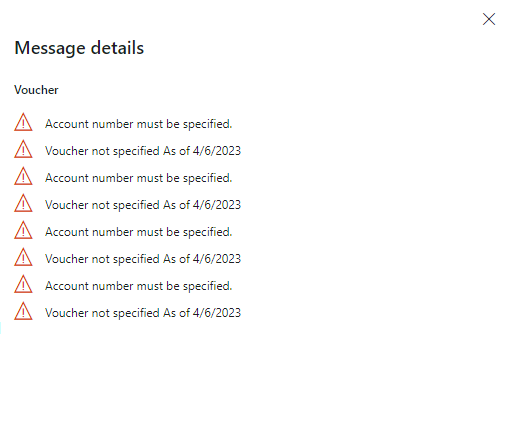
I am getting this errors while posting the journal : Voucher not specified as of today Date & Account No. must be filled in.
Actually, I am working on a task where I am reading some data from a simple text file whose address is provided using Contract class & creating a journal based on file data, I am using Number Sequence class to generate unique voucher's. but at the time of posting I am getting this error & I have tried to give voucher manually in the text file & read & assign to each Transactions but getting the same error again,
I debug the code & found that numberSeq is creating unique vouchers but not stored in the LedgerJournalTrans.Voucher field.
Also, I am confused how to filled this Account Number field which is available on Journal Lines but not directly available in LedgerJournalTrans Table.
I am sharing my code for the reference.
class HSHTGLBatchProcessService extends SysOperationServiceBase
{
    ///
    /// processGLData method process the logic
    ///
    /// _contract
    public void processGLData(HSHTGLBatchProcessContract _contract)
    {
        str sFileName,sTempPath,sFileContent;
        FileIOPermission fileIoPermission;
        container fields;
        LedgerJournalTable  ledgerJournalTable;
        LedgerJournalTrans  ledgerJournalTrans;
        JournalTableData journalTableData;
        str description, currencyCode;
        real amount;
        NumberSeq numberSeq;
        LedgerJournalCheckPost ledgerJournalValidate, ledgerJournalPost;
        try
        {
            sFileName = _contract.parmFilePath();

            // Get the temporary path
            sTempPath = System.IO.Path::GetTempPath();

            numberSeq = NumberSeq::newGetNum(LedgerParameters::numRefAdvancedLedgerEntryVoucher(),true);

            // Initialize the journal header information
            ledgerJournalTable.initvalue();
            journalTableData = JournalTableData::newTable(ledgerJournalTable);
            ledgerJournalTable.JournalType = LedgerJournalType::Daily;
            ledgerJournalTable.JournalNum = journalTableData.nextJournalId();
            ledgerJournalTable.JournalName = @"GL Batch Journal";
            ledgerJournalTable.initFromLedgerJournalTable(ledgerJournalTable);
            ttsbegin;
            if (ledgerJournalTable.validateWrite())
            {
                ledgerJournalTable.insert();
            }
            ttscommit;
            // Assert Permisssion
            fileIoPermission = new FileIOPermission(sTempPath   sFileName, @"RW");
            fileIoPermission.assert();

            // Open the input file for reading.
            System.IO.StreamReader streamReader = new System.IO.StreamReader(sTempPath   sFileName);

            // Read the first line and discard it
            streamReader.ReadLine();

            if (ledgerJournalTable.RecId)
            {

            if (streamReader)
            {

                while (!streamReader.EndOfStream)
                    {
                        sFileContent = streamReader.ReadLine();

                    // Split the line by comma and create a container
                    fields = list2Con(strSplit(sFileContent,','));

                    // Check that there are exactly four fields
                    if (conLen(fields) == 3)
                    {
                        // Assign the fields to variables
                        description = conPeek(fields, 1);
                        currencyCode = conPeek(fields, 2);
                        amount = str2num(conPeek(fields, 3));


                            // Initialize the journal line information
                            ledgerJournalTrans.clear();
                            ledgerJournalTrans.initValue();
                            ledgerJournalTrans.JournalNum = ledgerJournalTable.JournalNum;
                            ledgerJournalTrans.TransDate = DateTimeUtil::getSystemDate(DateTimeUtil::getUserPreferredTimeZone());
                            ledgerJournalTrans.AccountType = LedgerJournalACType::Ledger;
                            ledgerJournalTrans.CurrencyCode = currencyCode;
                            ledgerJournalTrans.Txt = description;
                            ledgerJournalTrans.Voucher = numberSeq.num();
                            ledgerjournalTrans.OffsetAccountType = LedgerJournalACType::Ledger;
                            ledgerjournalTrans.OffsetLedgerDimension = 0;
                            ledgerJournalTrans.Approved = NoYes::Yes;
                            ledgerJournalTrans.SkipBlockedForManualEntryCheck = true;
                            ledgerJournalTrans.defaultRow();

                            // Set the debit or credit amount based on the value in the text file
                            if (amount > 0)
                            {
                                ledgerJournalTrans.AmountCurDebit = amount;
                            }
                            else
                            {
                                ledgerJournalTrans.AmountCurCredit = abs(amount);
                            }

                            // Validate and insert the journal line
                            ttsbegin;

                            if (ledgerJournalTrans.validateWrite())
                            {
                                ledgerJournalTrans.insert();
                            }

                            else
                            {
                                throw Exception::Error;
                            }

                            ttscommit;
                    }

                        numberSeq.used();
                        info(strFmt(@"Voucher : %1", ledgerJournalTrans.Voucher));

                }

                streamReader.Close();

                ttsbegin;

                    ledgerJournalValidate = ledgerJournalCheckPost::newLedgerJournalTable(ledgerJournalTable,NoYes::No);

                    if (ledgerJournalTable.numOfLines() > 0)
                    {
                        ledgerJournalValidate.runOperation();

                        if (!ledgerJournalValidate.tableErrorLog())
                        {
                            ledgerJournalPost = ledgerJournalCheckPost::newLedgerJournalTable(ledgerJournalTable,NoYes::Yes);
                            ledgerJournalPost.runOperation();

                        }
                        else
                        {
                            Error(@"errorLog : %1",ledgerJournalValidate.tableErrorLog());

                        }
                    }
                    else
                    {
                        Error(@"CannotPostJournal");
                    }

                ttscommit;

            }

            else
            {
                Error(@"Failed to create streamReader object for Reading.");
            }

          }

        }

        catch(Exception::CLRError)
        {
            throw error(@"An error occurred while creating the StreamWriter/StreamReader object for writing/Reading.");
        }

        finally
        {
            CodeAccessPermission::revertAssert();
        }

    }

}
this image containing the exact errors:
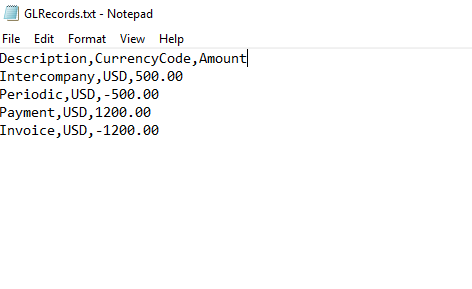
& this is how my input text file look like :
Thanks & Regards,
Harshit





