web
You’re offline. This is a read only version of the page.
close
Skip to main content

Notifications

Announcements

No record found.

Community site session details

Community site session details

Session Id :
Microsoft Dynamics CRM (Archived)

Add Custom Button in Project Product View Toolbar

(0) ShareShare
ReportReport
Posted on by 175

Hello,


I want to add custom button in project-> product list view screen tool bar.

I tried to do it with ISV.config but i am not able to find entity "Project Product List View". (Go To Project-> Open Project-> Click on "Products" from left pane to view product list associated with project-> product list will open above the screen there is tool bar) i want to add to this location my custom botton

please find screenshot which will show where i want button.
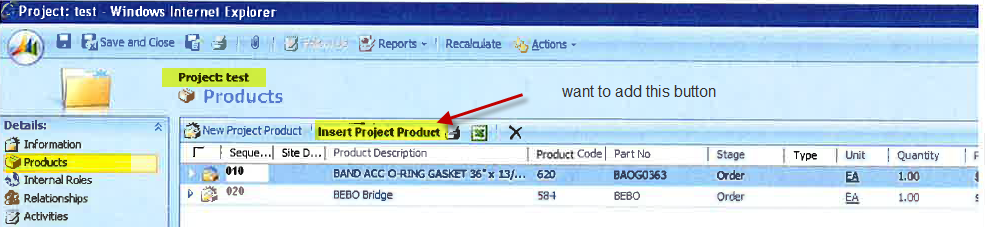
please help me

Regards,

Lalit Singh


*This post is locked for comments

I have the same question (0)
  • Gus Gonzalez Profile Picture
    27,113 on at

    This is the best tool to achieve the result you are looking for:

    crmvisualribbonedit.codeplex.com

    Good Luck!

  • Lalit Singh Profile Picture
    175 on at

    Hi Gus Gonzalez,

    Thanks for your valuable reply. I want this for CRM 4.0

    Do we have solution for this in CRM 4.0

    Regards,

    Lalit Singh

  • Lalit Singh Profile Picture
    175 on at

    can anybody provide me solution for crm 4.0, how to add custom button on project product associated view toolbar

  • Gus Gonzalez Profile Picture
    27,113 on at

    Here is the information for CRM v4:

    mscrm4ever.blogspot.com/.../crm-40-creating-inline-toolbar-and.html

    Thanks.

  • Verified answer
    Lalit Singh Profile Picture
    175 on at

    Hi Friends,

    I digged into several areas and able to find that this can be achieved through dynamic creating element on load for having button in toolbar at desired location. please find code below

    IframeDoc = associatedViewIFrame.contentWindow.document;
    var menuElement = IframeDoc.getElementById('mnuBar1');
    var _UL = menuElement.getElementsByTagName('ul')[0];
    var _LI = _UL.getElementsByTagName('li')[2];
    var li_insertProduct = document.createElement("li");       
    li_insertProduct.setAttribute('tabIndex', '-1');
    li_insertProduct.setAttribute('title','Insert Project Product');
    li_insertProduct.className = 'ms-crm-Menu';
    li_insertProduct.setAttribute('id','test1123');
    li_insertProduct.onclick=function()

     {
    var querystr = IframeDoc.getElementById('divGridParams').all[8].value;
     var myHeight = 573;
     var myWidth = 797;
     var myLeft = (screen.width - myWidth) / 2;
     var myTop = (screen.height - myHeight) / 2;
     window.open('/YourEnvironment/YourPage.aspx?id=' + querystr + '&ORG_UNIQUE_NAME=' + ORG_UNIQUE_NAME,'Project Product','height='+ myHeight +',width='+ myWidth +',status=yes,scrollbars=yes,toolbar=no,menubar=no,location=no,left='+ myLeft +',top='+ myTop);

    }
    li_insertProduct.innerHTML ='<SPAN class=ms-crm-Menu-Label><A class=ms-crm-Menu-Label tabIndex=-1 onclick="return false;" href ="javascript:openwindow1();" target=_self><IMG class=ms-crm-Menu-ButtonFirst tabIndex=-1 alt="Add a new Project Product to this record" src="/_imgs/Insert_ProjectProduct_16.png"><SPAN class=ms-crm-MenuItem-TextRTL tabIndex=0>Insert Project Product</SPAN></A></SPAN>';       
    _UL.insertBefore(li_insertProduct,_LI);
           
    var space =document.createElement("li");
    space.setAttribute('tabIndex', '-1');
    space.className = 'ms-crm-Menu-Spacer';
    space.innerHTML ='&nbsp;<IMG style="CLIP: rect(0px 4px 17px 0px); BACKGROUND-IMAGE: url(/_imgs/imagestrips/control_imgs_1.gif); WIDTH: 4px; BACKGROUND-POSITION-Y: -55px; HEIGHT: 17px" id=mnu_hSpacerGrid alt="" src="/_imgs/imagestrips/transparent_spacer.gif">&nbsp;';
    _UL.insertBefore(space, _UL.getElementsByTagName('li')[3]);

Under review

Thank you for your reply! To ensure a great experience for everyone, your content is awaiting approval by our Community Managers. Please check back later.

Helpful resources

Quick Links

Responsible AI policies

As AI tools become more common, we’re introducing a Responsible AI Use…

Neeraj Kumar – Community Spotlight

We are honored to recognize Neeraj Kumar as our Community Spotlight honoree for…

Leaderboard > 🔒一 Microsoft Dynamics CRM (Archived)

#1
SA-08121319-0 Profile Picture

SA-08121319-0 4

#1
Calum MacFarlane Profile Picture

Calum MacFarlane 4

#3
Alex Fun Wei Jie Profile Picture

Alex Fun Wei Jie 2

Last 30 days Overall leaderboard

Featured topics

Product updates

Dynamics 365 release plans



