web
You’re offline. This is a read only version of the page.
close
Skip to main content

Announcements

No record found.

News and Announcements icon
Community site session details

Community site session details

Session Id :
Customer experience | Sales, Customer Insights,...
Answered

Best way to create an email engagement report

(0) ShareShare
ReportReport
Posted on by 15

We have a few different sales messages we'd like to test against each other using metrics like opens and clicks. I know email opens are being tracked because I can see them when clicking into each individual Lead profile, but I can't find an easy way of getting metrics for each email message.

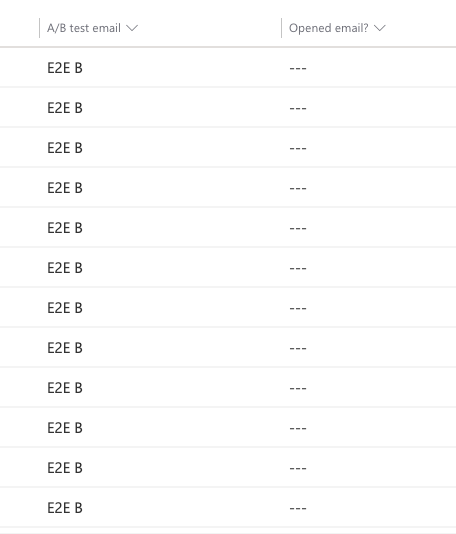
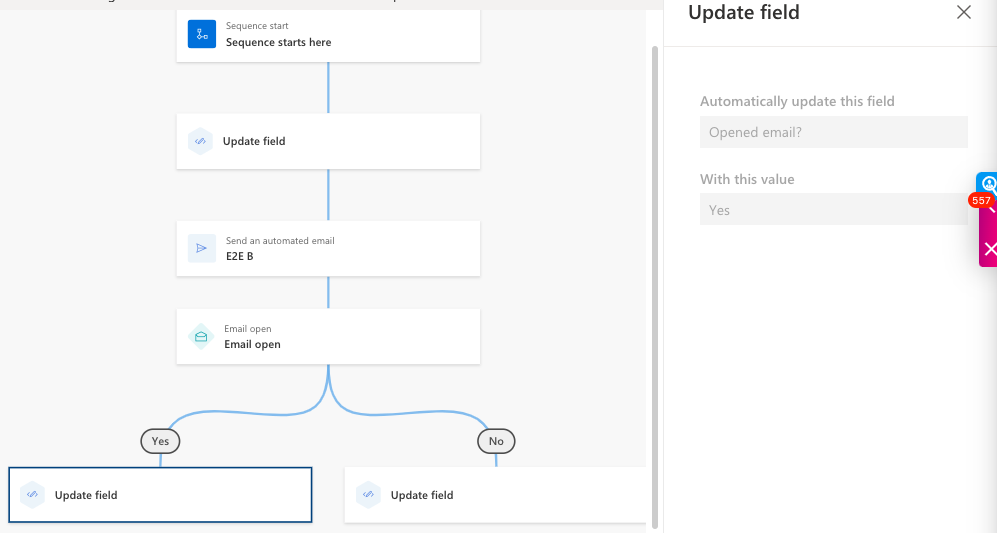
One attempt I made was creating a Sequence where it updated a field for which email the lead was sent, sent the respective email then used a condition for Email Open where after 3 days it updated a field for whether the email was opened or not. The field for which email was sent was updated, the emails were sent, but the Yes/No field I created for Opened Email is not getting updated.

I've included screenshots of the Sequence and the ensuing report showing that one field is updating but the Opened Email field is not.

Any suggestions for what I may be doing wrong with the sequence or a better alternative to it would be much appreciated.

Thank you!
Screen-Shot-2022_2D00_12_2D00_05-at-10.40.11-AM.png

Screen-Shot-2022_2D00_12_2D00_05-at-10.40.36-AM.png

I have the same question (0)
  • Verified answer
    Haig Liu Profile Picture
    Microsoft Employee on at

    Hi Daniel Cicala,

    Maybe you can try this to see if it can help you:

    1.Open Sales Hub -> Sales Insights settings 

    pastedimage1670304119452v1.png

    2.Add an email in timeline and put a link in content

    pastedimage1670304673491v6.png

    3.Viewing in Timeline

    pastedimage1670304604502v5.png

    Or open activity view and add "Open Count" column

    pastedimage1670304805391v7.png

  • Suggested answer
    Daniel Cicala Profile Picture
    15 on at

    Thank you, Haig, the Open Count and Links Clicked columns fulfill everything I'm looking for.

    No need to overcomplicate things with a Sequence!

Under review

Thank you for your reply! To ensure a great experience for everyone, your content is awaiting approval by our Community Managers. Please check back later.

Helpful resources

Quick Links

Introducing the 2026 Season 1 community Super Users

Congratulations to our 2026 Super Stars!

Meet the Microsoft Dynamics 365 Contact Center Champions

We are thrilled to have these Champions in our Community!

Congratulations to the April Top 10 Community Leaders

These are the community rock stars!

Leaderboard > Customer experience | Sales, Customer Insights, CRM

#1
ManoVerse Profile Picture

ManoVerse 98 Super User 2026 Season 1

#2
11manish Profile Picture

11manish 72

#3
Muhammad Shahzad Shafique Profile Picture

Muhammad Shahzad Sh... 69 Most Valuable Professional

Last 30 days Overall leaderboard

Product updates

Dynamics 365 release plans