web
You’re offline. This is a read only version of the page.
close
Skip to main content

Notifications

Announcements

No record found.

Community site session details

Community site session details

Session Id :
Customer experience | Sales, Customer Insights,...
Suggested Answer

text wrap in sub grid/view

(0) ShareShare
ReportReport
Posted on by 85

I have sub grid of question and answers for an Entity (Table)

I am using the Editable Grid Control and would like the Fields to wrap the content.

Below is a sample of the grid.  Looking to warp text in Question and Rationale

Sample-Grid.gif

I have the same question (0)
  • Suggested answer
    Fubar Profile Picture
    2,761 on at

    Not with the standard functionality, best you could do is hover the field or make the column the max of 300px wide.  

    But, if you really needed it you could probably write a PCF Control that would do it.

  • Suggested answer
    AJ-22040756-0 Profile Picture
    on at

    Hi Partner

    You can check by enabling new control in the system settings to optimize displays for longer field labels and values by enabling text wrapping:

    pastedimage1606196435755v1.png

    To demonstrate this new capability a new field with a long label title has been configured with a data type set as a 'single line of text': 
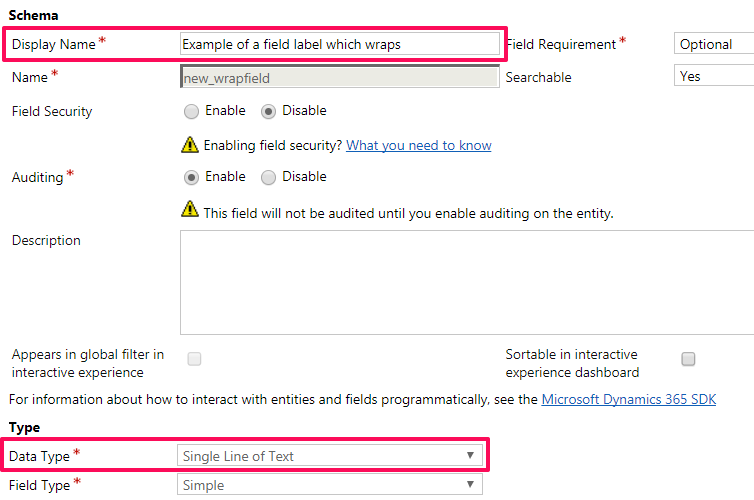
    pastedimage1606196435756v2.png

    This field has now been applied to a section on an account form:

    pastedimage1606196435756v3.png

    The width for the field label area in this section is set to 115 pixels to make it a good test of the new text-wrapping capabilities:
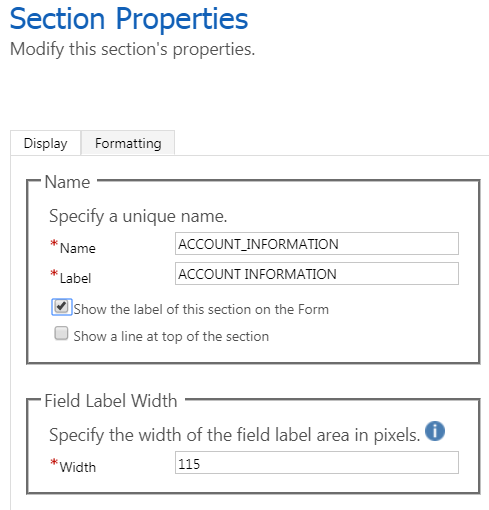
    pastedimage1606196435756v4.png

    In this example, we are using the D365 - Version 9.0 refreshed web user interface and upon opening an account record, this field label now wraps onto a second line as shown below. 

    While the data type was set as a single line of text because text wrapping is enabled this entry flows into a second line.
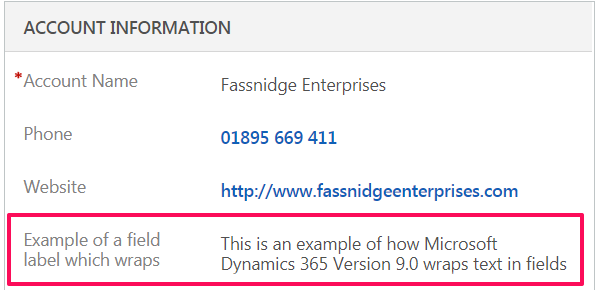
    pastedimage1606196435757v5.png

  • Fubar Profile Picture
    2,761 on at

    Aakash Jain the original poster is specifically asking about in an editable grid, not a field on a form.

  • Mark TVC Profile Picture
    85 on at

    Correct

  • AJ-22040756-0 Profile Picture
    on at

    Sorry My Bad :(

    Yes for fields within subgrid, there is no OOB way to wrap the text

  • Mark TVC Profile Picture
    85 on at

    Would there be some CSS that could be applied to the form which could sort this out?

  • Suggested answer
    Fubar Profile Picture
    2,761 on at

    Possibly, but not in a way that is supported by Microsoft.

Under review

Thank you for your reply! To ensure a great experience for everyone, your content is awaiting approval by our Community Managers. Please check back later.

Helpful resources

Quick Links

Responsible AI policies

As AI tools become more common, we’re introducing a Responsible AI Use…

Neeraj Kumar – Community Spotlight

We are honored to recognize Neeraj Kumar as our Community Spotlight honoree for…

Leaderboard > Customer experience | Sales, Customer Insights, CRM

#1
Tom_Gioielli Profile Picture

Tom_Gioielli 170 Super User 2025 Season 2

#2
#ManoVerse Profile Picture

#ManoVerse 70

#3
Jimmy Passeti Profile Picture

Jimmy Passeti 50 Most Valuable Professional

Last 30 days Overall leaderboard

Product updates

Dynamics 365 release plans
