web
You’re offline. This is a read only version of the page.
close
Skip to main content

Notifications

Announcements

No record found.

Community site session details

Community site session details

Session Id :
Microsoft Dynamics CRM (Archived)

User in two different Business Unit Default Teams at the same time - this should not happen???

(0) ShareShare
ReportReport
Posted on by 215

Hi,

I have come across a strange issue in CRM. Somehow a user is in two different business' unit's default teams at the same time. If I try to remove the one that is incorrect I get an error message saying I cannot remove the default business unit's team. Normally CRM would prevent this scenario ever happening, but somehow it has happened.

Any tips or advice?

Here is a screenshot from the user record showing the issue:
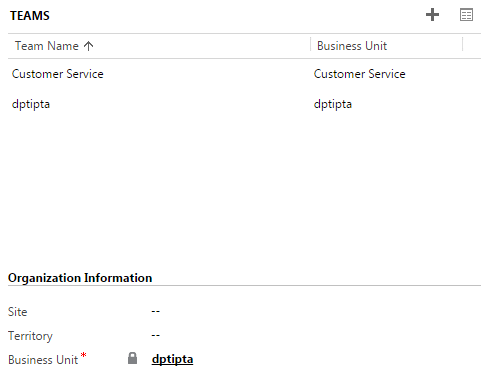
DPTI-Bug.PNG

UPDATE**

Thank you all again for taking the time to answer.

I tried to remove the user form the Customer Service team but it would not allow me to do it and came up with an error.

I also tried setting the BU of the user to the Customer Service but it came up with a duplicate key issue (probably because the user is in the default team for the Customer Service BU already):

After looking through Audit history I can see where the Customer Service team association was made, but the BU was not changed to Customer Service. Somehow the internal CRM checks to prevent this happening weren't running? Not really sure as I didn't run the script my self:

Now to try and find a solution...hopefully a script will allow the Customer Service team to be removed, otherwise a record might need to be removed from the DB itself.

*This post is locked for comments

I have the same question (0)
  • Suggested answer
    Community Member Profile Picture
    on at

    Hi Cosair,

    Check whether the user whom you want to change Default B.U is in enabled state or not.

    Hope this helps you.

    If u have any further questions. Plz let me know.

    Thanks & Regards,

    Fathima

  • Cosair Profile Picture
    215 on at

    Thanks for the reply Fathima. The user is indeed enabled.

  • Suggested answer
    Community Member Profile Picture
    on at

    Try this.

    First you change the B.U of the user & then remove it.

  • Suggested answer
    Aileen Gusni Profile Picture
    44,524 on at

    Hi Cosair,

    You can only remove the 'Customer Service' not the Default Team from the user' BU, that is dptipta.

    And how to REMOVE', do not use clicking the 'RECYCLE BIN' icon, because it would try to Delete, not to Remove.

    removeteam1.png

    This is the CRM Design in the subgrid

    You need to go to the Team associated view and then remove the team relationship properly.

    Remove, don't delete the team.

    Hope this can help you!

    Thanks.

  • Suggested answer
    Community Member Profile Picture
    on at

    As suggested in my above post.U can't remove the Default B.U of the User. But instead u can change it by assigning it into other B.U.

    & If u have added any Teams to Users B.U. Those can be removed.

    Thanks & Regards,

    Fathima

  • mscrmba Profile Picture
    on at

    Cosair,

    You're right - it should never happen...

    The User is enabled - that's fine.

    Fatima's question was:  Is the Business Unit active/enabled?  (i.e. Are both business units active/enabled?)

    (A BU that is disabled will disable all users attached to it, but perhaps the user has since been reactivated and that has allowed the user to become attached to more than one default BU.)

    Try what Aileen suggests - removing the team relationship.

    If that doesn't work - perhaps try deactivating the user (if that won't cause any issues) and then reactivating them again - it might reset things.

  • Suggested answer
    Aileen Gusni Profile Picture
    44,524 on at

    Cosair,

    Correct.

    That should never happened like what MSCRMBA said.

    In fact, I wish that one user could be able to have multiple business unit, I tried to input them into two default team and the system blocked it, apparently.

    But, try first to remove the Customer Service team.

    it can be the Team name is just same with Business Unit in some condition (I am not sure whether CRM allows and check it or not) but actually it is not the Default Team.

    Thanks.

  • Community Member Profile Picture
    on at

    You can check if these teams are actually default teams or just named the same as the BUs in a couple of ways. Most easily, you could use Advanced Find to query for all teams and add the column "IsDefault", or use that in your query.

  • Cosair Profile Picture
    215 on at

    Hi Fathima, we tried that but it would not let us remove.

    Looking more into audit history it looks like a script was responsible for adding the Customer Service team, but did not also change the BU. I hope if a script could create the issue then we can fix it with a script as well.

    Appreciate you taking the time to look into this.

  • Cosair Profile Picture
    215 on at

    Thanks for your time Aileen, it looks as though the issue was caused by a data import script. I'll post the evidence at the bottom of this post.

Under review

Thank you for your reply! To ensure a great experience for everyone, your content is awaiting approval by our Community Managers. Please check back later.

Helpful resources

Quick Links

Responsible AI policies

As AI tools become more common, we’re introducing a Responsible AI Use…

Neeraj Kumar – Community Spotlight

We are honored to recognize Neeraj Kumar as our Community Spotlight honoree for…

Leaderboard > 🔒一 Microsoft Dynamics CRM (Archived)

#1
SA-08121319-0 Profile Picture

SA-08121319-0 4

#1
Calum MacFarlane Profile Picture

Calum MacFarlane 4

#3
Alex Fun Wei Jie Profile Picture

Alex Fun Wei Jie 2

Last 30 days Overall leaderboard

Featured topics

Product updates

Dynamics 365 release plans



