web
You’re offline. This is a read only version of the page.
close
Skip to main content

Notifications

Announcements

No record found.

Community site session details

Community site session details

Session Id :
Microsoft Dynamics CRM (Archived)

How to get primary key of opportunity in workflow designer

(0) ShareShare
ReportReport
Posted on by

I have created a workflow on Opportunity entity after the opportunity object is created. This workflow will call an action and needs to pass the opportunity id, and this action will perform some logic on the opportunity.

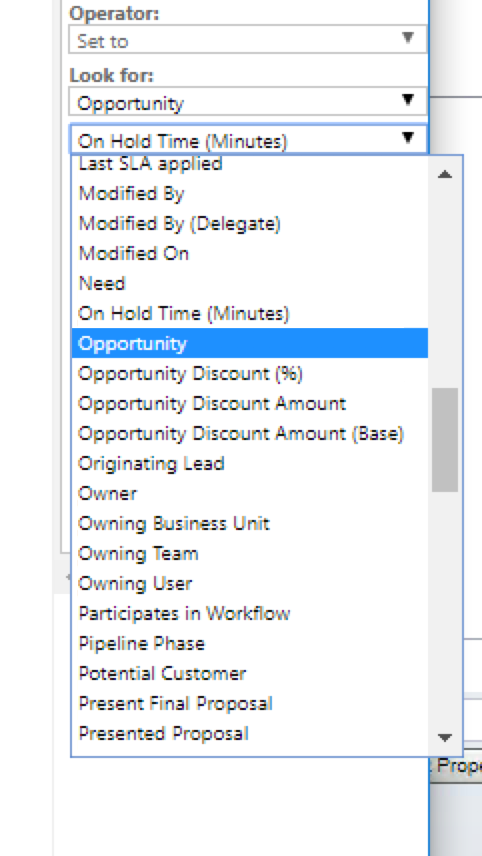
I see that the opportunity (Display Name) field is there for primary key (name -> opportunityid , schema name -> opportunityid).

I used it in the workflow in a text field, but it gives me the opportunity's "Name" instead of the "id".

Below is the screenshot of how i used this:

Screen-Shot-2017_2D00_09_2D00_27-at-2.21.48-PM.png

Screen-Shot-2017_2D00_09_2D00_27-at-2.51.15-PM.png

Is there something more i need to do to get the id?

*This post is locked for comments

I have the same question (0)
  • Verified answer
    RaviKashyap Profile Picture
    55,410 Moderator on at

    Hi,

    There is no standard way to get the guid within the workflow.  You might need to write cu  stom workflow activity to return the entity guid value.

    This link is for crm 2011 but should works in CRM 2016-

    danielbergsten.wordpress.com/.../crm-2011-fetch-entity-id-in-processworkflow

    Refer below thread-

    community.dynamics.com/.../220039

    Thanks,

    Ravi Kashyap

  • Community Member Profile Picture
    on at

    The above links are contradictory to what is shown in the pic in my question. I do see an Opportunity field in the dropdown. May be this changed in later versions of CRM.

  • Suggested answer
    Kevin Grech Profile Picture
    380 on at

    The input parameter of the action needs to be an entity reference not a GUID or GUID String. That way, you can use Opportunity:Opportunity as input

  • Community Member Profile Picture
    on at

    Kevin, my action is Global and i would not be able to use :Opportunity, because i would not be able to know what my entity is and what will be the name of the GUID.

  • Suggested answer
    ashlega Profile Picture
    34,477 on at

    Hi Aseem,

      think of it as if it were a type cast.. If you have a text field, "Opportunity" reference will be converted to a text(but the system will use opportunity title for that).. if you have an EntityReference, it'll stay an entity reference(which means you'll have access to the Guid).. if you want a Guid in that text field, you need a custom action as Ravi suggested - that custom action might simply convert "context. PrimaryEntityId" to a text (if you wanted to make it work for all types of entities)

Under review

Thank you for your reply! To ensure a great experience for everyone, your content is awaiting approval by our Community Managers. Please check back later.

Helpful resources

Quick Links

Responsible AI policies

As AI tools become more common, we’re introducing a Responsible AI Use…

Neeraj Kumar – Community Spotlight

We are honored to recognize Neeraj Kumar as our Community Spotlight honoree for…

Leaderboard > 🔒一 Microsoft Dynamics CRM (Archived)

#1
SA-08121319-0 Profile Picture

SA-08121319-0 4

#1
Calum MacFarlane Profile Picture

Calum MacFarlane 4

#3
Alex Fun Wei Jie Profile Picture

Alex Fun Wei Jie 2

Last 30 days Overall leaderboard

Featured topics

Product updates

Dynamics 365 release plans