web
You’re offline. This is a read only version of the page.
close
Skip to main content

Notifications

Announcements

No record found.

Community site session details

Community site session details

Session Id :
Small and medium business | Business Central, N...
Suggested Answer

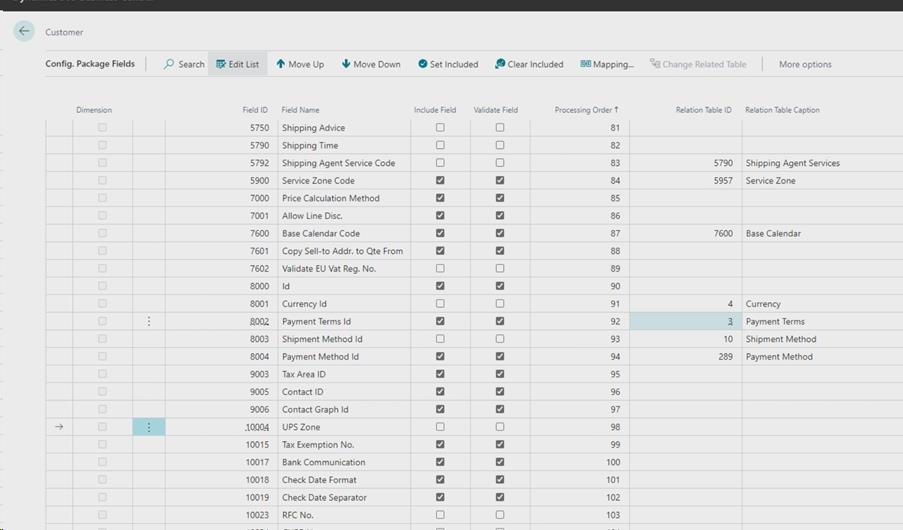
Where might I find a description of each of the field choices in the rapidstart table configuration list?

(0) ShareShare
ReportReport
Posted on by 5

New to D365 BC, coming from quickbooks enterprise. Learning how to set up BC for my small company. I am working on setting up the various tables There are over a 100 choices in the customer table configuration. Some items are self explanatory like name, address, etc. However, many are not obvious based on the name. I hunted for a resource that provided descriptions but did not find anything. I did finding some in articles but many I don't understand what they are for and would like to better informed before I start creating the tables.
pastedimage1667789861809v1.png

I have the same question (0)
  • Suggested answer
    Marco Mels Profile Picture
    on at

    Hello,

    Good question, I do not think if we have that documented as the product has been there for ages and has matured since. In general we start with a demo company which covers the majority of basic functionality.  In general the setup is done by a a partner that has done this numerous times before.

    Thank you.

  • Suggested answer
    Amit Profile Picture
    2,559 on at

    Hi,

    Refer the below link

    https://erpconsultors.com/create-customer-master-in-d365-bc/

    For more information regarding BC D365 visit www.erpconsultors.com

    Regards

    Amit Sharma

    www.erpconsultors.com

  • Suggested answer
    YUN ZHU Profile Picture
    95,748 Super User 2025 Season 2 on at

    Hi, This is indeed a problem, but Microsoft has been strengthening the tooltips on the page. If you have a field that you don't know, you can go to the page and check the description of this field.

    pastedimage1668039539712v1.png

    Also, if you're a developer and can open standard code, this might seem a little more convenient.

    pastedimage1668039695023v2.png

    Hope this helps.

    Thanks.

    ZHU

Under review

Thank you for your reply! To ensure a great experience for everyone, your content is awaiting approval by our Community Managers. Please check back later.

Helpful resources

Quick Links

Responsible AI policies

As AI tools become more common, we’re introducing a Responsible AI Use…

Neeraj Kumar – Community Spotlight

We are honored to recognize Neeraj Kumar as our Community Spotlight honoree for…

Leaderboard > Small and medium business | Business Central, NAV, RMS

#1
OussamaSabbouh Profile Picture

OussamaSabbouh 2,066

#2
YUN ZHU Profile Picture

YUN ZHU 658 Super User 2025 Season 2

#3
Sumit Singh Profile Picture

Sumit Singh 595

Last 30 days Overall leaderboard

Featured topics

Product updates

Dynamics 365 release plans
