web
You’re offline. This is a read only version of the page.
close
Skip to main content

Notifications

Announcements

No record found.

Community site session details

Community site session details

Session Id :
Microsoft Dynamics CRM (Archived)

Creating Custom Reports

(0) ShareShare
ReportReport
Posted on by

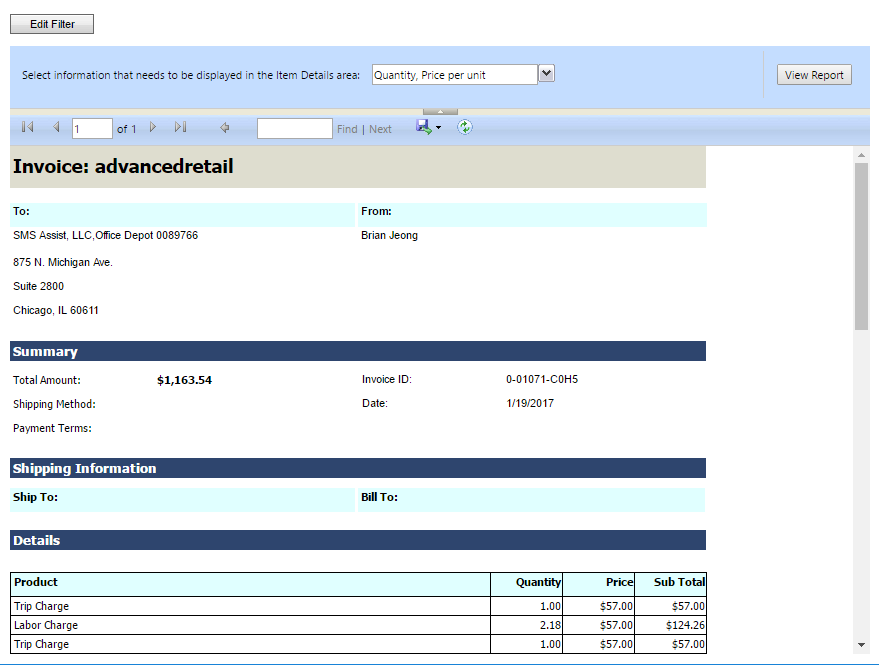
Hi there, I am trying to create custom reports through the CRM. I can get the necessary information with ease but I'm trying to find a way I can design the layout of how the report comes out.

Such as this report:
74348.Capture.PNG

When I try to create a report, it ONLY gives me the data in a table format. How do I get information like the Customer Location, Total Amount, Invoice ID, etc? 

And I understand how to do this in a word template but I would like to be able to do this in the reports as well.

*This post is locked for comments

I have the same question (0)
  • Verified answer
    Nick.Doelman Profile Picture
    1,947 Most Valuable Professional on at

    Are you trying to do this using the CRM Report Wizard?  It is pretty limited in how you can format and layout your data.

    If you want to have full control over your report layouts then you need to build them in Visual Studio (Business Intelligence Design Studio)

    It is a bit of learning curve but you don't need to be a full-on .NET developer.

    I recently posted a blog on how to setup a report writing environment for CRM.  

    https://readyxrmblog.wordpress.com/2016/11/23/setting-up-your-workstation-to-write-sql-server-reporting-services-reports-for-dynamics-365/

    Once you have that part setup, there are other tutorials, etc online that will show you how to author and upload reports into CRM.

    From there you can add logos, place fields, layouts, fonts, etc.

    Hope that helps!

    Cheers
    Nick

  • Community Member Profile Picture
    on at

    Just read your blog post - just a few questions before trying it out:

    1. I currently have VS 2015 installed. Must I download VS 2012 for it to work?

    2. On the Microsoft downloads, I see that there is SSDT that is compatible for VS 2012 and for VS 2015. If I download the SSDT for VS 2015, will that still work since I have VS 2015?

  • Suggested answer
    Nick.Doelman Profile Picture
    1,947 Most Valuable Professional on at

    Downloading VS 2012 SSDT will work for sure.  It will live in harmony with VS 2015 (it does on my machine)

    I know at one time, the CRM Report Authoring Extensions were not compatible with most recent SSDT versions.  However, to be honest I haven't tried it lately.  

    Cheers

    Nick

  • laurisofsystems Profile Picture
    7 on at

    Let me just ramble for a bit here.

    Good luck with installation of the Visual studio/BIDS/Reporting Services and the other necessary bits. It took me many trials and errors over a few days, including setting up separate virtual machines for this purpose etc. What I was getting stuck on was Live ID sign in assistant that was impossible to install due to miscellaneous issues, then trials and errors with various Visual Studio versions (paid/free/specific version) (only VS 2012, really MS, what's the point) etc. etc.

    Well and when you're done with this initial challenge, then the real fun with CRM / VS will only start as you begin to downloading fetchxml versions, create reports, upload the rdl files back into CRM etc.

    So, really, good luck! MS have made the custom CRM reporting with Visual Studio too complicated and it's far from being user friendly. Though, does it have to be user friendly on this level? And MS guidelines for setting this up aren't the easiest read either.

    But, having successfully gone trough the initial phases of frustration with custom reports in CRM/VS , one can feel like a real Neo when you see that the report works at the end.

  • Nick.Doelman Profile Picture
    1,947 Most Valuable Professional on at

    The whole CRM/Report developer setup thing is why I wrote that blog article... the process is really not intiutive and there wasn't any published instructions online.  Not to say that my steps are 100% perfect, but they generally work.

    Microsoft's reporting darling child is now PowerBI, but SSRS continues to serve a purpose, especially for things like quotes/invoices, etc.  However even that is slightly more achievable these days in Word templates (not 100%, but better)

    There definitely is a sense of satisfaction when you do get a report to generate out of CRM, but I totally agree there is a lot of cuts and bruises to get there.

    Cheers

    Nick

  • ACECORP Profile Picture
    1,589 on at

    You can use text boxes and other structures from BIDS that sit outside of a table or matrix. If you only need to display information, BIDS / SSRS via CRM is the way to go.

    Another option is to use a non MS reporting platform like DevExpress. You can use JScript to call DevExpress reports since they will sit outside of SSRS.

    I found that DevExpress provides a lot of additional formatting options, graphical capabilities, and other reporting controls that are not native to SSRS. When you hit SSRS limitations, check out DevExpress.

  • laurisofsystems Profile Picture
    7 on at

    Nick,

    just some quick positive feedback for you.

    I just had to reinstall my laptop which also meant the whole stack of tools for CRM reporting. Oh was I worried about that ... that dreaded inexplicable notification about Windows Live ID assistant not installed without any solution.

    So I decided to follow your guide word by word. Everything went smoothly, it's working, no issues.

    Microsoft should give you a medal or something. And learn how to write a humanly readable guide for installation of their own tools necessary for CRM reporting.

  • Nick.Doelman Profile Picture
    1,947 Most Valuable Professional on at

    I am happy to hear that my steps helped!  A lot of stuff I post is really just steps for me so I don't re-learn something in 6 months. :)

    Cheers

    Nick

  • Goodbrat_in Profile Picture
    50 on at

    Has anyone implemented custom reports for Dynamics CRM using DevExpress? I would appreciate some guidance. I am very familiar and have made custom Dynamics CRM reports using SSRS numerous times but I am having a difficult time making it work through DevExpress. Please help.

    Thank you.

  • Goodbrat_in Profile Picture
    50 on at

    Have you used DevExpress to implement custom reports in Dynamics CRM? Could you please guide me as to how to connect to the data source for CRM Online?

Under review

Thank you for your reply! To ensure a great experience for everyone, your content is awaiting approval by our Community Managers. Please check back later.

Helpful resources

Quick Links

Responsible AI policies

As AI tools become more common, we’re introducing a Responsible AI Use…

Neeraj Kumar – Community Spotlight

We are honored to recognize Neeraj Kumar as our Community Spotlight honoree for…

Leaderboard > 🔒一 Microsoft Dynamics CRM (Archived)

#1
SA-08121319-0 Profile Picture

SA-08121319-0 4

#1
Calum MacFarlane Profile Picture

Calum MacFarlane 4

#3
Alex Fun Wei Jie Profile Picture

Alex Fun Wei Jie 2

Last 30 days Overall leaderboard

Featured topics

Product updates

Dynamics 365 release plans
