web
You’re offline. This is a read only version of the page.
close
Skip to main content

Announcements

No record found.

News and Announcements icon
Community site session details

Community site session details

Session Id :
Customer experience | Sales, Customer Insights,...
Suggested Answer

Interactive Calendar Component in Email Designer

(1) ShareShare
ReportReport
Posted on by 30

Hi everyone, hope we're all well 


Context:

A client we're working with has a Marketing Manager who used to work with HubSpot.

Apparently there was an interactive calendar module/component he could add to his email templates.

This would allow customers to schedule appointments/calls with staff straight from the email body.


Problem:

With the research I've done, I can't really find anything in Dynamics 365 that could facilitate that kind of need.

Please note: I currently major in the Sales module, so there may just be something that a marketing-illiterate individual such as myself may have missed.

Best I can think of at the moment would be either using a Customer Voice form linked in the email body, or perhaps the QR Code or Teams Check-In components.

That being said, I'm not confident this could facilitate this need on its own and would need extra customisations from either Power Automate, Workflows, or just straight-up custom code.

As I'm sure you can understand, this would then completely defeat the purpose as we'd be looking to implement this feature into multiple emails relatively quickly.


Suspicion:

I believe that he used to have a plugin that would facilitate this need.

Doing some snooping around on D365 Community I've seen a few plugin recommendations from some users, but we're looking to keep this as Out-of-the-Box as possible to minimise incompatibilities.


Example:

I've created a mock-up of what this component could look like.
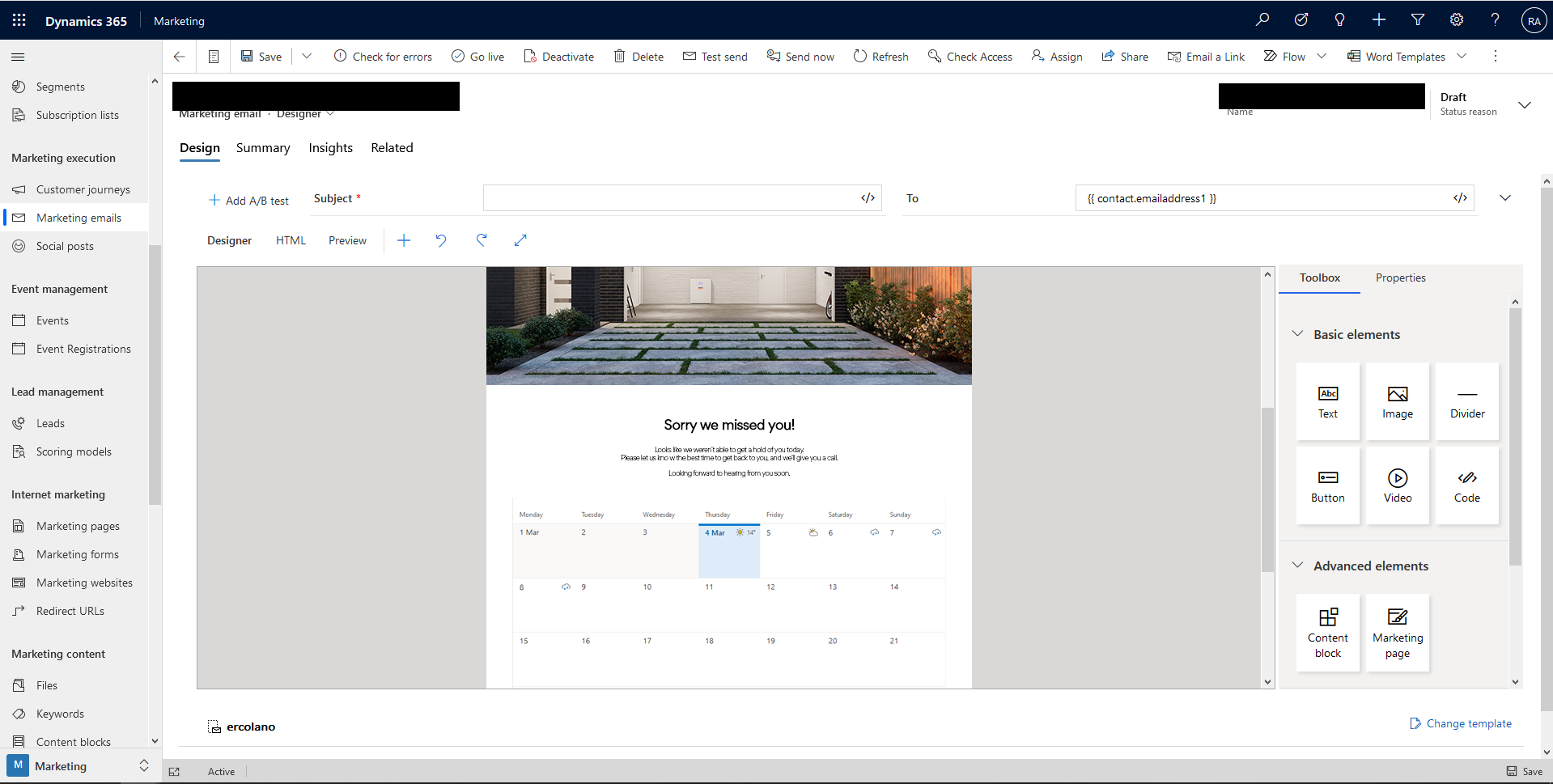

6278.Calendar-in-Email-Body-Idea.png


Any and all help would be appreciated 


Thanks,

RSTSi

I have the same question (0)
  • cloflyMao Profile Picture
    25,210 on at

    Hi Simon,

    Thanks for sharing the great mock-up, I believe it would be useful once the component is implemented in marketing email designer.

    https://experience.dynamics.com/ideas/categories/?forum=dfa5b83d-9e4c-e811-a956-000d3a1bef07&forumName=Dynamics%20365%20Marketing

    However, could you share more details about the "plugin" you mentioned in Suspicion paragraph? As far as I know, calendar-like component is not available in previous marketing application releases, and it is not supported to add custom element to marketing email designer. 

    Did the marketing manager import some third party's calendar generator tool as web resource to Dynamics? 

  • Suggested answer
    Aga M Profile Picture
    Microsoft Employee on at

    Hi Simon,

    This functionality currently doesn’t exist in Dynamics 365 for Marketing. 

    Could you please suggest it on the Ideas forum? (and ideally, also specify a business scenario and what configuration would be needed for such a calendar).

    Thank you,

    Aga

Under review

Thank you for your reply! To ensure a great experience for everyone, your content is awaiting approval by our Community Managers. Please check back later.

Helpful resources

Quick Links

Introducing the 2026 Season 1 community Super Users

Congratulations to our 2026 Super Stars!

Congratulations to our 2025 Community Spotlights

Thanks to all of our 2025 Community Spotlight stars!

Leaderboard > Customer experience | Sales, Customer Insights, CRM

#1
ManoVerse Profile Picture

ManoVerse 213 Super User 2026 Season 1

#2
CU11031447-0 Profile Picture

CU11031447-0 100

#3
NeerajPawar Profile Picture

NeerajPawar 71

Last 30 days Overall leaderboard

Product updates

Dynamics 365 release plans
