web
You’re offline. This is a read only version of the page.
close
Skip to main content

Notifications

Announcements

No record found.

Community site session details

Community site session details

Session Id :
Microsoft Dynamics CRM (Archived)

MSD 365 - Portal - Queue Lookup is not working on Case form

(0) ShareShare
ReportReport
Posted on by 441

Hi All,

I've a case form designed for portal and on that form we have "Assigned To" as a lookup field which is referring to "Queue" entity.

To given permissions to Queue on portal , I have created following  a entity permissions,

  • Queue - Global Permission (without Delete privilege)
  • Queue Item -Global Permission (without Delete privilege)
  • Team -Global Permission (without Delete privilege)
  • User -Global Permission (without Delete privilege)

But when I'm entering data in queue field and creating or updating Case through Portal, I'm getting below error,
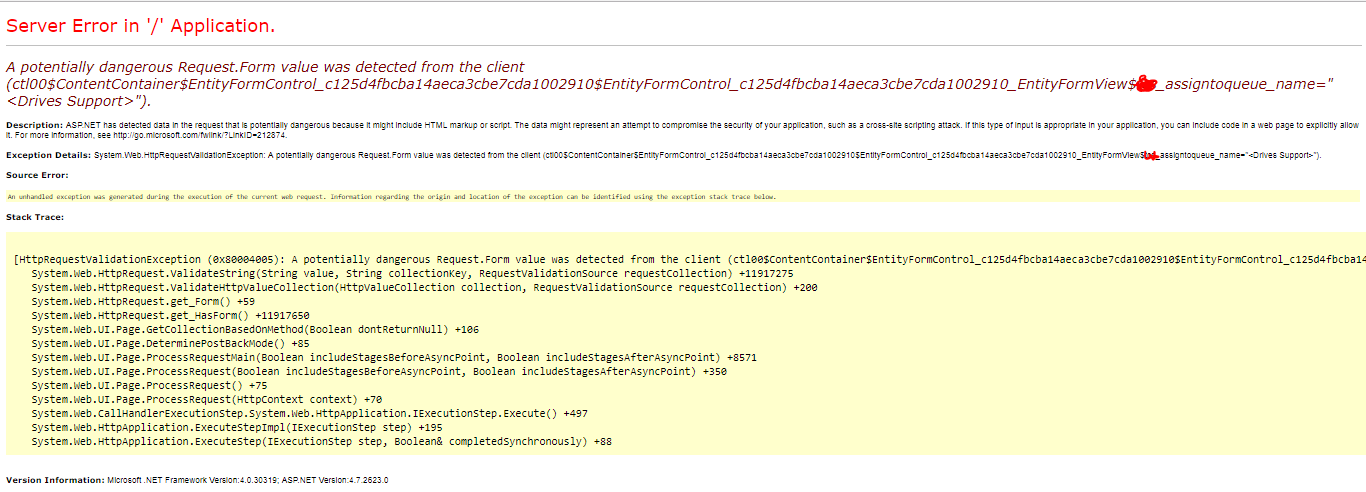
Queue-error-in-portal.PNG

To make sure that no plugin or workflow running behind the scene I've disabled all the workflows and plugin on Case as well as Queue and Queue Item Entity.

When Queues are "User" owned then queues on Cases are editable and Inserted but when I select queues owned by "Team".

Please help me if somebody has noticed same error or aware about !!

*This post is locked for comments

I have the same question (0)
  • Prashant Wani Profile Picture
    441 on at

    I have tried same thing on my trial organization there also the same error is populated.

    In trial organization I've added new lookup referring to Queue entity , but it is also not working on save as well on edit form.

    Is there any specific settings or permission we need to do ?

  • Verified answer
    rules Profile Picture
    51 on at

    This is most likely happening because there is a special character < in the name of certain queues (that's what the error is saying".

    By default portals will not allow any html character in the field values.

    To turn this off u can set following site setting "DisableValidationWebTemplate" to true. Once done it will work.

  • Prashant Wani Profile Picture
    441 on at

    Thanks a lot Rules. It worked fine now.  

    Please let me know if there are any more hidden tricks  (like above..:) ] used in portal .That would be really grateful for new developer of portal.

Under review

Thank you for your reply! To ensure a great experience for everyone, your content is awaiting approval by our Community Managers. Please check back later.

Helpful resources

Quick Links

Responsible AI policies

As AI tools become more common, we’re introducing a Responsible AI Use…

Neeraj Kumar – Community Spotlight

We are honored to recognize Neeraj Kumar as our Community Spotlight honoree for…

Leaderboard > 🔒一 Microsoft Dynamics CRM (Archived)

#1
SA-08121319-0 Profile Picture

SA-08121319-0 4

#1
Calum MacFarlane Profile Picture

Calum MacFarlane 4

#3
Alex Fun Wei Jie Profile Picture

Alex Fun Wei Jie 2

Last 30 days Overall leaderboard

Featured topics

Product updates

Dynamics 365 release plans



