web
You’re offline. This is a read only version of the page.
close
Skip to main content

Notifications

Announcements

No record found.

Community site session details

Community site session details

Session Id :
Microsoft Dynamics CRM (Archived)

Business Process missing Document Templates on solution import

(0) ShareShare
ReportReport
Posted on by 167

Hey All,

I am running into this issue while trying to export a solution from our DEV environment to our PPE environment. 

I have a business processes linked to the case entity called "Case - Set Template". This process selects from multiple Document Templates and appends them to the notes section of a case. The document templates exist in each environment already with the same name. This process works correctly in DEV.

When I import this into my PPE environment, all of my rules are there but I have to update the document template references in the process manually despite the fact these documents already exist in both environments.
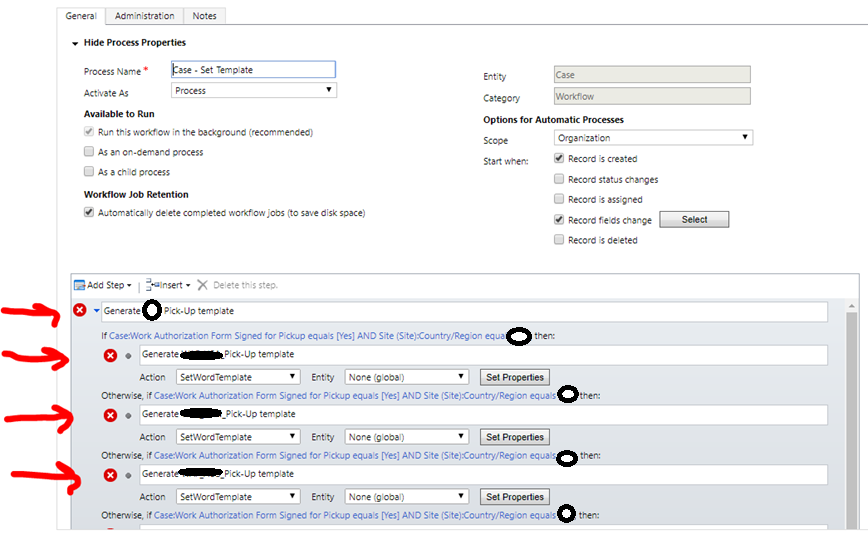
 0027.ish.png

When I look at the XML for the solution customization (snippet), it appears that the reference are exported. 

<mxswa:ActivityReference AssemblyQualifiedName="Microsoft.Crm.Workflow.Activities.EvaluateExpression, Microsoft.Crm.Workflow, Version=8.0.0.0, Culture=neutral, PublicKeyToken=31bf3856ad364e35" DisplayName="EvaluateExpression">

                            <mxswa:ActivityReference.Arguments>

                              <InArgument x:TypeArguments="x:String" x:Key="ExpressionOperator">CreateCrmType</InArgument>

                              <InArgument x:TypeArguments="s:Object[]" x:Key="Parameters">[New Object() { Microsoft.Xrm.Sdk.Workflow.WorkflowPropertyType.EntityReference, "documenttemplate", "***-***-Pick-Up", InvokeSdkMessageStep16_2, "Lookup" }]</InArgument>

                              <InArgument x:TypeArguments="s:Type" x:Key="TargetType">

                                <mxswa:ReferenceLiteral x:TypeArguments="s:Type" Value="mxs:EntityReference" />

                              </InArgument>

                              <OutArgument x:TypeArguments="x:Object" x:Key="Result">[InvokeSdkMessageStep16_1]</OutArgument>

                            </mxswa:ActivityReference.Arguments>

                          </mxswa:ActivityReference>

I would appreciate any help/feedback on this.

Thank you,

Taylor

*This post is locked for comments

I have the same question (0)
  • Verified answer
    a33ik Profile Picture
    84,331 Most Valuable Professional on at

    Taylor,

    I believe that names doesn't matter. What matter is ids of templates. Try to move templates using following plugin of XrmToolbox - www.xrmtoolbox.com/.../MsCrmTools.DocumentTemplatesMover

  • Verified answer
    Community Member Profile Picture
    on at

    tayapr ,

    you get this error because lookup refers to entity id, not to entity primary attribute!

    The solution to your problem is the following:

    1) Identify the entity id in your dev environment (by open new window or sending link by ribbon button)

    2) Identify the entity id in your prod environment (by open new window or sending link by ribbon button)

    3) Run this code by console application (this example is for account, adapt it to your entity):

    Guid sourceguid_FROMPROD = new Guid("6DDD0D8A-87DE-E711-8139-E0071B66C0A1");
    Guid targetguid_FROMDEV = new Guid("2916926f-3468-488f-8f66-93100b4dabcf");
    
    Entity sourceentity = crmService.Retrieve("account", sourceguid_FROMPROD, new ColumnSet(true));
    
    Entity targetentity = new Entity("account");
    targetentity["accountid"] = targetguid_FROMDEV;
    targetentity["name"] = "ACCOUNT TEST 1 - CLONED";
    crmService.Create(targetentity);
    
    Entity targetentity_upd = new Entity("account");
    targetentity_upd.Id = targetguid_FROMDEV;
    
    foreach (KeyValuePair<string, object> attr in sourceentity.Attributes)
    {
        if (attr.Key == "statecode" || attr.Key == "statuscode" || attr.Key == "accountid" || attr.Key == "accountnumber" || attr.Key.Contains("address")) // eg. templateid
            continue;
    
        targetentity_upd[attr.Key] = attr.Value;
    }
    
    crmService.Update(targetentity_upd);

    Please let me know if you solve.

    If you found the answer helpful, please mark as Verified 

    Join my network on LinkedIn      Follow me on Twitter 

    Thank You & Best Regards

    Francesco Picchi

    Microsoft Dynamics CRM Consultant, Bologna+Milano, ITALY

    Independent Contractor

    http://www.francescopicchi.com

  • tayapr Profile Picture
    167 on at

    Hey Andrew,

    Thanks for this- am going to check it out soon. However I did have a question.

    I did some digging into my document template ID's and what they were mapped to between different environments. I discovered that between DEV and PPE the ID's were in fact different.... however between PROD and PPE they were the identical. So, I attempted to export the process from PROD to PPE to see if the document template references would be caught- however they still weren't. I am wondering if there is a larger issue or not- I am still new to dynamics crm and figuring things out. But in theory, if the ID's were the same between prod and ppe then exporting the process from prod to ppe should work, no?

    Thanks again,

    Taylor

  • Suggested answer
    a33ik Profile Picture
    84,331 Most Valuable Professional on at

    Taylor,

    Theoretically it should work but I would suggest to doublecheck that. I'm too old to believe in miracles there is always an explanation why something doesn't work like it should.

  • tayapr Profile Picture
    167 on at

    I agree completely, there always has to be a path to the root cause. I'll keep investigating, thank you.

  • Suggested answer
    Syed Ibrahim Profile Picture
    6,257 on at

    word templates cant be added to solutions for import and export to other organisation or instance.  You need to recreate the template in new instance after u deployed your solution. This is know issue. Rather use doc mover tool XrmToolBox which transfers all the doc to new instance without manually recreating.

    Hope this helps

Under review

Thank you for your reply! To ensure a great experience for everyone, your content is awaiting approval by our Community Managers. Please check back later.

Helpful resources

Quick Links

Responsible AI policies

As AI tools become more common, we’re introducing a Responsible AI Use…

Neeraj Kumar – Community Spotlight

We are honored to recognize Neeraj Kumar as our Community Spotlight honoree for…

Leaderboard > 🔒一 Microsoft Dynamics CRM (Archived)

#1
SA-08121319-0 Profile Picture

SA-08121319-0 4

#1
Calum MacFarlane Profile Picture

Calum MacFarlane 4

#3
Alex Fun Wei Jie Profile Picture

Alex Fun Wei Jie 2

Last 30 days Overall leaderboard

Featured topics

Product updates

Dynamics 365 release plans
