Hi Edwin,
From your description and as per my understanding,
There are two type of forms in Dynamics 365 for Marketing:
> Entity record form
> Marketing form
> If your form means Marketing form,
it seems that your another form could be regarded as updating other fields for your contacts,
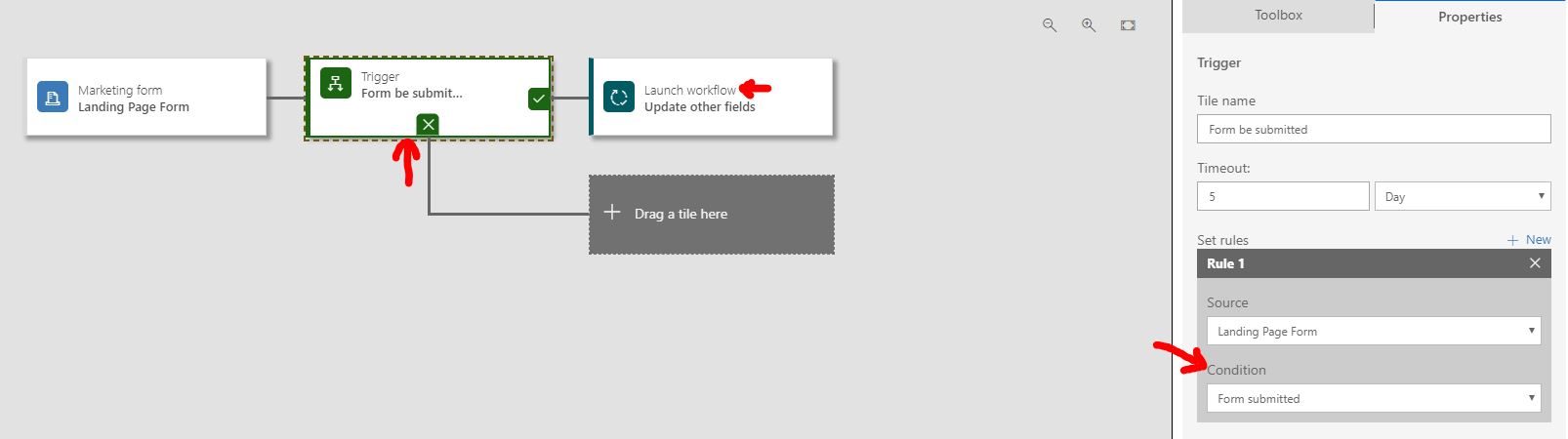
so you could build a customer journey in Dynamics 365 for Marketing like below:
Read it for what customer journey is and how does it work:
https://docs.microsoft.com/en-us/dynamics365/customer-engagement/marketing/create-simple-customer-journey
With more detailed description:
1. You form visitors(contacts) submit their information on a form
2. Create a trigger tile to detect whether the form has been submitted, once submitted, launch a workflow for that visitor(contact) to update other fields of him/her.
Read it for what workflow is and how does it work:
https://docs.microsoft.com/en-us/dynamics365/customer-engagement/customize/workflow-processes
https://crmbook.powerobjects.com/system-administration/processes/workflows/
> For your second requirement, a data field is changed can be also detected in a workflow to trigger other operations,
so in such situation, if your form means Entity record form:
a specific record will be updated once an Entity record form been submitted(data been saved),
obviously just create a background workflow to detect any field has been changed, then update the record's other fields.
Please share me more details of your business requirements if you would like thus I could have a better understanding.
Regards,
Clofly


