web
You’re offline. This is a read only version of the page.
close
Skip to main content

Announcements

No record found.

News and Announcements icon
Community site session details

Community site session details

Session Id :
Customer experience | Sales, Customer Insights,...
Suggested Answer

Error when trying to use DeployToDynamics365Instance.ps1 to deploy changes to Portal-hosted Event website

(0) ShareShare
ReportReport
Posted on by 422

Hi all, 

Have been having a good look around but can't find a solution to the issue I'm experiencing. 

I'm just trying to achieve some basic styling changes for my Dynamics 365 Marketing Events Website which is hosted on a Portal. 

I believe I've correctly followed all of the steps in the documentation, however when I go to deploy using the provided PowerShell script I am facing the error below:
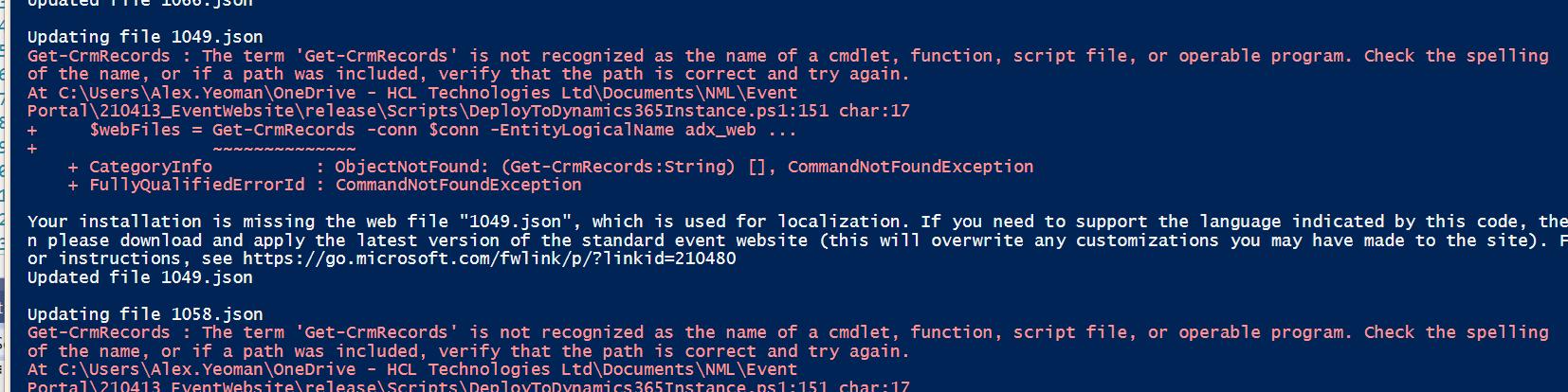
GetCRMRecordsError.PNG

"Get-CRMRecords : The term 'Get-CrmRecords' is not recognized as the name of a cmdlet, function, script file, or operable program.  

This happens after I enter my credentials and the same error shows for each file it tries to update. 

In the environment.ts file I have entered the apiEndpoint variable as my portal URL taken from the Website Binding record and I have ensured the useRestStack is set false. 

Any help very much appreciated.  I hadn't expected to have to get so involved when I just wanted to update the colour of the register button and add a logo!

Thanks

Alex

I have the same question (0)
  • Nya Profile Picture
    29,064 on at

    Hi Alex,

    Have you tried to download and install the latest version of the standard event website as the message mentioned?

  • AlexJay Profile Picture
    422 on at

    Hi Nya,

    I downloaded the latest version 1.34.0 (April release).

    Thanks

  • Nya Profile Picture
    29,064 on at

    Hi Alex,

    Here is an article which describes the same error message as yours and its solution.

    Get-CrmSetting : The Term 'Get-CrmSetting' Is Not Recognized As The Name Of A Cmdlet - InteractiveWebs (2021)

    Please have a try to see if it solves your problem.

  • Suggested answer
    AlexJay Profile Picture
    422 on at

    Hi Nya,

    Thanks for the further reply.  The article you've linked is actually a different error message and context.

    I have however been able to resolve this issue myself last night.

    On closer inspection of the PowerShell errors I noticed that the PowerShell XRM module was failing to install correctly at the start of the script due to my administrator apparently having enforced constrained language mode in PowerShell.

    Save-error.PNG

    I am unable to set the mode to full language due to a group policy restriction it seems. 

    I repeated the same steps on my personal laptop and was able to complete the end to end steps and re-deploy the customised site back to my portal. 

    Unfortunately I'm now getting another error following deployment which I have just posted on this forum also.  

    Many thanks

    Alex

Under review

Thank you for your reply! To ensure a great experience for everyone, your content is awaiting approval by our Community Managers. Please check back later.

Helpful resources

Quick Links

Introducing the 2026 Season 1 community Super Users

Congratulations to our 2026 Super Stars!

Meet the Microsoft Dynamics 365 Contact Center Champions

We are thrilled to have these Champions in our Community!

Congratulations to the March Top 10 Community Leaders

These are the community rock stars!

Leaderboard > Customer experience | Sales, Customer Insights, CRM

#1
ManoVerse Profile Picture

ManoVerse 151 Super User 2026 Season 1

#2
11manish Profile Picture

11manish 134

#3
Jimmy Passeti Profile Picture

Jimmy Passeti 55 Most Valuable Professional

Last 30 days Overall leaderboard

Product updates

Dynamics 365 release plans
