web
You’re offline. This is a read only version of the page.
close
Skip to main content

Notifications

Announcements

Community site session details

Community site session details

Session Id :
Microsoft Dynamics 365 | Integration, Dataverse...
Answered

Rollup fields on Date-Only columns

(0) ShareShare
ReportReport
Posted on by 22

It doesn't seem possible to create rollup fields based on Date Only columns. In the Rollup Wizard, it only displays columns which are of type Date-Time, not Date Only. Can anyone confirm this?

I have the same question (0)
  • Verified answer
    Community Member Profile Picture
    on at

    Hi Ben,

    Through my test, I find that what shown in the rollup wizard based on rollup field behavior.

    For example, I created two date and time fields, one is date only behavior, another is not.

     pastedimage1606891234678v1.png   pastedimage1606891258194v2.png

    when rollup field behaviour is date only, it just shows date only field in rollup wizard.

     pastedimage1606891458289v4.png

    But if rollup field behaviour is not date only, it will not show date only field.

    pastedimage1606891304593v3.png

    Regards,

    Leah Ju

    Please mark as verified if the answer is helpful. Welcome to join hot discussions in Dynamics 365 Forums.

  • Ben  Walker Profile Picture
    22 on at

    Hi Leah,

    thanks for the reply. I did some more testing of my own last night and you are right - Date Only fields do sometimes show up in the Rollup editor, but not always.

    If you look here, there are three custom Date Only fields on this entity:

    pastedimage1606899907647v1.png

    but only one of them shows up in the wizard:

    pastedimage1606899939811v2.png

    Either it's a bug, or there's some other aspect of the field that determines whether it can be included in the rollup or not. I'll carry on investigating today.

    Thanks again,

    Ben

  • Suggested answer
    Ben  Walker Profile Picture
    22 on at

    Hi again,

    turns out that

    a.) You can only base a Date-Only rollup on a Date-Only field but also

    b.) The 'Behavior' setting needs to be the same for both fields.

    pastedimage1606921017703v1.png

    I had a mismatch between the two fields and that's why it wasn't allowing me to create the rollup.

    I'll mark this as closed.

  • Suggested answer
    Community Member Profile Picture
    on at

    Hi Ben,

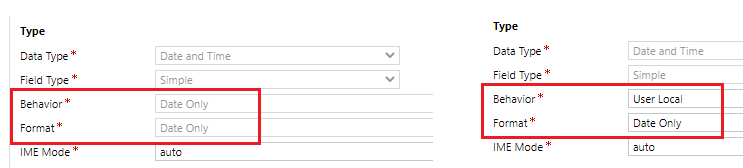
    As I said above, it just based on behavior of the field, no relationship of format.

    Why three ‘date only’ field just one can be shown in the rollup wizard?

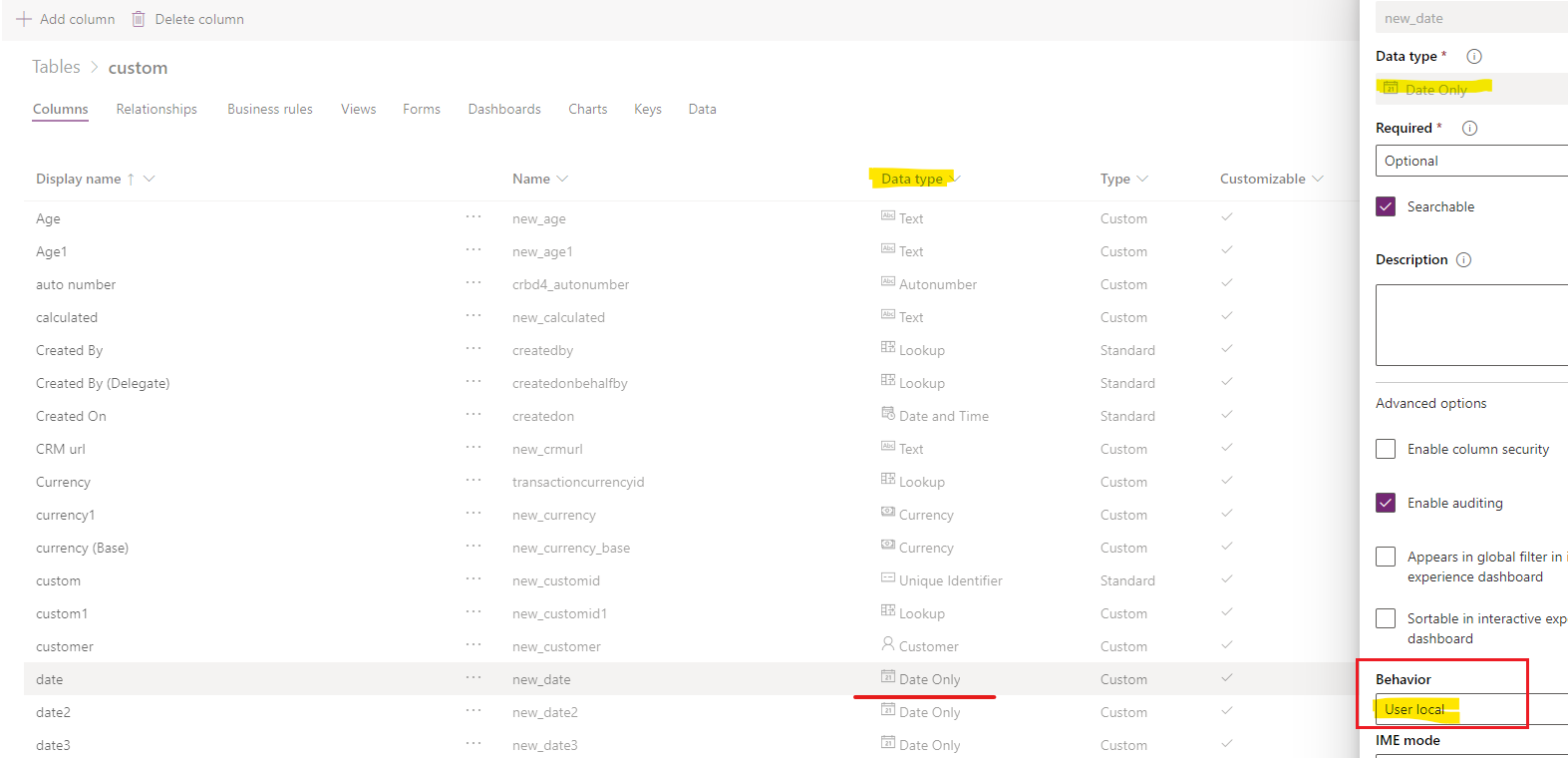
    Because the other ‘date only’ field just format is ‘date only’, but behavior is ‘user local’, These two ‘date only’ are different concepts.
    pastedimage1606976035911v1.png

    In the page, the data type shows the format of the date field, not behavior.
    pastedimage1606976073148v3.png

    Regards,

    Leah Ju

    Please mark as verified if the answer is helpful. Welcome to join hot discussions in Dynamics 365 Forums.

  • Suggested answer
    Community Member Profile Picture
    on at

    Hi Ben,

    Please click Yes under "Did this answer your question?" to close this thread.

    pastedimage1606976119691v1.png

    Thanks. 

    Regards,

    Leah Ju

    Please mark as verified if the answer is helpful. Welcome to join hot discussions in Dynamics 365 Forums.

Under review

Thank you for your reply! To ensure a great experience for everyone, your content is awaiting approval by our Community Managers. Please check back later.

Helpful resources

News and Announcements

Season of Giving Solutions is Here!

Quick Links

Responsible AI policies

As AI tools become more common, we’re introducing a Responsible AI Use…

Neeraj Kumar – Community Spotlight

We are honored to recognize Neeraj Kumar as our Community Spotlight honoree for…

Leaderboard > Microsoft Dynamics 365 | Integration, Dataverse, and general topics

#1
iampranjal Profile Picture

iampranjal 67

#2
André Arnaud de Calavon Profile Picture

André Arnaud de Cal... 37 Super User 2025 Season 2

#3
Pallavi Phade Profile Picture

Pallavi Phade 24

Last 30 days Overall leaderboard

Product updates

Dynamics 365 release plans



