web
You’re offline. This is a read only version of the page.
close
Skip to main content

Announcements

No record found.

News and Announcements icon
Community site session details

Community site session details

Session Id :
Microsoft Dynamics NAV (Archived)

Batch Finding

(0) ShareShare
ReportReport
Posted on by

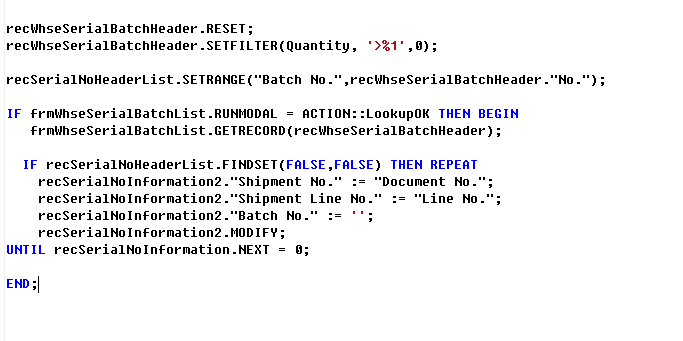
I have added a function on the posted sales shipment page which called 'Find Batch'. It should take the document number and line number and apply it to the serial number information list and add it to Shipment No and Shipment Line number. Here's the code I have done so far however i'm not sure what's missing to make it complete. 4073.4.PNG
*This post is locked for comments

I have the same question (0)
  • Nareshwar Raju Vaneshwar Profile Picture
    5,596 on at

    Hi,

    Your requirement and the code are confusing. Please be bit more elaborative.

    Thanks :)

  • Verified answer
    Community Member Profile Picture
    on at

    I'm sorry It's sorted now however. 

    IF you were wondering this is what I was trying to get


    recWhseSerialBatchHeader.RESET;
    recWhseSerialBatchHeader.SETFILTER(Quantity, '>%1',0);

    IF frmWhseSerialBatchList.RUNMODAL = ACTION::LookupOK THEN BEGIN
    frmWhseSerialBatchList.GETRECORD(recWhseSerialBatchHeader);

    recSerialNoInformation.RESET;
    recSerialNoInformation.SETRANGE("Batch No.", recWhseSerialBatchHeader."No.");

    IF recSerialNoInformation.FINDSET(FALSE,FALSE) THEN REPEAT
    recSerialNoInformation2 := recSerialNoInformation;
    recSerialNoInformation2."Shipment No." := "Document No.";
    recSerialNoInformation2."Shipment Line No." := "Line No.";
    recSerialNoInformation2."Batch No." := '';
    recSerialNoInformation2.MODIFY;
    UNTIL recSerialNoInformation.NEXT = 0;
    END;

Under review

Thank you for your reply! To ensure a great experience for everyone, your content is awaiting approval by our Community Managers. Please check back later.

Helpful resources

Quick Links

Introducing the 2026 Season 1 community Super Users

Congratulations to our 2026 Super Stars!

Meet the Microsoft Dynamics 365 Contact Center Champions

We are thrilled to have these Champions in our Community!

Congratulations to the April Top 10 Community Leaders

These are the community rock stars!

Leaderboard > 🔒一 Microsoft Dynamics NAV (Archived)

Last 30 days Overall leaderboard

Featured topics

Product updates

Dynamics 365 release plans
