web
You’re offline. This is a read only version of the page.
close
Skip to main content

Notifications

Announcements

No record found.

Community site session details

Community site session details

Session Id :
Microsoft Dynamics NAV (Archived)

Developer Environment stop working

(0) ShareShare
ReportReport
Posted on by 1,144

Dear Sir,

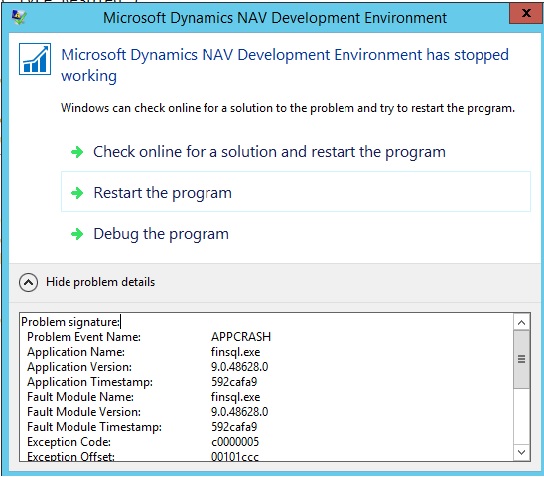
I have faced the below error message while working in Developer Environment in NAV 2016 IN (CU 20).
er.jpg

Problem signature:
Problem Event Name: APPCRASH
Application Name: finsql.exe
Application Version: 9.0.48628.0
Application Timestamp: 592cafa9
Fault Module Name: finsql.exe
Fault Module Version: 9.0.48628.0
Fault Module Timestamp: 592cafa9
Exception Code: c0000005
Exception Offset: 00101ccc
OS Version: 6.3.9600.2.0.0.272.7
Locale ID: 16393

Read our privacy statement online:
go.microsoft.com/fwlink

If the online privacy statement is not available, please read our privacy statement offline:
C:\Windows\system32\en-US\erofflps.txt

Please help to solve this issue.

Thanks & regards,

-SB

*This post is locked for comments

I have the same question (0)
  • Suggested answer
    Mohana Yadav Profile Picture
    60,993 Super User 2025 Season 2 on at

    when is it happening?

    did you try opening dev environment as run as administrator?

  • subrata.bauri Profile Picture
    1,144 on at

    When is it happening?

    Ans. :- While working in developer environment.

    Did you try opening dev environment as run as administrator?

    Ans. :- Yes, since last week I'm facing this issue.

  • Suggested answer
    Tina Menezes Profile Picture
    2,582 on at

    Hi,

    It probably must be due to some incorrect customization which is causing the app to crash. You need to revert the last customization you did, restart the services and check again. I have also faced this issue once previously, it was due to some improper customization. It re-started after reverting the customization and then I did it again properly. Also check it you have made any change to the User table like changed some primary key or secondary key. This might be causing the error too.

  • subrata.bauri Profile Picture
    1,144 on at

    I have the same doubt... I'm facing this in a Particular page.

  • Suggested answer
    Suresh Kulla Profile Picture
    50,243 Super User 2025 Season 2 on at

    I have faced this issue couple of times when I have imported the objects from different version of NAV. It also happened when i have added some code in the pages or forms like CurrPage. Update in wrong triggers. so review if  you have those kind of customizations.

  • subrata.bauri Profile Picture
    1,144 on at

    Thanks to everybody...

    A single Line of code was creating a issue.

    Please look into the below (wrong) Line of Code.

    // Code-

    AccType:=AccType::"G/L Account";

    // Code+

    The (wrong) Line of Code is copied & paste within the same function and after that the system stops working frequently.

    When I have commented the second line of code, the system starts working without any issue...

    What is the issue in Copy & Paste functionality ?

  • Tina Menezes Profile Picture
    2,582 on at

    Which is the second line of code which you commented?

    Kindly post the function code snippet

  • subrata.bauri Profile Picture
    1,144 on at

    CASE "Application Type" OF
    "Application Type"::Attach :
    BEGIN
    ......
    ......
    AccType:=AccType::"G/L Account"; // Line 1
    ......
    ......
    END;
    "Application Type"::Detach :
    BEGIN
    ......
    ......
    ......
    ......
    END;
    "Application Type"::X :
    BEGIN
    ......
    ......
    AccType:=AccType::"G/L Account"; // Line 2 (Copied from Line 1)
    ......
    ......
    END;
    "Application Type"::Y:
    BEGIN
    ......
    ......
    ......
    ......
    END;
    END;

  • Raik Zobel Profile Picture
    5 on at

    The problem is the option itself. This occurs also with other options (not all) if you move your mouse over the option. Seems to be a problem with developer client.

Under review

Thank you for your reply! To ensure a great experience for everyone, your content is awaiting approval by our Community Managers. Please check back later.

Helpful resources

Quick Links

Responsible AI policies

As AI tools become more common, we’re introducing a Responsible AI Use…

Neeraj Kumar – Community Spotlight

We are honored to recognize Neeraj Kumar as our Community Spotlight honoree for…

Leaderboard > 🔒一 Microsoft Dynamics NAV (Archived)

Last 30 days Overall leaderboard

Featured topics

Product updates

Dynamics 365 release plans
