web
You’re offline. This is a read only version of the page.
close
Skip to main content

Notifications

Announcements

No record found.

Community site session details

Community site session details

Session Id :
Microsoft Dynamics CRM (Archived)

In Email records, Created By and Modified By fields are set to SYSTEM

(0) ShareShare
ReportReport
Posted on by 193

Hi guys,

Can anyone please help me how does the 'Created By', 'Created By (Delegate)', 'Modified By', and 'Modified By (Delegate)' behave in email messages? For some reason some of the email records are set to 'System' I am just not sure which scenario this occurs. 

Also, please note that we already turned-off the folder level tracking and email correlation to prevent auto tracking of emails. 
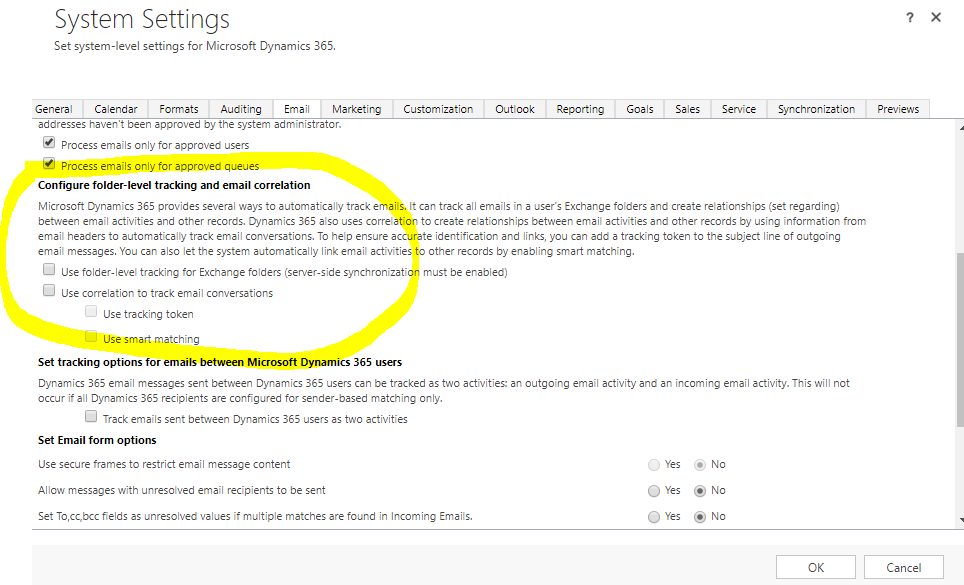
auto-tracking.PNG

*This post is locked for comments

I have the same question (0)
  • Suggested answer
    RaviKashyap Profile Picture
    55,410 Moderator on at

    Hi,

    Check the status of emails. If it is Received then the created by modifiedby would be System as the received emails are tracked by CRM System.

    Hope this helps.

  • JZot Profile Picture
    193 on at

    Hi Ravi!

    Thanks for the reply.

    Upon checking there are email messages as well which are not 'Received' in status but with createdby and modifiedby set to 'System'. 

    Any thoughts on this?

    2742.email.PNG

  • Suggested answer
    Pawar Pravin  Profile Picture
    5,237 on at

    Hi ,

    Are you using plugin/custom workflow to create email activity ?

    If yes then please check for context.userId.

    IOrganizationService service = serviceFactory.CreateOrganizationService(null);

    If you are using impersonation in coding then it be happen as 'system' user created.

  • JZot Profile Picture
    193 on at

    Hi Pravin!

    Thanks for  the reply.

    Yes we have some emails that are sent thru plugins/workflows but I tried to send an email directly from the 'Email' form of CRM and its still showing 'Modified By' = SYSTEM. Please see screenshot.

    38756640.Capture.PNG

    I wonder what are the scenarios those fields are being set to 'SYSTEM'.

    Again, thank you for your help

  • RaviKashyap Profile Picture
    55,410 Moderator on at

    Hi,

    It appears these are the notification email which are generated by either a worklow or some custom code. If yes then it is possible to have System in the created By/ Modify By depending upon workflow/ plugin.

  • JZot Profile Picture
    193 on at

    Hi Ravi,

    Thanks for the reply.

    As mentioned in my previous reply, I also tried sending an email directly from CRM Email form (no plugins or workflows) but still the 'Modified By' was set to 'SYSTEM'

  • Suggested answer
    Pawar Pravin  Profile Picture
    5,237 on at

    Hi ,

    If possible can you please share snapshot of audit history for any particular record, so that it could help to explore more.

  • JZot Profile Picture
    193 on at

    Hi Pravin,

    Please see screenshot of the email record I created and sent manually from CRM Email form.

    email-screenshot.png

Under review

Thank you for your reply! To ensure a great experience for everyone, your content is awaiting approval by our Community Managers. Please check back later.

Helpful resources

Quick Links

Responsible AI policies

As AI tools become more common, we’re introducing a Responsible AI Use…

Neeraj Kumar – Community Spotlight

We are honored to recognize Neeraj Kumar as our Community Spotlight honoree for…

Leaderboard > 🔒一 Microsoft Dynamics CRM (Archived)

#1
SA-08121319-0 Profile Picture

SA-08121319-0 4

#1
Calum MacFarlane Profile Picture

Calum MacFarlane 4

#3
Alex Fun Wei Jie Profile Picture

Alex Fun Wei Jie 2

Last 30 days Overall leaderboard

Featured topics

Product updates

Dynamics 365 release plans



