web
You’re offline. This is a read only version of the page.
close
Skip to main content

Notifications

Announcements

No record found.

Community site session details

Community site session details

Session Id :
Customer experience | Sales, Customer Insights,...
Suggested Answer

Automated surveys

(0) ShareShare
ReportReport
Posted on by 45

I want to create an automated customer journey which will send out an email containing a survey link.  I can create the segment for the survey audience (to be sent to customer day after travel).  In order to prevent over surveying I want to create a suppression segment which will prevent customers who have travelled more than once in a 60 day period from receiving the survey email each time they travel.  I know how to add a static suppression segment to a customer journey.  How do I create a dynamic suppression segment?

I have the same question (0)
  • Suggested answer
    d_radulova Profile Picture
    2 User Group Leader on at

    Hi @Poppy10,

    Are you using the Marketing app or Customer Insights, or both?

    Sounds a bit like a marketing question. I can help your creating it in the Marketing app if that helps any.

    Thanks,

    -DD

  • Mukesh Pohuja Profile Picture
    on at

    Hi -

    1. Here is a link to the documentation to create the dynamic segments: docs.microsoft.com/.../pm-segments  

    2. Every segment you create, creates an entity, that you can view under the Entities.

    So additionally, If you already have the last used or survey sent segment, you can use that segment based entity in your Dynamic Segment definition as well with the AND condition.

    3. One more option would be to pre-calculate your criteria "Traveled more than once in a 60 day period" first, by creating a "Customer attribute" (steps here:docs.microsoft.com/.../pm-measures)

    Then this customer attribute can be easily used in your segment to evaluate the criteria before being added to the segment list.

    Let us know what works for you or if you have any more questions!

  • Poppy10 Profile Picture
    45 on at

    Marketing.  I have already built the dynamic segment that will include customers who travelled the day before I just don't know how to create a suppression that as the segment runs will exclude anyone who travels again in the next 30/60 days to prevent them from being sent the survey again.

    Thanks

  • Suggested answer
    d_radulova Profile Picture
    2 User Group Leader on at

    Hi @Poppy10 ,

    there is a bit more to think about - is this going to be a recurring journey or not? If not, people once suppressed, will not go back on the journey even after 70 days.

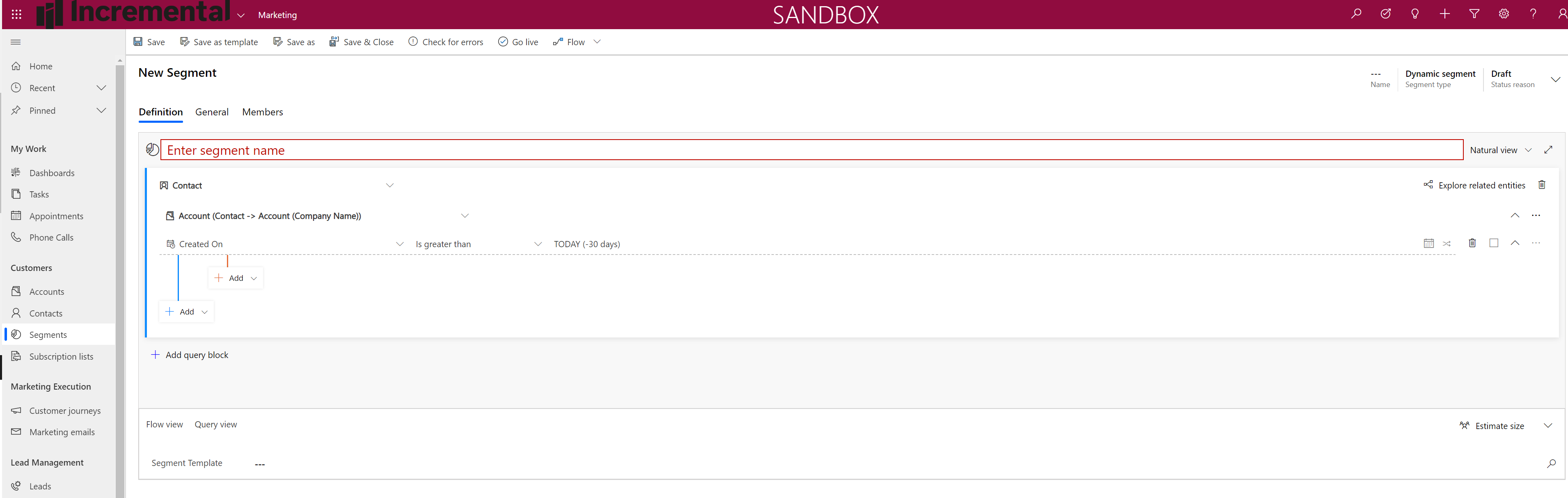
    However, if you just wanted a dynamic segment with a people who travelled in the last 30 days, you can do something like that (replace account with your booking or journey, etc).
    pastedimage1579264992161v5.png

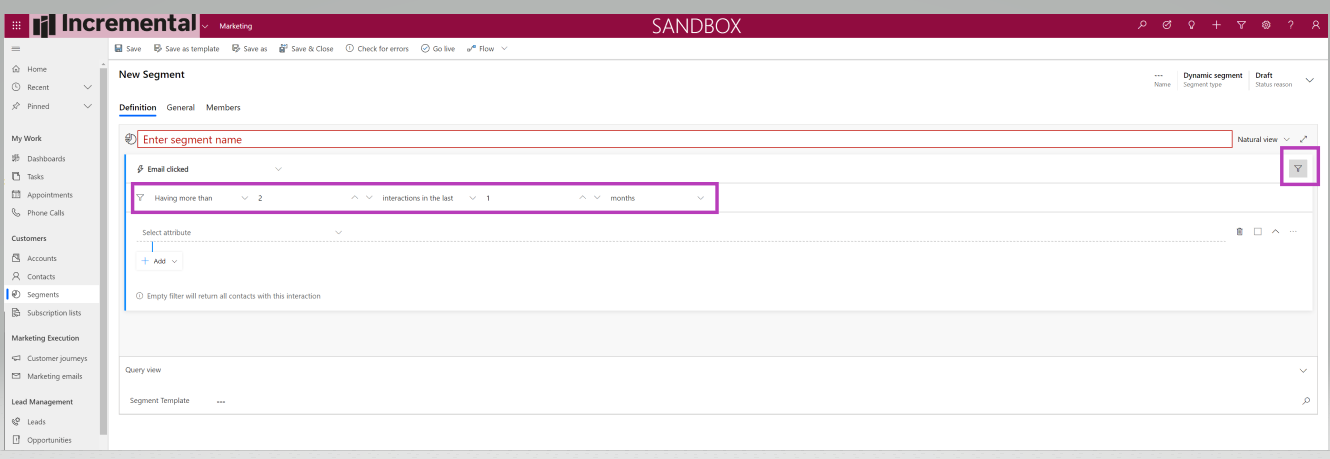
    On a different note, for behavioural segments you can use a sliding window as such - 
    pastedimage1579264934183v3.png

    But you can't do that for a demographic segment.

    Hope this help. I don't really know the structure of your data to help more. Sorry.

    Thanks,

    -DD

  • Poppy10 Profile Picture
    45 on at

    Hi DD

    It would be an ongoing recurring automated customer journey.  As we have a large number of frequent travellers, they would receive the first survey but I wouldn't want them to receive the survey again if they travelled again within 30/60 days however after the 30/60 days had elapsed I would want them to receive the survey next time they travelled.

    Ros (ferry company)

  • Mukesh Pohuja Profile Picture
    on at

    What email send system are you using to send those surveys? 
    basically you are trying to run an ongoing campaign and want to do a frequency cap?

  • Poppy10 Profile Picture
    45 on at

    I am sending the survey out via an automated customer journey in the Microsoft Dynamics Marketing app.  The email that is being sent out contains a link to the survey.  It is an ongoing campaign and I want to prevent over surveying frequent travellers by adding a condition that stops the survey email being sent to a customer again if they travel again with 30/60 days.  Not sure if it will be 30 or 60 days.  If, after receiving the survey they then travel again say 65 days later I would want them to receive the survey again.

  • MsMarketing Profile Picture
    on at

    Try adding survey respondents to a suppression segment and introduce some expiration logic on the contacts ‘membership’ of that segment. Not sure if there is a ‘days in segment’ counter out of the box. Please check.

  • MsMarketing Profile Picture
    on at

    The simpler solution could just be to add a scheduler tile to the customer that waits until the 30/60 day period is up and only then triggers the next survey email when the "travel" event happens (using the "record updated" tile)

  • Mukesh Pohuja Profile Picture
    on at

    @Poppy10 - did any of those suggestions help? what was your option? If you'd like you can reach out to CIHelp@microsoft.com as well.

Under review

Thank you for your reply! To ensure a great experience for everyone, your content is awaiting approval by our Community Managers. Please check back later.

Helpful resources

Quick Links

Responsible AI policies

As AI tools become more common, we’re introducing a Responsible AI Use…

Neeraj Kumar – Community Spotlight

We are honored to recognize Neeraj Kumar as our Community Spotlight honoree for…

Leaderboard > Customer experience | Sales, Customer Insights, CRM

#1
Tom_Gioielli Profile Picture

Tom_Gioielli 185 Super User 2025 Season 2

#2
#ManoVerse Profile Picture

#ManoVerse 110

#3
Gerardo Rentería García Profile Picture

Gerardo Rentería Ga... 69 Most Valuable Professional

Last 30 days Overall leaderboard

Product updates

Dynamics 365 release plans
