web
You’re offline. This is a read only version of the page.
close
Skip to main content

Announcements

No record found.

News and Announcements icon
Community site session details

Community site session details

Session Id :
Service | Customer Service, Contact Center, Fie...
Unanswered

How to add Option Set field on Schedule Assistant Filter

(0) ShareShare
ReportReport
Posted on by 10

Hello,

I have added custom Option Set field (Role Level) on Resource Requirement entity.
We need to bring this field on Schedule Assistant Filter (i.e., after click of Find Resource button on Resource Request), for this I have added below code in Scheduled Assistant Filter Layout


till this, it is working fine and showing Role Level on Schedule Assistant Filter as shown below
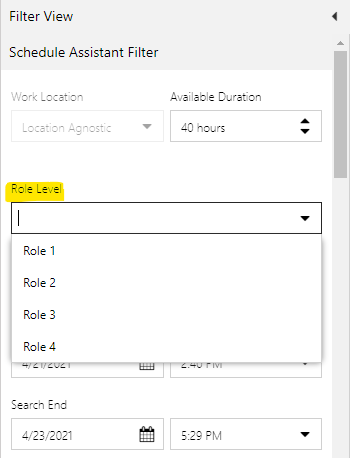
7444.png

and below mentioned piece of code is added in Schedule Assistant Retrieve Constraints Query

But for this schedule board is not loading

For this schedule board is loading, but Role Level option set selected value on Resource Requirement is not populating on Schedule Assistant Filter as shown below
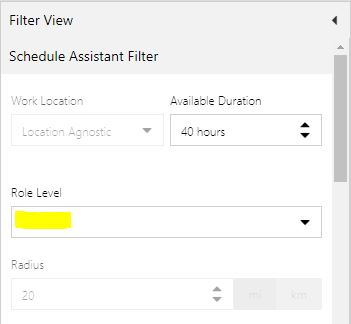
4530.JPG

How can we show the selected value of Option Set field from Resource Requirement onto the Schedule Assistant Filter?

Thanks!

I have the same question (0)
  • apa Profile Picture
    8,284 Moderator on at

    Akshay Gawande I've moved this thread from ProjOps to Field Service for better visibility. This is the best place to get answers to URS extensibility related questions.

  • Al Iggs Profile Picture
    Microsoft Employee on at

    Hi Akshay, not sure if that helps, but long time ago I put together some documentation for adding a custom option set, maybe you can get some ideas from that.

    0825.Extend-the-Schedule-Board-with-a-custom-resource-attribute.pdf

  • Akshay Gawande Profile Picture
    10 on at

    Hi Alexander Heinze,

    Thanks for the reply!
    Nice document, but this provides how to show the fields on board.
    This is also working fine for me. I want to pre populate the values which were selected on Resource Requirement entity onto the Schedule Assistant Filter.

  • Al Iggs Profile Picture
    Microsoft Employee on at

    I would look at the logic for work location and try to reproduce that. It has

     <control type="combo" source="optionset" key="Requirement/msdyn_worklocation" label-id="ScheduleAssistant.West.settingsform.WorkLocation" entity="msdyn_resourcerequirement" attribute="msdyn_worklocation"> <bind property="disabled" to="Requirement/InitialWorkLocation" operator="eq" value="690970002" />

    in the filter layout and

    <InitialWorkLocation ufx:select="msdyn_worklocation" />

    in the Retrieve Resources Query.

  • Akshay Gawande Profile Picture
    10 on at

    Hi,

    Filter layout has 
    <control type="combo" source="optionset" key="RoleLevel" label-id="Role Level" entity="msdyn_resourcerequirement" attribute="new_rolelevel" >

    in the Schedule Assistant Retrieve Constraints Query has
    <RoleLevel ufx:select="option(Requirement/new_rolelevel)" />

    This auto populates the selected option from Resource Requirement to Schedule Assistant Filter.

    Now, we want to keep Option Set on Resource Requirement. However, we want to make Schedule Assistant Filter control as multiselect.
    So, the Filter Layout will be
    <control type="combo" source="optionset" key="RoleLevel" label-id="Role Level" entity="msdyn_resourcerequirement" attribute="new_rolelevel" multi="true" >

    However, the below Schedule Assistant Retrieve Constraints Query doesn't work with this multi="true".
    <RoleLevel ufx:select="option(Requirement/new_rolelevel)" />

    So, need solution on this.

    Thanks!

  • Community Member Profile Picture
    on at

    how did you change schedule assistant filter?

    i created a new schedule assistant filter layout in msdyn_configuration but i cant find the option how to use it

    thanks in advance

Under review

Thank you for your reply! To ensure a great experience for everyone, your content is awaiting approval by our Community Managers. Please check back later.

Helpful resources

Quick Links

Introducing the 2026 Season 1 community Super Users

Congratulations to our 2026 Super Stars!

Meet the Microsoft Dynamics 365 Contact Center Champions

We are thrilled to have these Champions in our Community!

Congratulations to the April Top 10 Community Leaders

These are the community rock stars!

Leaderboard > Service | Customer Service, Contact Center, Field Service, Guides

#1
FSRon Profile Picture

FSRon 61

#2
James White Profile Picture

James White 21

#3
AT-28040446-0 Profile Picture

AT-28040446-0 20

Last 30 days Overall leaderboard

Featured topics

Product updates

Dynamics 365 release plans
