web
You’re offline. This is a read only version of the page.
close
Skip to main content

Notifications

Announcements

No record found.

Community site session details

Community site session details

Session Id :
Small and medium business | Business Central, N...
Suggested Answer

Job to be a dimension on payment journal

(0) ShareShare
ReportReport
Posted on by 5

Hi,
Can you allocate an employee payment to a job using the jobs module and not setting up independent job dimensions?
Regards...

I have the same question (0)
  • Suggested answer
    Andy Sather Profile Picture
    on at

    Hello,

    If you don't get further responses to this issue, you may want to raise a support request to Microsoft support via your CSP / Partner.

  • Suggested answer
    DAnny3211 Profile Picture
    11,397 on at

    hi

    look this

    learn.microsoft.com/.../finance-dimensions

    DAniele

  • Suggested answer
    Amit Profile Picture
    2,557 on at

    Refer the below link

    usedynamics.com/.../

    Regards

    Amit Sharma

    www.erpconsultors.com

  • Suggested answer
    Dallefeld Profile Picture
    211 User Group Leader on at

    You cannot process payments and have them post to the jobs module. You need to process your expenses to the job through a purchase invoice. You post employee time through timesheets and job journal to the job.

  • Suggested answer
    YUN ZHU Profile Picture
    95,311 Super User 2025 Season 2 on at

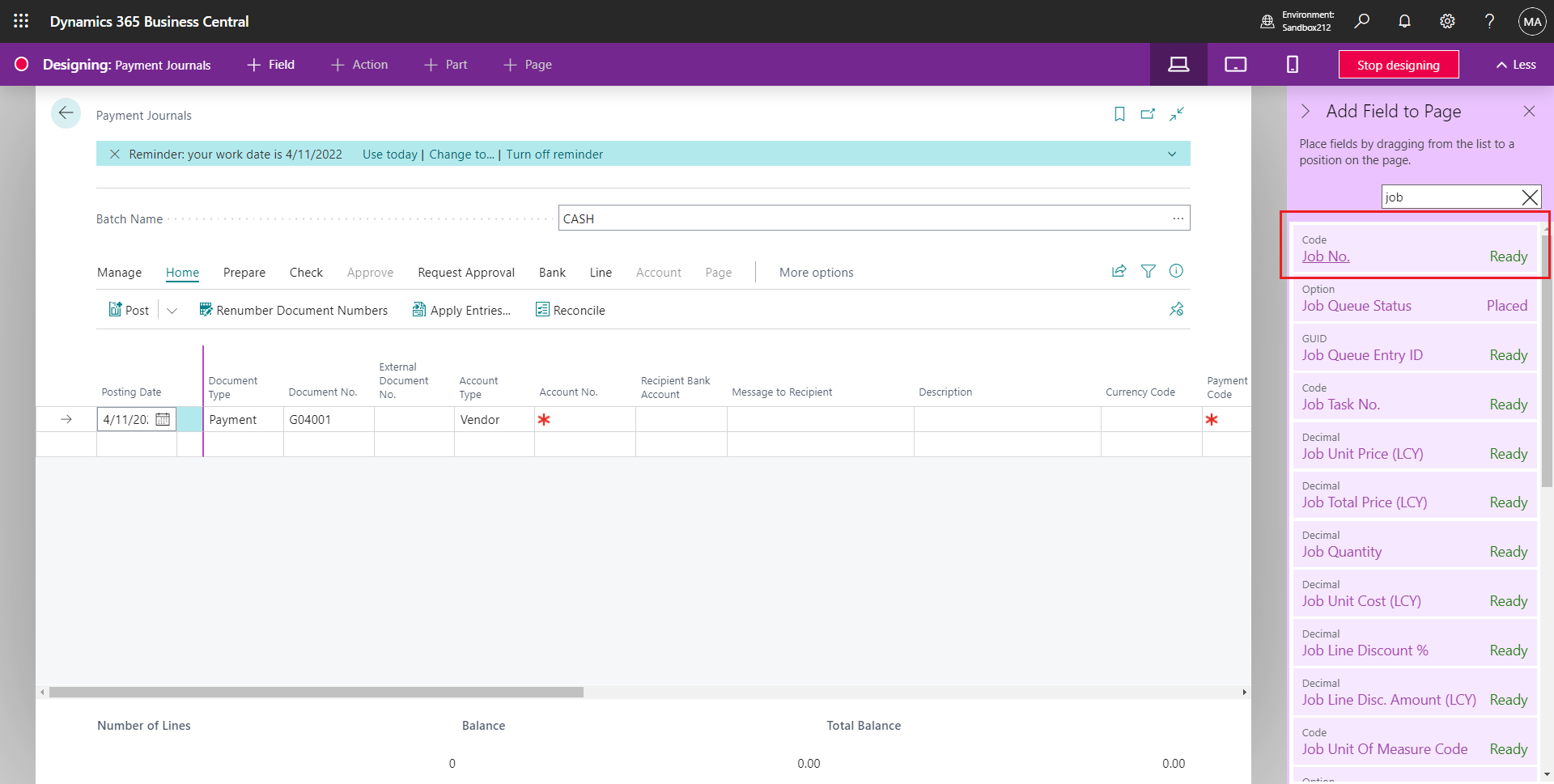
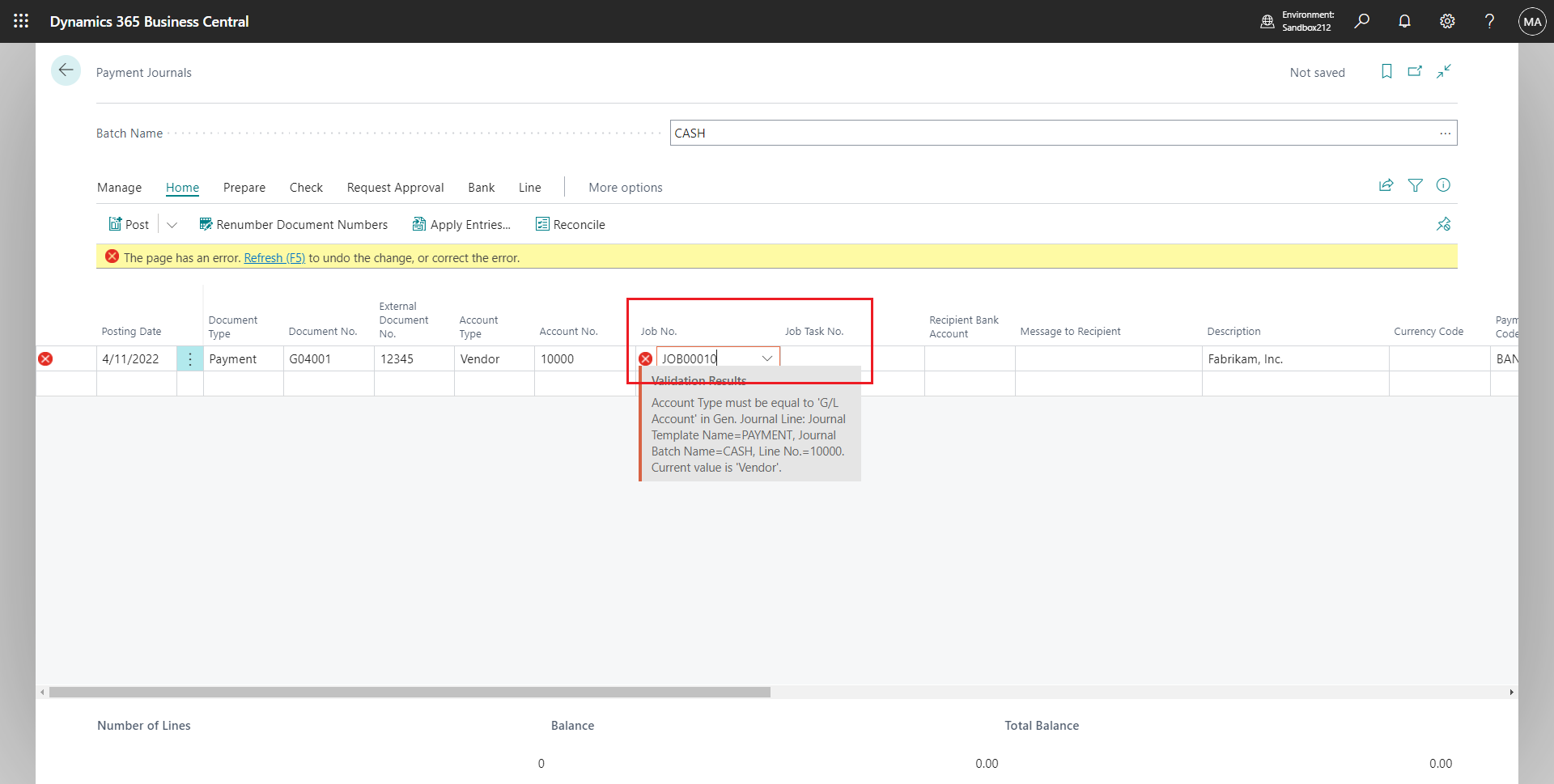
    Hi, in fact, there are Job No. and Job Task No. in the Payment Journal, but they need Design to display them. And there are restrictions on usage, I think you can give it a try.
    pastedimage1670545207035v1.png

    Note:

    Account Type must be equal to 'G/L Account' in Gen. Journal Line: Journal Template Name=PAYMENT, Journal Batch Name=CASH, Line No.=10000. Current value is 'Vendor'.
    pastedimage1670545257598v2.png

    Hope this helps as well.

    Thanks.

    ZHU

  • Suggested answer
    Manan_Shah Profile Picture
    1,459 on at

    Hi Katlego,

    What I understand from your question is you want to add employee on Jobs.

    You can add resources on Jobs. 

    1) You have to create Resource as same name with Employee. Also need to create Resource with same name.  And create Dimension for employee and attach on resource you get reference and report if needed.

    2) Now you can use that Resource on jobs. 


    Hope this will help. 

    Many Thanks,
    Manan

Under review

Thank you for your reply! To ensure a great experience for everyone, your content is awaiting approval by our Community Managers. Please check back later.

Helpful resources

Quick Links

Responsible AI policies

As AI tools become more common, we’re introducing a Responsible AI Use…

Neeraj Kumar – Community Spotlight

We are honored to recognize Neeraj Kumar as our Community Spotlight honoree for…

Leaderboard > Small and medium business | Business Central, NAV, RMS

#1
OussamaSabbouh Profile Picture

OussamaSabbouh 3,177

#2
Jainam M. Kothari Profile Picture

Jainam M. Kothari 2,467 Super User 2025 Season 2

#3
YUN ZHU Profile Picture

YUN ZHU 1,435 Super User 2025 Season 2

Last 30 days Overall leaderboard

Featured topics

Product updates

Dynamics 365 release plans
