web
You’re offline. This is a read only version of the page.
close
Skip to main content

Notifications

Announcements

No record found.

Community site session details

Community site session details

Session Id :
Finance | Project Operations, Human Resources, ...
Suggested Answer

How to identify/find the relation between parent and child data sources in queries

(0) ShareShare
ReportReport
Posted on by

Hi Team,

Ca you please suggest any code snippet or logic to identify the relation between the parent and child data sources for queries in AOT.

Using xpo file we unable to find the relation ship for the parent and child data sources and the relations as well.

Thanks in advance,

Phani

I have the same question (0)
  • Suggested answer
    zhifeng Profile Picture
    on at

    Hello Phani,

    You can use Cardinality /RelatedTableCardinality  property to verify relationship. Below article has some samples: 

    docs.microsoft.com/.../cardinality-in-valid-time-state-table-relationships

  • Suggested answer
    ergun sahin Profile Picture
    8,826 Moderator on at

    You say xpo, so you're using one of the older versions.
    Apart from Cardinality (FetchMode), you first need to determine the relationship itself. If you look at the relationship tab of the child datasource, you can see through which filds the relationship is established.

    pastedimage1619423737018v2.png
    In some cases, automatic relations is used. In these cases, you can see the relationship name in child ds.
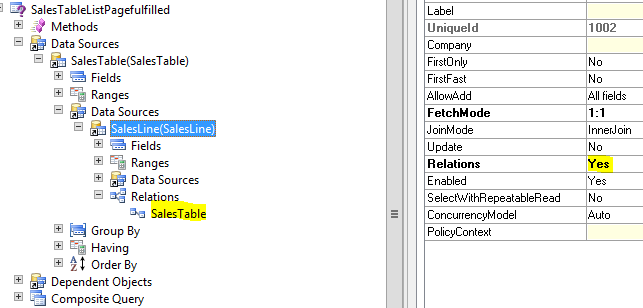
    pastedimage1619423845188v3.pngpastedimage1619423882612v4.png

    In these cases, you need to go to the table of child ds and examine the relationship with the same name in order to see between fields.
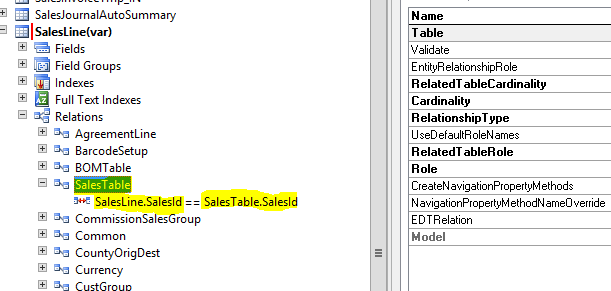
    pastedimage1619424006157v5.png

    Of course, in order to fully understand the relationship, you need to examine the concepts such as join type, cardinality, fetchmode(etc.).

  • Suggested answer
    ergun sahin Profile Picture
    8,826 Moderator on at

    If you want to determine the relationship with the code, it is actually possible. I'm not sure if the query has such a feature, but you can determine the relationships on the tables with the dictrelation.

    stackoverflow.com/.../how-can-i-get-and-show-the-fields-that-are-part-of-a-table-relation

    You need some luck. You can determine the tables by using Query and see if there is a relationship between them. However, there are situations that need to be considered.

    There may be more than one relationship between tables.

    There may be no relationship between the tables.

    There may be a different relationship defined in the query than in the table.

Under review

Thank you for your reply! To ensure a great experience for everyone, your content is awaiting approval by our Community Managers. Please check back later.

Helpful resources

Quick Links

Responsible AI policies

As AI tools become more common, we’re introducing a Responsible AI Use…

Neeraj Kumar – Community Spotlight

We are honored to recognize Neeraj Kumar as our Community Spotlight honoree for…

Leaderboard > Finance | Project Operations, Human Resources, AX, GP, SL

#1
Martin Dráb Profile Picture

Martin Dráb 565 Most Valuable Professional

#2
André Arnaud de Calavon Profile Picture

André Arnaud de Cal... 450 Super User 2025 Season 2

#3
Sohaib Cheema Profile Picture

Sohaib Cheema 250 User Group Leader

Last 30 days Overall leaderboard

Product updates

Dynamics 365 release plans
