web
You’re offline. This is a read only version of the page.
close
Skip to main content

Announcements

No record found.

News and Announcements icon
Community site session details

Community site session details

Session Id :
Microsoft Dynamics CRM (Archived)

Dynamics 365 FetchXML SSRS Report not displaying bigger images

(0) ShareShare
ReportReport
Posted on by 5

I'm developing SSRS Report to show pictures attached in the Notes of an Account Entity. The environment is Dynamics 365 Online. I have used fetchxml  to retrieve the images from Notes.

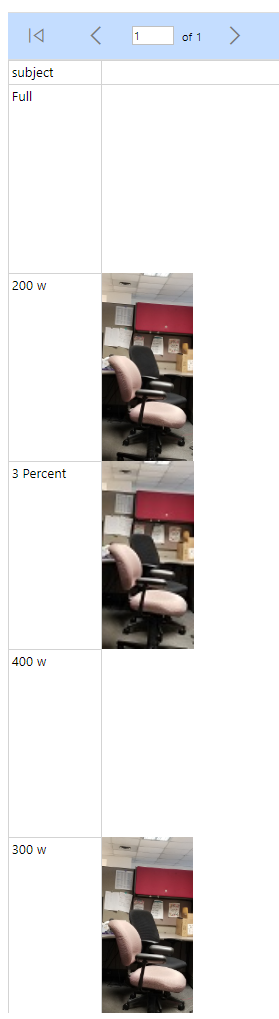
It is working fine if the attached picture size is less than 40KB. If the image size is bigger than 40/60KB, then the image is not displayed in the report. 

If I embed the bigger size image directly in the SSRS Report, then SSRS displaying the image properly. So, It looks as the problem of FetchXML returning image data partially.

Is there any return data size limit for FetchXML? 

Fetch XML used to test this.

<fetch version="1.0" output-format="xml-platform" mapping="logical" distinct="false">
  <entity name="annotation">
	<attribute name="documentbody" />
		<attribute name="mimetype" />
		<attribute name="subject" />
		<attribute name="notetext" />
		<attribute name="filename" />
		<filter type="and">
			<condition attribute="isdocument" operator="eq" value="1" />
		</filter>
    <link-entity name="account" from="accountid" to="objectid" alias="account" link-type="inner">
    <filter type="and">
      <condition attribute="name" operator="eq" value="Image Test" />
    </filter>	
    </link-entity>
  </entity>
</fetch>

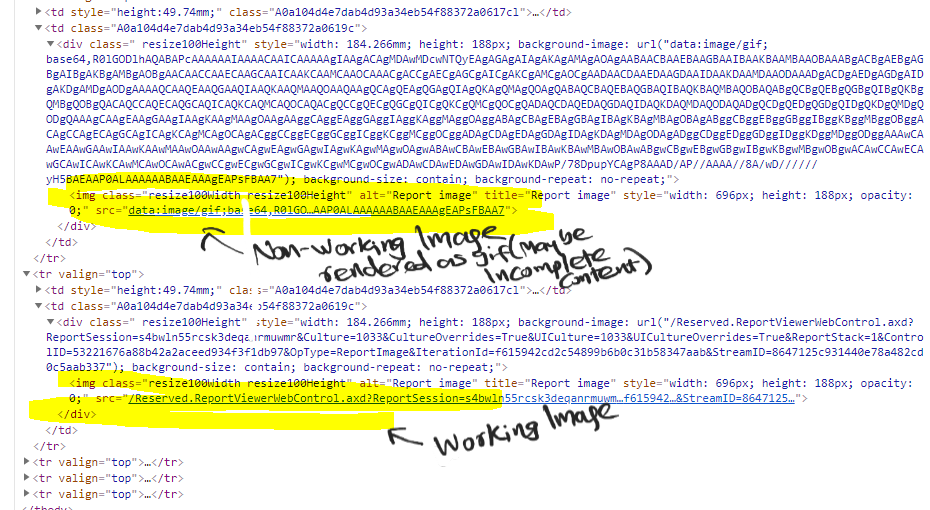
If I inspect the report window, I can find the images displayed properly having the tags with Reserved.ReportViewerWebControl.axd, but the images not displayed are having tags as <img> with gif type.
20181101_5F00_114641.png

4846.Capture2.PNG

Appreciate your inputs to resolve this issue or find workaround to display big size images attached to the Notes in Dynamics 365 Online SSRS Reports.

Note: In the Visual Studio Preview, all the images are displayed properly. Only on Dynamics 365 Online, it is not working. 

*This post is locked for comments

I have the same question (0)
  • Krystian Witoszkin Profile Picture
    on at

    Hi Alex,

    I have exactly the same problem, but the strange thing is that on version 8.2 the images were displayed correctly, it broke down in version 9.0.

    Maybe the size limit for image is smaller now? I don't know.

    Did you find any solution for that?

  • Krystian Witoszkin Profile Picture
    on at

    I didn't say one thing, I don't download images attached in Notes through fetchXml, only in the report I put a url of a picture from web application with variable guid (for example https://ftp..../WebApplication/Wykres?Guid=+<guid from fetchXml>)

    When, for example, I put a smaller picture in report (*.png from google) everything displayed correctly. So maybe the limit applies to the report itself? Each image in report should have size below ~40/60KB?

  • Suggested answer
    Raghav Chadha Profile Picture
    106 on at

    Did you find any solution for this,i am also facing this issue after v9 upgrade.

  • BarneyZA Profile Picture
    20 on at

    Hi Guys

    My team and I also have this problem currently.

    Did you guys find a solution?

  • Jarrod Williams Profile Picture
    1,747 on at

    This is likely an issue with either the RDL Sandboxing or the way that FetchXML is translated into a SQL statement.  My guess is with the later and that if you had an On Premises testing environment you would see something that limits the return string to some thousand returned characters. You could open a ticket with Support and confirm but you likely aren't going to have a lot of good workarounds for this.  PowerBI might be an option and would probably get around this.  Otherwise, within the fetchXML confines you might end up having to just keep a maximum file size for images.  

Under review

Thank you for your reply! To ensure a great experience for everyone, your content is awaiting approval by our Community Managers. Please check back later.

Helpful resources

Quick Links

Introducing the 2026 Season 1 community Super Users

Congratulations to our 2026 Super Stars!

Meet the Microsoft Dynamics 365 Contact Center Champions

We are thrilled to have these Champions in our Community!

Congratulations to the April Top 10 Community Leaders

These are the community rock stars!

Leaderboard > 🔒一 Microsoft Dynamics CRM (Archived)

Last 30 days Overall leaderboard

Featured topics

Product updates

Dynamics 365 release plans
