web
You’re offline. This is a read only version of the page.
close
Skip to main content

Announcements

News and Announcements icon
Community site session details

Community site session details

Session Id :
Small and medium business | Business Central, N...
Answered

Report Extension Layout not populating from Base Report

(0) ShareShare
ReportReport
Posted on by

Hello Experts,

As you know that Microsoft has introduced Report Extension in D365 BC 2021 wave 1 (BC 18).

For Example - I need to add one more column "Salesperson Code" in Report ID 119 (Customer - Sales List), hence i have added "Salesperson Code" through "Report Extension". Also added the RDLC Layout Property.

Below screenshot for your reference-

pastedimage1618995952093v2.png

But when i compile my Report Extension my RDLC Layout is generated and when i am opening the layout ExtendCustomerSalesList.rdl in report builder it is showing as blank Layout.
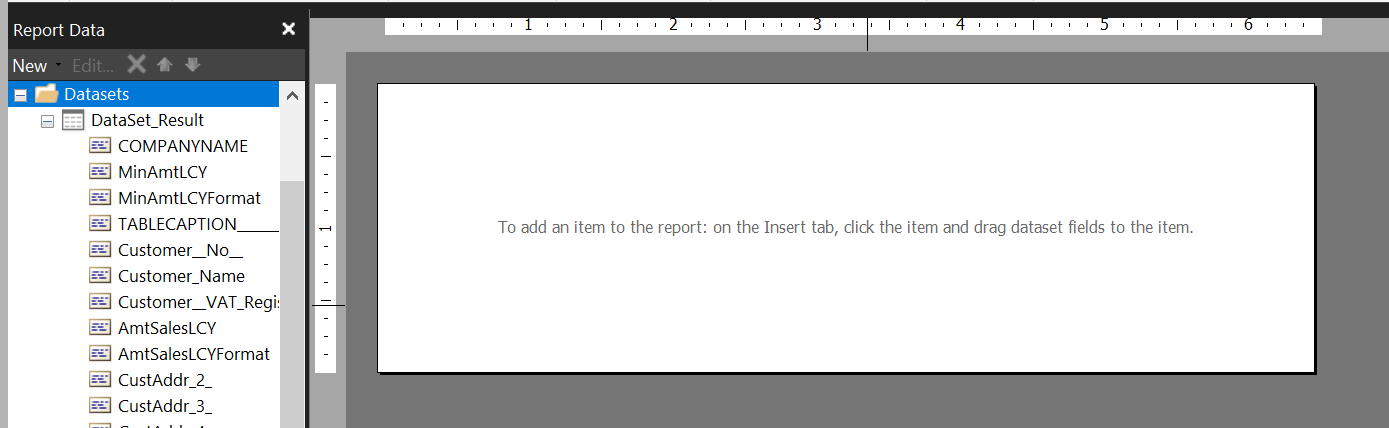
pastedimage1618996223643v3.png

Ideally it should bring the default layout of Report ID 119 (Customer - Sales List) and developer can add/modify the default layout through Report Extension.

Just want to confirm whether this is expected behavior or something i missed in my report extension?

Thanks in Advance.

I have the same question (0)
  • Verified answer
    THE Italian Profile Picture
    Microsoft Employee on at

    This is the expected behavior. You have to manually download RDL / Word layout and add it to your report extension. 

    The rationale behind this is that you might want to add a complete different RDL / Word layout and also there are private IP considerations. 

    In shorts: this is a not implemented feature. You might create an IDEA in ideas site about that Ideas (dynamics.com)

  • Community Member Profile Picture
    on at

    Hi Duilio,

    Thanks for the update.

    I have raised the idea for this on Ideas (dynamics.com)

Under review

Thank you for your reply! To ensure a great experience for everyone, your content is awaiting approval by our Community Managers. Please check back later.

Helpful resources

Quick Links

Season of Sharing Community Challenge Winners!

Congratulations to our community stars!

Women in Power Builds Momentum

Expanding mentorship, skilling, and AI innovation

Congratulations to the July Top 10 Community Leaders

These are the community rock stars!

Leaderboard > Small and medium business | Business Central, NAV, RMS

#1
OussamaSabbouh Profile Picture

OussamaSabbouh 601 Super User 2026 Season 2

#2
YUN ZHU Profile Picture

YUN ZHU 338 Super User 2026 Season 2

#3
Grigorios Mavrogeorgis Profile Picture

Grigorios Mavrogeorgis 329 Super User 2026 Season 2

Last 30 days Overall leaderboard

Featured topics

Microsoft Training Manuals

Product updates

Dynamics 365 release plans
