web
You’re offline. This is a read only version of the page.
close
Skip to main content

Announcements

No record found.

News and Announcements icon
Community site session details

Community site session details

Session Id :
Finance | Project Operations, Human Resources, ...
Unanswered

Custom SSRS reports not working after AOS Load Balancer configuration

(0) ShareShare
ReportReport
Posted on by 281

Dear All,

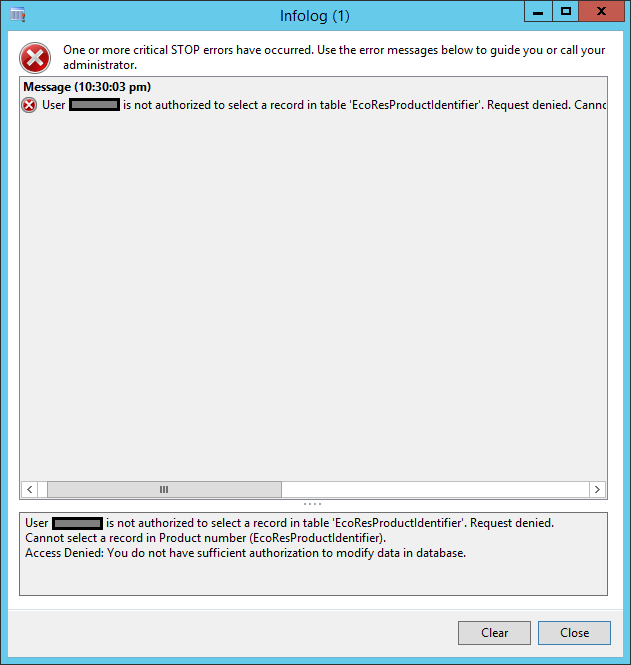
pastedimage1581960745045v1.png

I tried to search almost everywhere and couldn't find any suitable or related answer so I decided to put my query here.

I recently configured "Load Balancer" on just AOS level {(1)Dedicated Load Balancer AOS as  and (2) Active AOS's batch server} (NOT NETWORK LOAD BALANCER) and added multiple AOS pointers of SSRS. The problem is all the system reports work just fine, it opens perfectly however the custom reports which we developed are showing "Access denied" error on multiple (system/user-defined) tables/views.

I've added those tables/views in "Security/Privileges" and "Roles" under "Tables" too but no luck. Can anyone please suggest me what I'm missing here?

I have the same question (0)
  • Crispin John Augustine Profile Picture
    37,081 on at

    Just a guess, could be due to the AOS-Report server connection. Login to all the AOS servers and test report server connection with the local client.

  • Herbie @ Microsoft Profile Picture
    Microsoft Employee on at

    Rahat, if this is still an issue, have you reviewed the narrative at:  cloudblogs.microsoft.com/.../

    Otherwise, it is odd that this happens on only custom reports.  Are there additional errors that you have uncovered in the event viewer?

    I presume a review of any connection / credential use by the load balancer - is that running as a system account that does not have adequate permissions or represented in 2012?  Just a thought, but I think we need a bit more information.

Under review

Thank you for your reply! To ensure a great experience for everyone, your content is awaiting approval by our Community Managers. Please check back later.

Helpful resources

Quick Links

Introducing the 2026 Season 1 community Super Users

Congratulations to our 2026 Super Stars!

Meet the Microsoft Dynamics 365 Contact Center Champions

We are thrilled to have these Champions in our Community!

Congratulations to the March Top 10 Community Leaders

These are the community rock stars!

Leaderboard > Finance | Project Operations, Human Resources, AX, GP, SL

#1
Giorgio Bonacorsi Profile Picture

Giorgio Bonacorsi 688

#2
André Arnaud de Calavon Profile Picture

André Arnaud de Cal... 524 Super User 2026 Season 1

#3
CP04-islander Profile Picture

CP04-islander 301

Last 30 days Overall leaderboard

Product updates

Dynamics 365 release plans
