web
You’re offline. This is a read only version of the page.
close
Skip to main content

Notifications

Announcements

No record found.

Community site session details

Community site session details

Session Id :
Finance | Project Operations, Human Resources, ...
Suggested Answer

Summary trial balance report not using date interval code when running in batch

(0) ShareShare
ReportReport
Posted on by 25

Hi

When I set up the summary trial balance report to run in batch using a date interval code for yesterday it runs ok first time, but the next time it runs (tomorrow for example) its using the dates from 2 days ago, it seems that its not recognising the period code when executing in batch.

If this report is not run in batch each day it is fine.

Has anyone else experienced a similar issue and found a solution?
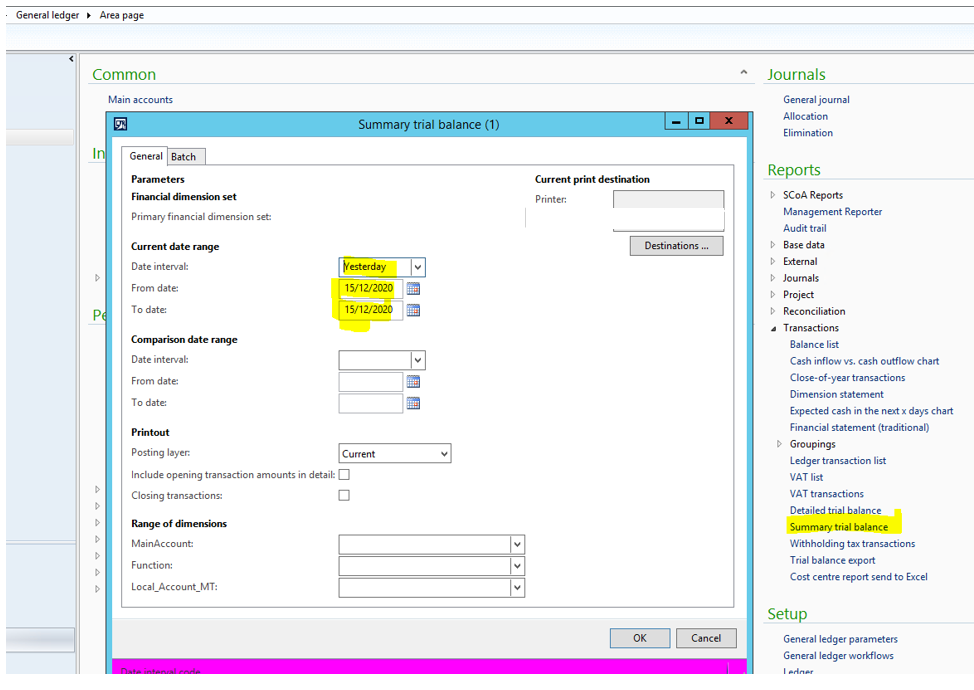
pastedimage1608131731955v1.png

Thanks

Andy

I have the same question (0)
  • Ludwig Reinhard Profile Picture
    Microsoft Employee on at

    Hello Andy,

    When does the batch job start running?

    Did you schedule it to run a specific day/time?

    Best regards,

    Ludwig

  • andrewhill4 Profile Picture
    25 on at

    Hi Ludwig

    I set this to start running from the day I create the batch job and It runs every hour and exports the data to a file (.csv), for the day the batch job is created all the exports are fine, after this the dates are wrong

    Thanks

    Andy

  • andrewhill4 Profile Picture
    25 on at

    Hi Ludwig

    I set this to start running from the day I create the batch job and It runs every hour and exports the data to a file (.csv), for the day the batch job is created all the exports are fine, after this the dates are wrong

    Thanks

    Andy

  • Suggested answer
    Ludwig Reinhard Profile Picture
    Microsoft Employee on at

    Hello Andy,

    It seems to disregard the date interval entered but rather focus on the from and to date values entered last time.

    Can you have a developer double checking this behavior?

    Might need a small modification to get things fixed.

    Best regards,

    Ludwig

  • andrewhill4 Profile Picture
    25 on at

    Hi Ludwig

    That was my next step but I was hoping that someone on here had experienced this before and had a solution.

    Many thanks for your replies

    Andy

  • Suggested answer
    Ludwig Reinhard Profile Picture
    Microsoft Employee on at

    Hi Andy,

    I had a look at LCS for available hotfixes but have not found anything. Guess the best way is thus asking a developer for some help with debugging this issue.

    Best regards,

    Ludwig

Under review

Thank you for your reply! To ensure a great experience for everyone, your content is awaiting approval by our Community Managers. Please check back later.

Helpful resources

Quick Links

Responsible AI policies

As AI tools become more common, we’re introducing a Responsible AI Use…

Neeraj Kumar – Community Spotlight

We are honored to recognize Neeraj Kumar as our Community Spotlight honoree for…

Leaderboard > Finance | Project Operations, Human Resources, AX, GP, SL

#1
Martin Dráb Profile Picture

Martin Dráb 646 Most Valuable Professional

#2
André Arnaud de Calavon Profile Picture

André Arnaud de Cal... 529 Super User 2025 Season 2

#3
Sohaib Cheema Profile Picture

Sohaib Cheema 285 User Group Leader

Last 30 days Overall leaderboard

Product updates

Dynamics 365 release plans
