web
You’re offline. This is a read only version of the page.
close
Skip to main content

Notifications

Announcements

No record found.

Community site session details

Community site session details

Session Id :
Small and medium business | Business Central, N...
Answered

Deploy app from Power Automate to Business Central

(0) ShareShare
ReportReport
Posted on by 42

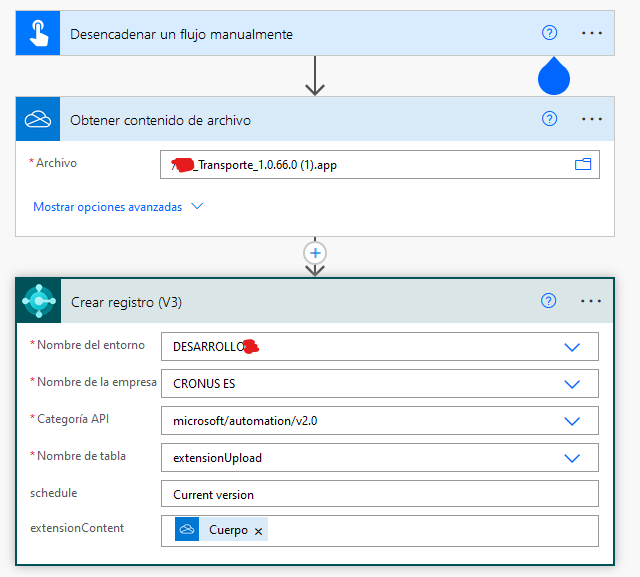
I have the following flow in Power Automate but it doesn't work. I have an .app saved in OneDrive and I want to deploy it to Business Central with Power Automate:
pastedimage1653824999607v3.png

  1. First step is Manual trigger
  2. Second step is Get content file from OneDrive
  3. Last step is Create record in BC through Microsoft Automation API with content file of second step

That flow doesn't work. It throws an error saying: ErrorCode: BadRequest  Invalid Request Body

What I am doing wrong? Is this expected to work and this is a bug?

I have the same question (0)
  • Suggested answer
    YUN ZHU Profile Picture
    95,331 Super User 2025 Season 2 on at

    Hi, Although I haven't tested it in detail, I think the third trigger should not use Create Record, it should use Execute action.

    Hope this can give you some inspiration.

    pastedimage1653877212235v1.png

    Thanks.

    ZHU

  • Sergio G Profile Picture
    42 on at

    Thank you for your answer Yun, but I already tested Execute action and you cannot attach a file, it only asks for systemid:

    pastedimage1653890994002v1.png

  • Suggested answer
    JAngle Profile Picture
    133 on at

    I’d try it with the http connector instead. Different scenario but I had to use that for passing pdf email attachments. BC connector just kept throwing an error. Asked MSFT about it on Yammer and got nothing back.

    joshanglesea.wordpress.com/.../

    For oauth2 authentication with the http connector in PA, you can follow this blog: joshanglesea.wordpress.com/.../

  • Sergio G Profile Picture
    42 on at

    Of course that with HTTP connector that would work, the thing is that I want to skip OAuth2 step using directly the BC connector. I think that my question should be considered as a bug if no one can use it :/

  • Suggested answer
    YUN ZHU Profile Picture
    95,331 Super User 2025 Season 2 on at

    Hi, thanks for the feedback, I tried it and it does not work......
    I suspect that the automation APIs provided by Microsoft do not support the currently released trigger in Power Automate.

    More details about automation APIs:

    https://docs.microsoft.com/en-us/dynamics365/business-central/dev-itpro/administration/itpro-introduction-to-automation-apis#upload-extension-file

    pastedimage1653895250168v1.png

    And as you know, HTTP connector should work but requires authentication.

    I have tried to install AppSource Apps via Admin Center API before. Hope this gives you some inspiration too.

    https://yzhums.com/12259/

    In additional, we can use bound actions in Power Automate. But I'm not sure if the action of uploading the extension can be customized.

    More details: https://yzhums.com/20111/

    And if you think this is a bug, you can try submitting a service request to MS.

    Hope this helps as well.

    Thanks.

    ZHU

  • Verified answer
    Sergio G Profile Picture
    42 on at

    I contacted Microsoft and this is what they have said to me:

    We have identified the issue about the extension content is a BLOB. Currently, our connector does not support editing of BLOBs

    We heard this feedback multiple times and we prioritized it accordingly, so the good news is that this will be fixed in the coming months, although we do not have a precise ETA to share yet.

    An potential workaround will be use a direct HTTP call, or a custom connector

  • Verified answer
    Marco Mels Profile Picture
    on at

    Thank you for sharing final outcome.

Under review

Thank you for your reply! To ensure a great experience for everyone, your content is awaiting approval by our Community Managers. Please check back later.

Helpful resources

Quick Links

Responsible AI policies

As AI tools become more common, we’re introducing a Responsible AI Use…

Neeraj Kumar – Community Spotlight

We are honored to recognize Neeraj Kumar as our Community Spotlight honoree for…

Leaderboard > Small and medium business | Business Central, NAV, RMS

#1
OussamaSabbouh Profile Picture

OussamaSabbouh 3,143

#2
Jainam M. Kothari Profile Picture

Jainam M. Kothari 1,694 Super User 2025 Season 2

#3
YUN ZHU Profile Picture

YUN ZHU 1,067 Super User 2025 Season 2

Last 30 days Overall leaderboard

Featured topics

Product updates

Dynamics 365 release plans
