web
You’re offline. This is a read only version of the page.
close
Skip to main content

Notifications

Announcements

No record found.

Community site session details

Community site session details

Session Id :
Microsoft Dynamics CRM (Archived)

Opportunity close window

(0) ShareShare
ReportReport
Posted on by

Hi Guys,

This may have been asked before but I cant find the answer to this. I have CRM Online. I want to be able to report on the fields within the opportunity close window when closed as lost.
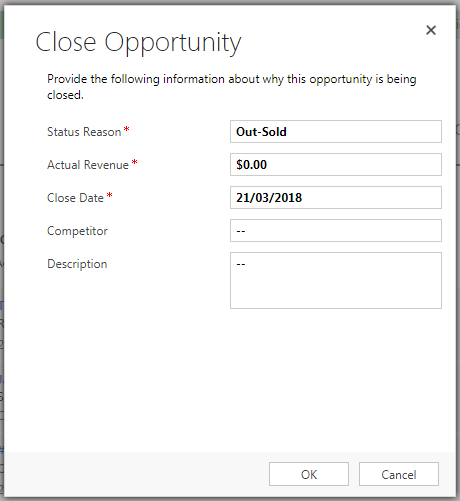
ice_5F00_screenshot_5F00_20180321_2D00_092707.png

Is there a standard report that I can use to get the above fields on a view? I need to be able to report firstly which sales people have not been populating this area and secondly what information has been populated.

Thanks in advance for your help.

*This post is locked for comments

I have the same question (0)
  • Suggested answer
    Michel van den Brink Profile Picture
    4,697 on at

    Hello,

    You can include these fields in an Advanced Find query to see their values.

    1. Open Advanced Find
    2. Select the 'Activity' entity
    3. In the query area, enter the search criteria Activity Type Equals 'Opportunity Close'
      dyncomm_5F00_mindsunited_5F00_opptyclose2.png
    4. Also add the 'Regarding (Opportunity)' relation so you can filter for only Lost Opportunitites
      dyncomm_5F00_mindsunited_5F00_opptyclose2.png
    5. Click 'Edit Columns' to add the columns you want

      7288.dyncomm_5F00_mindsunited_5F00_editcolumns.png
    6. In the popup click 'Add Columns' on the right to pick which ones you want to add
    7. Click the red exclamation mark 'Results' to run your query
  • Community Member Profile Picture
    on at

    Hi Michel, Thanks for the quick response on this.

    Ive got all the fields on my report bar the Competitor field and Description. When I add the description field it pulls in the description and Competitor from the Opportunity level, not the Opportunity Close window. Is there a way around this? I just know my sales team will only populate these fields on the close pop up window.

  • Suggested answer
    Michel van den Brink Profile Picture
    4,697 on at

    Yes there is, I updated my original post to reflect this.

    You are looking for the 'Activity' records of 'Activity Type' 'Opportunity Close'

    2671.dyncomm_5F00_mindsunited_5F00_opptyclose2.png

  • Community Member Profile Picture
    on at

    Thanks again Michel, this is a massive help. Im going to try and create this and if I cant get it to work I might contact you again. Thanks again from Ireland... Jason

  • Michel van den Brink Profile Picture
    4,697 on at

    Any time, Jason. Here to help! :-)

  • Community Member Profile Picture
    on at

    Hi Michel, your posts have been super helpful. I have managed to create a report showing the 5 of the 4 fields within the Opportunity Close window. The one I am missing is Competitor!! When adding a column to to the report, where can I find the competitor field to add to the report??

  • Suggested answer
    Michel van den Brink Profile Picture
    4,697 on at

    Hey jase450,

    In a regular view (like Advanced Find) that would be tough, because you'd need to display a column from the specialized 'Opportunity Close' entity, which is unfortunately not supported out-of-the-box.


    As an alternative to regular views, you could create a Report with the reporting wizard to show this field, because in the report wizard you can at least select the 'Opportunity Close' entity.

    Take a look at this related question and answer where you'll find how to create such a report:

    https://social.microsoft.com/Forums/en-US/9b14413d-adaa-4788-ad44-c1b22ac96683/how-to-display-opportunity-close-form-fields-in-different-views-or-reports?forum=crm

  • Community Member Profile Picture
    on at

    Thanks again for all of your help Michel on this.

Under review

Thank you for your reply! To ensure a great experience for everyone, your content is awaiting approval by our Community Managers. Please check back later.

Helpful resources

Quick Links

Responsible AI policies

As AI tools become more common, we’re introducing a Responsible AI Use…

Neeraj Kumar – Community Spotlight

We are honored to recognize Neeraj Kumar as our Community Spotlight honoree for…

Leaderboard > 🔒一 Microsoft Dynamics CRM (Archived)

#1
SA-08121319-0 Profile Picture

SA-08121319-0 4

#1
Calum MacFarlane Profile Picture

Calum MacFarlane 4

#3
Alex Fun Wei Jie Profile Picture

Alex Fun Wei Jie 2

Last 30 days Overall leaderboard

Featured topics

Product updates

Dynamics 365 release plans



