web
You’re offline. This is a read only version of the page.
close
Skip to main content

Notifications

Announcements

No record found.

Community site session details

Community site session details

Session Id :
Small and medium business | Business Central, N...
Suggested Answer

Editing only 1 Table Data Permission

(0) ShareShare
ReportReport
Posted on by 260

Greetings to all of you!


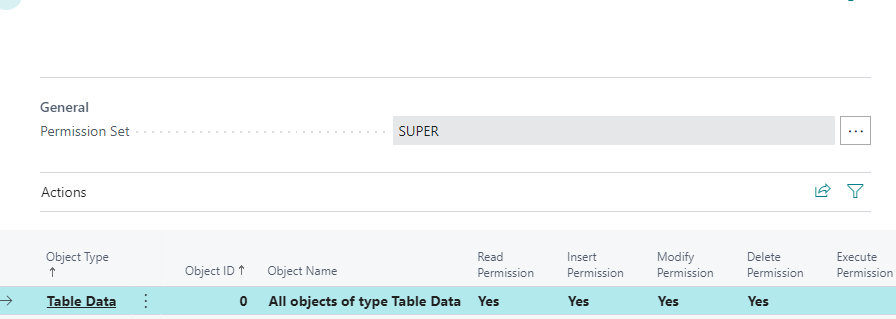
I have a user of mine who is granted with the SUPER Permission set.

Due to that , he has Object ID 0 , on tabledata.
pastedimage1663568368220v1.png

I need to restrict the instert and modify permission of this user, on a single tabledata ( to be precise, the sales price tabledata).

I tried doing that by copying the super permission set. However, as far as i know , the below setup , won't restrict the user from inserting data to the table.

pastedimage1663570099592v1.png

So , which is the best way to achieve my goal?

Thank you all in advance.

With respect,

Antonis

I have the same question (0)
  • Pushparaj Profile Picture
    on at

    Hi,

    When you Give user a Super Permission, It means the user can delete, insert, modify any data in any table.

    So If you want to Restrict him , You Should Remove The Super Permission From him.

  • AntonisK Profile Picture
    260 on at

    But,  if i do so , then i need to go manually , and add the insert/modify/delete permission , to each end every tabledata that the user interacts with. Right?

    If that's the case, this is really time consuming , considering that i only need to restrict the permissions in a single tabledata..

  • Suggested answer
    Amit Baru Profile Picture
    3,037 on at

    Hi,

    Do one thing, Create One Permission and assigned new permission set in the next line, means after the super permission.

    Regards

    Amit Sharma

    www.erpconsultors.com

  • AntonisK Profile Picture
    260 on at

    Let me see if i understand what you are saying.

    So , i created , a new permission set. I added there , only the tabledata for sales price and removed the insert/modify/delete permission.

    Then i assign this permission set to the needed user , who now , has both this permission set and the super permission set.

    The result are the ones below :

    https://prnt.sc/SRBPf1WESq6p

    As far as i know , if the one permission enables the user, and the other one restricts the user, in the end , the user , has the permissions to perform the action.

    Due to that , the result is not the desired one.

  • Pushparaj P Profile Picture
    205 on at

    Hi,

    You Don't Have to Add All Table data Permission Manually, Instead You Can Use Permission Set Or User Group.

    Then You Can Remove the Super Permission and Modify the Mentioned Table Data Permission As You want.

Under review

Thank you for your reply! To ensure a great experience for everyone, your content is awaiting approval by our Community Managers. Please check back later.

Helpful resources

Quick Links

Responsible AI policies

As AI tools become more common, we’re introducing a Responsible AI Use…

Neeraj Kumar – Community Spotlight

We are honored to recognize Neeraj Kumar as our Community Spotlight honoree for…

Leaderboard > Small and medium business | Business Central, NAV, RMS

#1
OussamaSabbouh Profile Picture

OussamaSabbouh 3,151

#2
Jainam M. Kothari Profile Picture

Jainam M. Kothari 1,443 Super User 2025 Season 2

#3
YUN ZHU Profile Picture

YUN ZHU 1,092 Super User 2025 Season 2

Last 30 days Overall leaderboard

Featured topics

Product updates

Dynamics 365 release plans
