web
You’re offline. This is a read only version of the page.
close
Skip to main content

Announcements

No record found.

News and Announcements icon
Community site session details

Community site session details

Session Id :
Microsoft Dynamics AX (Archived)

Update label value through x++ code

(0) ShareShare
ReportReport
Posted on by 1,264

Hello community, 

I am trying to update values for labels through code like this:

SysModelElementLabel.Text = 'zzzzz';

SysModelElementLabel.update();

I am unable to execute the update statement, the following error is raised
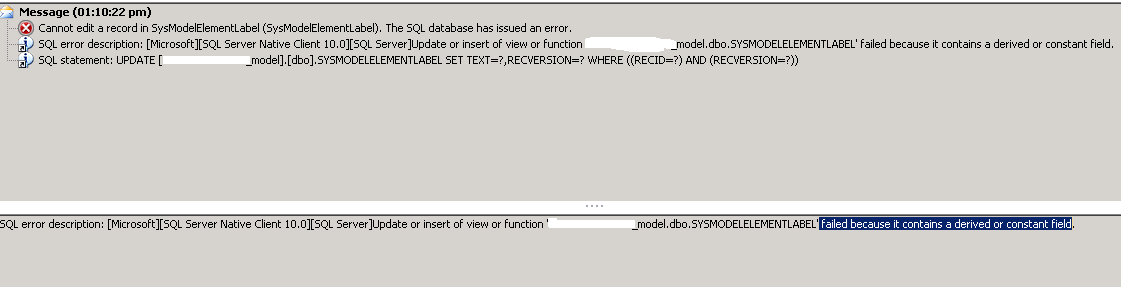


error-when-update.png

Might you please helping me solving this issue?

kind regards,

Jihane

*This post is locked for comments

I have the same question (0)
  • Verified answer
    Sohaib Cheema Profile Picture
    49,664 Super User 2026 Season 1 on at

    Directly writing update() statements are not useful in some cases, when it comes to AX Development.

    Here you go, that must be done by using Existing framework

  • jihane Profile Picture
    1,264 on at

    Thank you Sohaib, It is working :).

    kind regards

  • Suggested answer
    Bashir Ahmad Profile Picture
    5,248 on at

    here is the code example:

    community.dynamics.com/.../149821

  • Sohaib Cheema Profile Picture
    49,664 Super User 2026 Season 1 on at

    @Bashir

    The example would work only if you provide a fix TreeNode. It cannot work if I want to use it generically, by just Passing Label ID; The example forces me to provide a TreeNode.

    if I want to change a label which is being used somehwre inside code in any class method,   I cannot pass treeNode for specific Line of code. That makes it hard-coded kind of approach

  • jihane Profile Picture
    1,264 on at

    thank you Bashir for your replay,

    I am updating labels from an excel file, based on the LabelID.

    With the treeNode instruction, i need to provide a fixed object name accessible from AOT.

    In my case, i am using this process for any object, generally

Under review

Thank you for your reply! To ensure a great experience for everyone, your content is awaiting approval by our Community Managers. Please check back later.

Helpful resources

Quick Links

Introducing the 2026 Season 1 community Super Users

Congratulations to our 2026 Super Stars!

Meet the Microsoft Dynamics 365 Contact Center Champions

We are thrilled to have these Champions in our Community!

Congratulations to the April Top 10 Community Leaders

These are the community rock stars!

Leaderboard > 🔒一 Microsoft Dynamics AX (Archived)

#1
CP04-islander Profile Picture

CP04-islander 24

#2
Michel ROY Profile Picture

Michel ROY 14

#3
Jagadabi Profile Picture

Jagadabi 6

Last 30 days Overall leaderboard

Featured topics

Product updates

Dynamics 365 release plans
