Any assistance or guidance would be greatly appreciated. For the sake of being expedient, I have simplified the environment in this example so that we can deal only with the problem and the immediate components that impact it.
I have a CRM form named Test License. The Form connects back to the Test License entity.
The form has five text box fields in our example. We will call them 1, 2, 3, A, and L as shown in the image below.
Three of the five text box fields, labeled as 1, 2, and 3 will always populated with data. The data present is entirely dependent on what the user selects when they choose to create a new License and open this form.
Field A, gets its data via a managed plugin that auto increments when the user clicks the save button. So Field A gets its value when save is clicked.
The last field, field L, must be filed with data that is concatenated from the other 4 fields, and it must be placed in the 5th field after the managed plug in populates field A, but before the save process ends.

Normally, I would use JavaScript to simply check the values of field 1, 2, A, and 3 concatenate them, and then set them in field L.
However, I cannot do this because as per the design of CRM 2011, once the “save button is clicked” JavaScript no longer functions and fields can no longer be accessed via front end scripting.
If it could, I have a perfect script that would work. Prior to implementing it, I removed the CRM “save and close” as well as the “save and new” button because the script requires part of the changes to be made on form load, and the form must save and reload to set the permanent value in fieldL. So by forcing the end user to hit the save button, the that would force a form load, and run the script below, which would update the final field now that we can access the form again to grab the data put there by the auto-number.
Here was my original plan:
-
User chooses to create a new record
-
User enters their data
-
User clicks the save button, which stops all of my JavaScript code from running.
-
The 3rd party auto-number plugin fires and inserts the value into the fieldA field.
-
The save process completes, and the form reloads by design.
-
Then on Form Load, the following script executes to update the FieldL filed, (which currently has a temporary value just so it could be saved in the previous step) with the real value via the following JavaScript code.
function GenerateLicenseID(){
//field1 – will always contain a G or B value
//field2 – will always two digit license year
//field3 – will either contain letters and/or numbers or be null
//fieldA - the portion of the id number generated by the auto incrementing managed plugin – will always be populated via the 3rd party plugin solution once the save button is pressed.
//fieldL – destination where the final number must be copied to, final number is a concatenated combination of all the other fields
//fieldX – a two value radio button that must get set to yes once all five of these fields are properly populated
var fld1test = Xrm.Page.getAttribute("field1").getValue();
var fldXtext = Xrm.Page.getAttribute("fieldX").getValue();
var fld3test = Xrm.Page.getAttribute("field3").getValue();
if  (fldXtest == true) {SetAllLicenseFieldsDisabled(); return;}
else if (((fld1test ^= 'G') || (fld1test ^= 'B')) && ((fldXtest == null) || (fldXtest == false) || (fldxtest == 0)) && (fld3test == null)) {
var fld1 = Xrm.Page.getAttribute("field1").getValue();
var fld2 = Xrm.Page.getAttribute("field2").getValue();
var fld3 = Xrm.Page.getAttribute("field3").getValue();
var fldA = Xrm.Page.getAttribute("fieldA").getValue();
var fldL = Xrm.Page.getAttribute("fieldL").getValue();
var destination = field1 + "-" + field2 + "-"+ fieldA;
Xrm.Page.getAttribute("fieldL”).setValue(destination);
Xrm.Page.getAttribute("fieldX").setValue(true)
Xrm.Page.data.entity.save();
return;}
else if (((fld1test ^= 'G') || (fld1test ^= 'B')) && ((fldXtest == null) || (fldXtest == false) || (fldxtest == 0)) && (fld3test != null)) {
          var destination1 = field1 + "-" + field2 + "-" + field3 + "-" + fieldA;
          Xrm.Page.getAttribute("fieldL”).setValue(destination1);
          Xrm.Page.getAttribute("fieldX").setValue(true);
          Xrm.Page.data.entity.save();
                            return;}
}
This scenario would have worked perfectly if it were possible.
Unfortunately, when the form reloads immediately after hitting the save button, I get the error “Can’t execute code from a freed script”. And clicking to debug shows code on the main CRM page, which isn’t something I have control over with the Jscript.
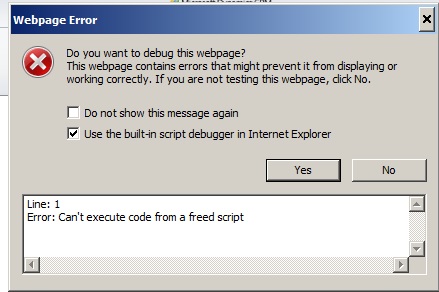
If the user does a save and close. And then opens the record from a closed state, this error doesn’t appear, but that usage scenario is not acceptable.
As a looked in to the problem, I found that other folks encountered similar issues calling Xrm.Page.data.entity.save(); on form load, but their work around was always to set a timeout value.
Therefore, I put the save command in a function
function CustomSave(){
Xrm.Page.data.entity.save(); }
Then I called that function with a time out as shown below, and tried time out values of 4000, then 6000, then 12,000 and no luck, same error shown above)
setTimeout(CustomSave(),6000)
I also tried the whole parent.Xrm.Page.data.entity.save(); thing after setting isDirty to true as some suggested, but that didn’t work either.
Unfortunately I am now out of time, and need this solved yesterday. So it seems based on everything I have read, that I am forced to use a plugin.
With that being said, the new order of operations must flow like this:
-
User chooses to create a new record
-
User enters their data
-
User clicks the save button, or save and close button, or save and new button, which stops all of my JavaScript code from running.
-
The 3rd party auto-number plugin fires and inserts the value into the fieldA field.
-
My plugin must fire, and execute code that does the C# equivalent of the JavaScript code in the function GenerateLicenseID above:
-
The save process completes.
-
The user moves on to do whatever they were planning to do next.
I never made a plug in before and I am coming at this knowing how to open visual studio, create a plugin project, and connect to CRM. Everything after that, is new.
I am not concerned about plug in registration and all the configuration particulars I can figure those out.
My concern is, however, threefold:
-
What options do I select when I create the plug in, so that when the plug in runs, it runs after the 3rd party plug in completes its data insert process in step 4, that runs once the user hits save, but is able to select and copy the values form the form before the save process actually completes?

-
What C# code must I actually write inside of the plugin so that the plugin will copy the values from the other fields, then concatenate them as I need it to, then set the concatenated value into the fieldL field as described above? The JavaScript code is pretty simple, but not having wrote anything in C#, I need some help “converting” or at least understanding where the code needs to go, and how to write it as close to the JavaScript code as is possible so I can actually understand what it’s doing when I see it.
-
What is a good mechanism to debug it? And troubleshoot it.
I already watched some of the videos here about how to make plug-ins
https://www.youtube.com/watch?v=rnQqxSO-WHQ
https://www.youtube.com/watch?v=TGX1zMMu4Uw
But when I do exactly what they do, I am left with an error that I cannot figure out how to get past.
Error 22 Error registering plugins and/or workflows. Plug-in assembly does not contain the required types or assembly content cannot be updated. C:\Program Files (x86)\MSBuild\Microsoft\CRM\Microsoft.CrmDeveloperTools.12.targets 176 4 CrmPackage

If anyone can provide some insight specific to the situation described above, that would be greatly appreciated.







