web
You’re offline. This is a read only version of the page.
close
Skip to main content

Notifications

Announcements

No record found.

Community site session details

Community site session details

Session Id :
Microsoft Dynamics CRM (Archived)

Create View Using Dynamic Field Entries

(0) ShareShare
ReportReport
Posted on by

Hello;

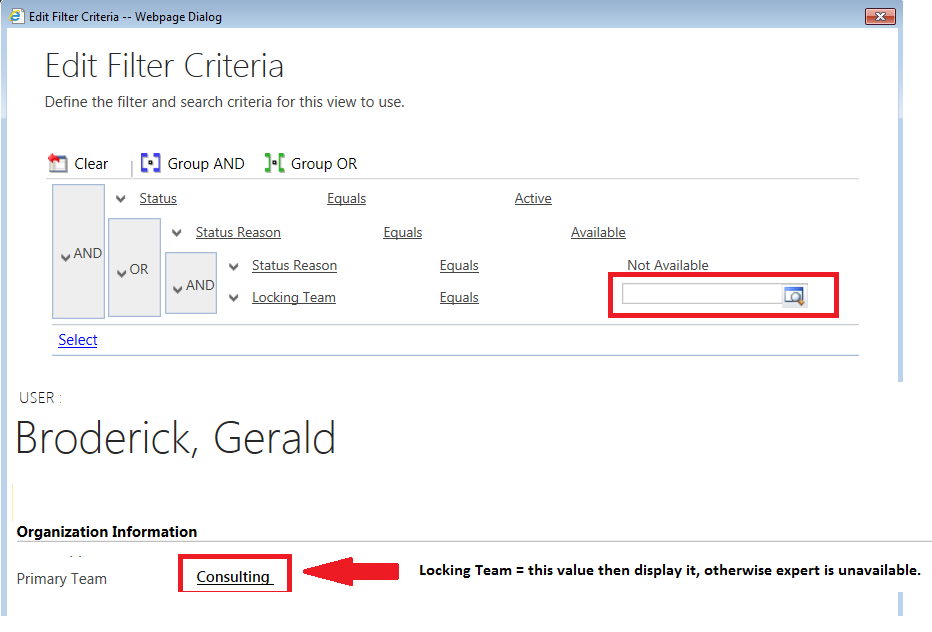
I've run into an issue with the custom View system in CRM that is causing me some issues.  I need to create a view based on 2 static choices and one dynamic choice, that is based on a field that is on the profile of the user that is looking at the view.  I created a screenshot/diagram that shows what I am trying to create and attached it to this question.

The problem that I am running into is that every value on the filter is static, I have to select them when I am creating the filter, but I want one of them to be dynamic, and based on the user viewing the table.

Is there a way to accomplish this, or is there a different way of hiding/showing the values in a table based on a few fields.

What we have set up is a system so that a pool of Experts is only available to one group within the system at a time, and this was requested by the various groups, as well as management and cannot be changed.  Originally the experts were locked to one project at a time, and this was easy I just had to have the only available experts have the available Status Reason, but now with them only being available to one team at a time, that changes things and I am not sure how to accomplish this.

Any help you can provide would be appreciated.

Thanks

Gerry BroderickAvailable_5F00_Filter.png
*This post is locked for comments

I have the same question (0)
  • Verified answer
    Nadeeja Bomiriya Profile Picture
    6,804 on at

    Hi Gerry,

    You could write a plugin that runs on RetrieveMultiple and manipulate the data before display.

  • Verified answer
    Inogic Profile Picture
    709 on at

    There is no OOB way to achieve this. So you may either go for the Plugin as mentioned above.

    Or if you want you may create a custom grid using scripts and add it on the DashBoard and display the data.

    Hope this helps.

    Thanks!

Under review

Thank you for your reply! To ensure a great experience for everyone, your content is awaiting approval by our Community Managers. Please check back later.

Helpful resources

Quick Links

Responsible AI policies

As AI tools become more common, we’re introducing a Responsible AI Use…

Neeraj Kumar – Community Spotlight

We are honored to recognize Neeraj Kumar as our Community Spotlight honoree for…

Leaderboard > 🔒一 Microsoft Dynamics CRM (Archived)

#1
SA-08121319-0 Profile Picture

SA-08121319-0 4

#1
Calum MacFarlane Profile Picture

Calum MacFarlane 4

#3
Alex Fun Wei Jie Profile Picture

Alex Fun Wei Jie 2

Last 30 days Overall leaderboard

Featured topics

Product updates

Dynamics 365 release plans



