web
You’re offline. This is a read only version of the page.
close
Skip to main content

Notifications

Announcements

No record found.

Community site session details

Community site session details

Session Id :
Customer experience | Sales, Customer Insights,...
Answered

Inline Editing the grids in Product Line

(0) ShareShare
ReportReport
Posted on by 25

Hi All,

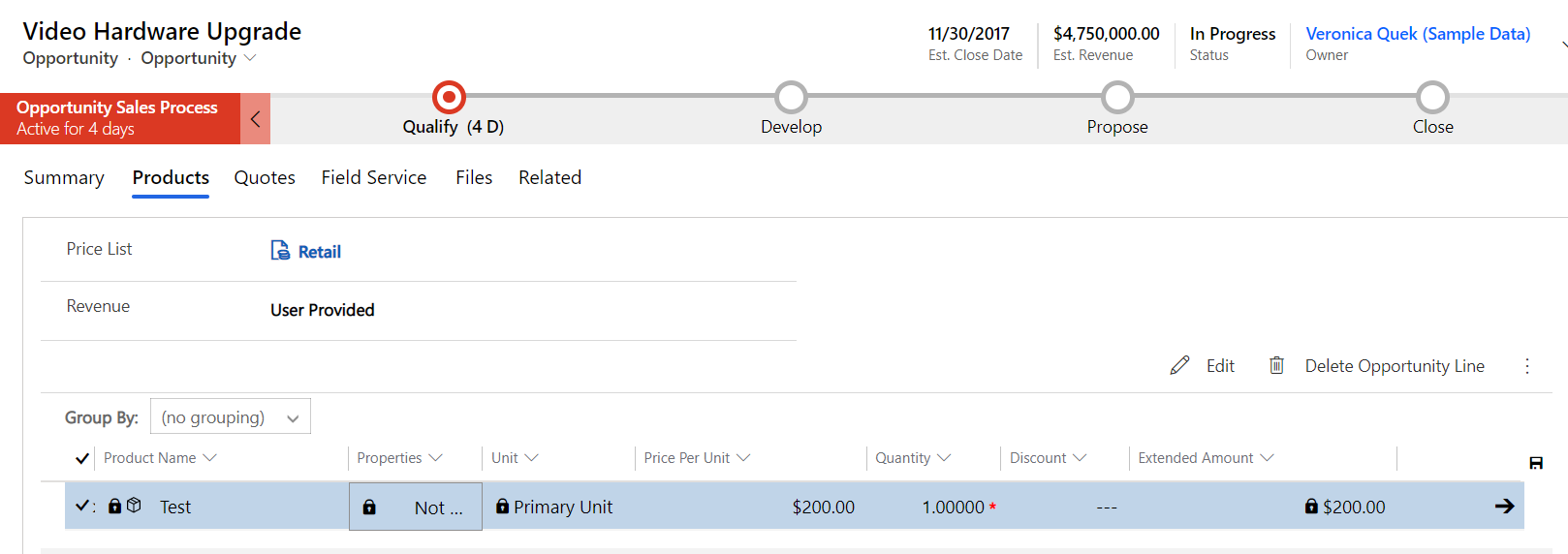
Could anyone explain how to make the grids editable inline? 
pastedimage1604699438491v1.png

Also, what fields are editable and which are not?

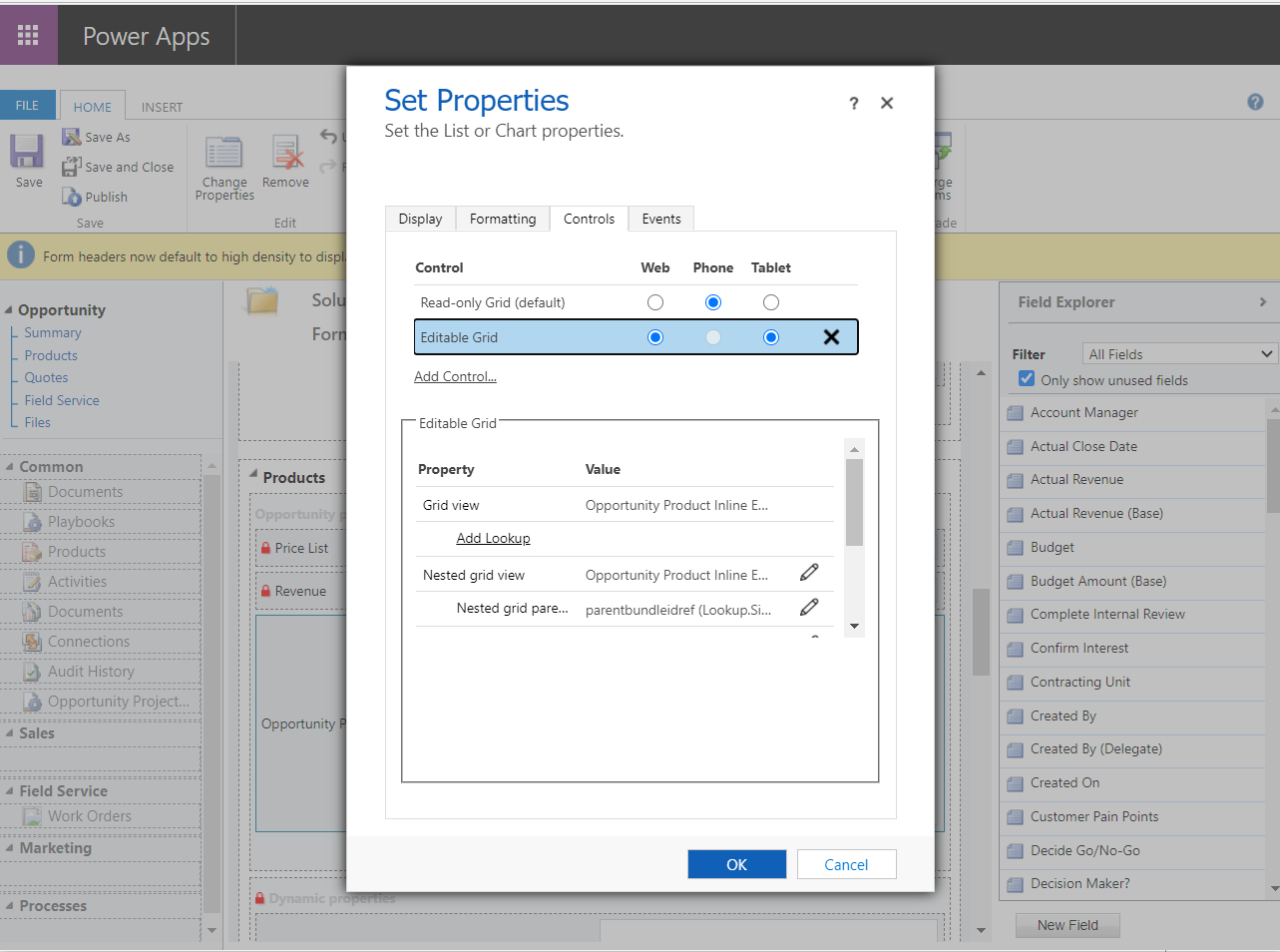
I have tried adding the Editable grid in Controls under Opportunity Products in Opportunity Form in the Entity in Default solution. Didn't work.
pastedimage1604699612612v2.png

And yes, before you ask, I did save and publish the customization

Help is much appreciated.

Thanks in advance!

LD.

I have the same question (0)
  • Suggested answer
    Bipin D365 Profile Picture
    28,983 Moderator on at

    Hi,

    Your grid is already Editable. You see Group by option which is only visible when you enable editable grid. Read only grid will not have group by option available.

    To edit any fields on editable grid, you will have to click on cell data.

    CQ71.PNG

    Please mark my answer verified if i were helpful

  • Verified answer
    LuHao Profile Picture
    40,892 on at

    Hi partner,

    1. Your first screenshot shows that you have enabled the editable grid control for the Opportunity Line sub-grid.

    To distinguish whether the current sub-grid is editable, just observe whether the cell is editable or locked when you click any field in the sub-grid record.

    pastedimage1604905853198v1.png

    In addition, if you want to switch between editable and read-only sub-grid, just click ··· and select Shown As > "Read Only" or "Editable Grid". (Provided that you have enabled the editable grid control.)

    pastedimage1604905981446v2.png    pastedimage1604905996391v3.png

    2. Your second screenshot shows that your configuration is correct. You can check whether the form you edited and the form you viewed are the same. Also, please clear your browser cache.

    3. Not all types of fields are editable in the editable grid. The following data types aren't editable in editable grids:

    • Customer and Partylist Lookup fields;
    • Composite (address) fields;
    • State/Status fields;
    • Lookup entity-related fields (for example, the Account entity includes a contact lookup, where the Contact field is editable but the EmailAdress(Contact) field is not editable).
    • Composite fields
    • Field Level Secure fields (if your field security profile prevents you from editing the field)

    Reference: https://docs.microsoft.com/en-us/dynamics365/customerengagement/on-premises/customize/make-grids-lists-editable-custom-control#data-types-that-arent-editable-in-an-editable-grid

    https://community.dynamics.com/crm/b/sonomapartners/posts/dynamics-365-editable-grids

  • LearnDynamics Profile Picture
    25 on at

    Hi Bipin,

    Thank you for taking the time and answering.

    By default, some fields are editable after I customized a bit. Still, a few fields are locked. So, I wasn't sure why or whether I messed up something.

    LD.

  • LearnDynamics Profile Picture
    25 on at

    Hi Lu,

    Thank you for taking the time and coming to my rescue!

    I was sure that I configured correctly from what I remember! Still, a few fields are locked. So I surely thought I messed up some configurations.

    But your answer explains it all!

    I wasn't aware that not all fields are editable in inline editing and your reference docs helps. Thank you :)

    LD.

  • LuHao Profile Picture
    40,892 on at

    Hi partner,

    Glad it helped.

    Please click Yes under "Did this answer your question?" to close this thread. Thanks.

Under review

Thank you for your reply! To ensure a great experience for everyone, your content is awaiting approval by our Community Managers. Please check back later.

Helpful resources

Quick Links

Responsible AI policies

As AI tools become more common, we’re introducing a Responsible AI Use…

Neeraj Kumar – Community Spotlight

We are honored to recognize Neeraj Kumar as our Community Spotlight honoree for…

Leaderboard > Customer experience | Sales, Customer Insights, CRM

#1
Tom_Gioielli Profile Picture

Tom_Gioielli 70 Super User 2025 Season 2

#2
Gerardo Rentería García Profile Picture

Gerardo Rentería Ga... 33 Most Valuable Professional

#3
Daniyal Khaleel Profile Picture

Daniyal Khaleel 32 Most Valuable Professional

Last 30 days Overall leaderboard

Product updates

Dynamics 365 release plans
