web
You’re offline. This is a read only version of the page.
close
Skip to main content

Announcements

No record found.

News and Announcements icon
Community site session details

Community site session details

Session Id :
Microsoft Dynamics AX (Archived)

SSRS Repeat Column Header, Cannot select All static

(0) ShareShare
ReportReport
Posted on by 1,214

Hi. I'd like to repeatedly display the column header in every page. 

I tried using the advanced mode and setting the RepeatOnNewPage property.
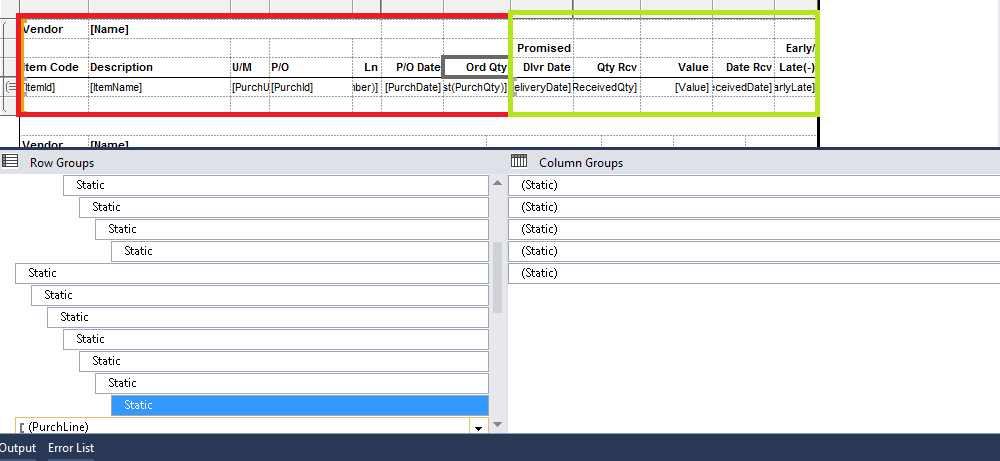
tablix.png

The problem is, I can only select the statics for textboxes in red zone. When I select the text boxes in the green zone, there's no static for them and hence I cannot change the property. The five statics inside Column Groups are only the empty text boxes at the top of green area.

So when I deploy the report I got this error:


The tablix 'Tablix1' has an invalid TablixMember. The TablixMember must have the same value set for the RepeatOnNewPage property as those following or preceding the dynamic TablixMember. (Expected Value: "True"; Actual Value: "False") 


What should I do?

Thank You.

*This post is locked for comments

I have the same question (0)
  • HAIRUL HAZRI Profile Picture
    1,214 on at

    Hi Crispin,

    Sorry I don't understand what do you mean. Aren't the columns and rows in a tablix are all text boxes?

    By the way, this tablix is in the report body. There's another tablix like this in the body, so that makes it two tablixes. So I couldn't possibly put this tablix header in the report header right?

    Regards,

    Hairul

  • Verified answer
    HAIRUL HAZRI Profile Picture
    1,214 on at

    I fixed this issue by:

    1. Setting the Tablix Row Headers Properties. I ticked the "Repeat header rows on each page" option.

    2. Then I set the statics "KeepWithGroup" and "RepeatOnNewPage "properties.

    KeepWithGroup = After

    RepeatOnNewPage  = True

    Cheers.

Under review

Thank you for your reply! To ensure a great experience for everyone, your content is awaiting approval by our Community Managers. Please check back later.

Helpful resources

Quick Links

Introducing the 2026 Season 1 community Super Users

Congratulations to our 2026 Super Stars!

Meet the Microsoft Dynamics 365 Contact Center Champions

We are thrilled to have these Champions in our Community!

Congratulations to the March Top 10 Community Leaders

These are the community rock stars!

Leaderboard > 🔒一 Microsoft Dynamics AX (Archived)

#1
CP04-islander Profile Picture

CP04-islander 26

#2
imran ul haq Profile Picture

imran ul haq 8

#3
André Arnaud de Calavon Profile Picture

André Arnaud de Cal... 4 Super User 2026 Season 1

Last 30 days Overall leaderboard

Featured topics

Product updates

Dynamics 365 release plans
