web
You’re offline. This is a read only version of the page.
close
Skip to main content

Notifications

Announcements

No record found.

Community site session details

Community site session details

Session Id :
Finance | Project Operations, Human Resources, ...
Answered

No General Ledger journal header Post button for user

(0) ShareShare
ReportReport
Posted on by 67

We have a user in D365 who has been assigned the following standard roles.  

Accountant

Accounting Supervisor

Accounting Manager

For all organisations in our instance.  After this user created a normal GL journal and had it approved, the expectation was that they would be able to "Post it to the ledger.  However, when trying to do so, the GL  journal cannot be posted by the user.  This is their view where there is no Post button.  
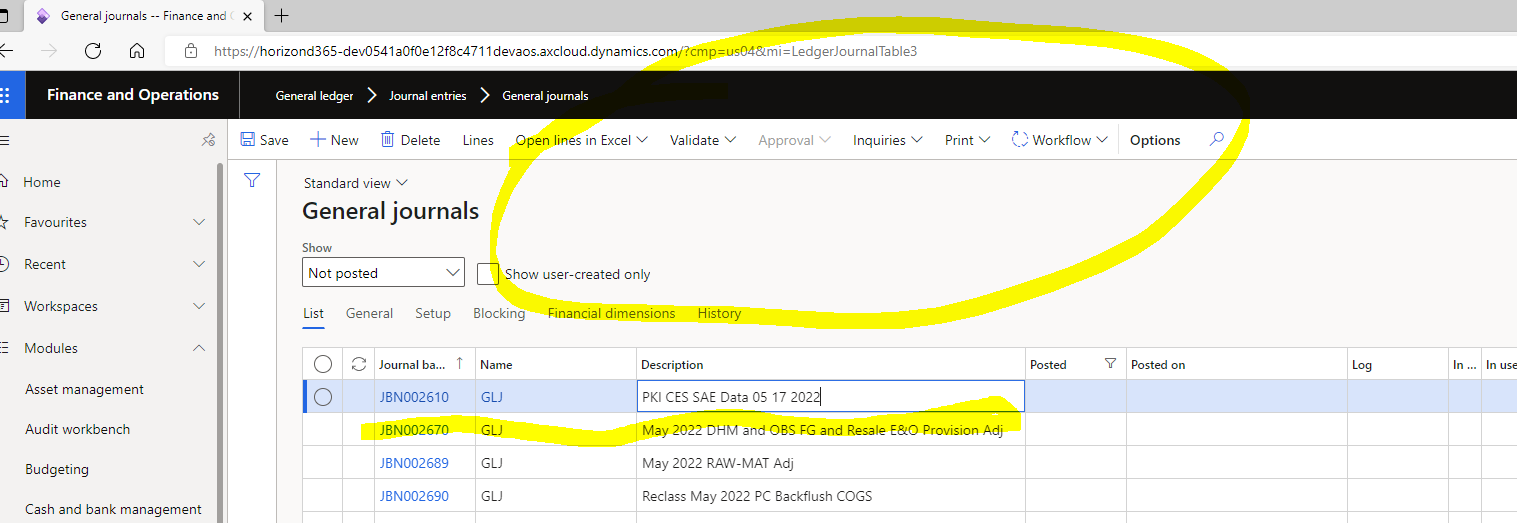
pastedimage1658767575854v1.png

This is my view of the same journal where I as sysadmin can see the Post option.  
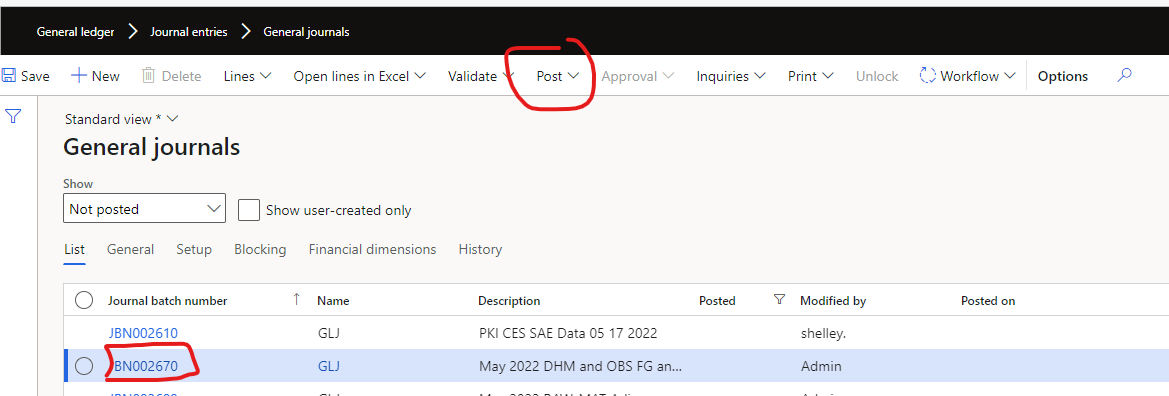
pastedimage1658767970101v2.png

The user has no personalisations and the button is not hidden.  Any ideas why this might be the case for this user?

thanks

I have the same question (0)
  • Suggested answer
    BillurSamdancioglu Profile Picture
    19,854 Most Valuable Professional on at

    Hi,

    Do this journal have WF?

  • André Arnaud de Calavon Profile Picture
    301,130 Super User 2025 Season 2 on at

    Hi jerhsysacct,

    Do other users with the same combination of roles have the same issue? In my test environment it is working correctly with these roles. When you mention the user has no personalization, have you checked the standard roles or other roles for additional 'deny' permissions which would then hide this post button?

  • jerhsysacct Profile Picture
    67 on at

    Yes it does and has been approved

  • jerhsysacct Profile Picture
    67 on at

    Hi Andre

    No just this user.  If I look at the same journal I can see the post button on the header.

    thanks

  • jerhsysacct Profile Picture
    67 on at

    Hi Andre

    I should say we are only in the process of testing D365 standard functionality and have not customised any roles at this stage.

    Joe

  • OsmanIstanbul Profile Picture
    2,818 on at

    Hi

    Could you please check journal restrictions for the journal name?

  • Suggested answer
    Prem Kumar Bachu Profile Picture
    3,418 on at

    Hi,

    Can you "reset usage data" for that user in user options and try. And also if possible delete that user and create again with same set of user roles.

  • jerhsysacct Profile Picture
    67 on at

    Hi Osman

    there are no posting restrictions on the journal name

    thanks

    Joe

  • Verified answer
    Ankit Life Profile Picture
    681 on at

    Hi,

    Could you please suggest what are the other roles assigned to this user? Is there any assistant role like Project assistant is assigned to User?

    Regards,

    Ankit Arora

  • Suggested answer
    Sheela Ningappa Profile Picture
    on at

    HI,

    Can you please disable the approval workflow option and check if you are able to see the Post button.

    Thanks,

    Sheela

Under review

Thank you for your reply! To ensure a great experience for everyone, your content is awaiting approval by our Community Managers. Please check back later.

Helpful resources

Quick Links

Responsible AI policies

As AI tools become more common, we’re introducing a Responsible AI Use…

Neeraj Kumar – Community Spotlight

We are honored to recognize Neeraj Kumar as our Community Spotlight honoree for…

Leaderboard > Finance | Project Operations, Human Resources, AX, GP, SL

#1
Martin Dráb Profile Picture

Martin Dráb 451 Most Valuable Professional

#2
André Arnaud de Calavon Profile Picture

André Arnaud de Cal... 428 Super User 2025 Season 2

#3
BillurSamdancioglu Profile Picture

BillurSamdancioglu 239 Most Valuable Professional

Last 30 days Overall leaderboard

Product updates

Dynamics 365 release plans
