web
You’re offline. This is a read only version of the page.
close
Skip to main content

Notifications

Announcements

No record found.

Community site session details

Community site session details

Session Id :
Microsoft Dynamics CRM (Archived)

Emails tracked to CRM missing date and time stamp.

(0) ShareShare
ReportReport
Posted on by

Hello,

We noticed that with tracking emails in CRM, if a user clicks on the email and they want to forward it to themselves or send to another that it keeps the time and date stamping of all the emails except for the most recent. When responding we can't see when that latest email was sent (expect for in the View for All or Completed activities) in the actual email.

Any ideas why and how to fix this?
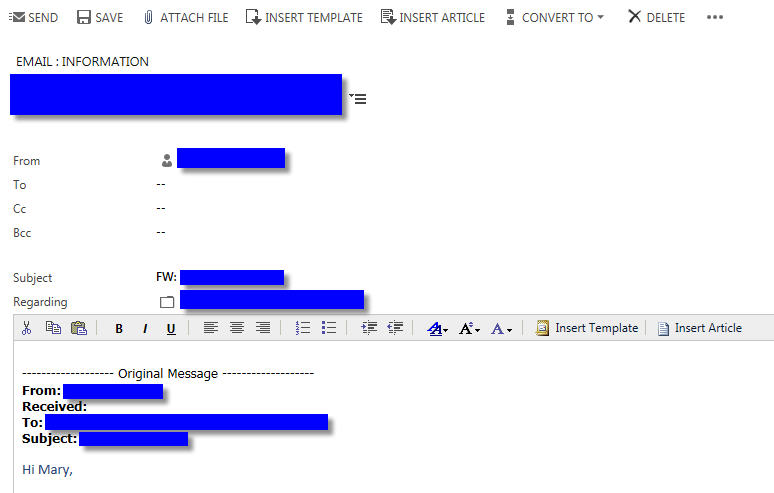
5736.email.jpg

*This post is locked for comments

I have the same question (0)
  • Suggested answer
    necsa Profile Picture
    3,455 on at
  • Jason M. Cosman Profile Picture
    5,234 Moderator on at

    Hello Brianna;

    Essentially Necdet is correct in terms of it only starts with when it was tracked into CRM; based on created date etc. The alternative to the users manually tracking them themselves is to use something like server side sync for your users. This will automatically sync the emails into CRM as they are received which will be near real time to when the message was truly received. This method would require no manual intervention.

    I'm not sure if this answers this question or not. If it doesn't and we're way off base on what your looking for please post again and explain where we have been mistaken. I'd love to help you resolve this issue or at least ensure we understand the functionality out of crm.

  • Community Member Profile Picture
    on at

    Hi Jason and Necdet,

    Those blogs were great, but don't necessarily answer what I'm after.

    In the first blog where it discusses Created vs. Actual End Date, we've already added "Actual End" date as a column on the Activity view. The User can see this currently.

    What the users would like to see is that Actual End Date not stripped from the body of the email when it gets replied to or forwarded.

    They do want that "received date" (the actual end of the email in Outlook) left when it's responded to, as they base who will receive the quote on it when there are multiple emails/quotes received on the same date.

    I don't know that the automatic sync resolves this for us.

    It sounds like the user may just have to look at the Actual End Date and base the timing on that?

    Thanks,

    Brianna

  • Verified answer
    Jason M. Cosman Profile Picture
    5,234 Moderator on at

    Hello Brianna;

    I think your right in that both solutions don't give you what your after. I'm not sure what the correct solution is in your case. I'm not sure if there is a way out of the box to not see the Actual End Date not stripped from the body of the email.

  • Yacine_Zine Profile Picture
    on at

    Brianna,

    We are currently having the same issue. I found this forum post: community.dynamics.com/.../184723

    where a employee from microsoft is stating that it is a known issue and it will be solved 1st quart of 2016. As its already passed that date I reckon it was not solved.

    When I obtain anymore information I will share it.

    Kind Regards,

    Yacine

  • Community Member Profile Picture
    on at

    Hi Yacine,

    Thank you for the update. We'll continue to wait patiently in hope sit'll be released soon.

    Brianna

Under review

Thank you for your reply! To ensure a great experience for everyone, your content is awaiting approval by our Community Managers. Please check back later.

Helpful resources

Quick Links

Responsible AI policies

As AI tools become more common, we’re introducing a Responsible AI Use…

Neeraj Kumar – Community Spotlight

We are honored to recognize Neeraj Kumar as our Community Spotlight honoree for…

Leaderboard > 🔒一 Microsoft Dynamics CRM (Archived)

#1
SA-08121319-0 Profile Picture

SA-08121319-0 4

#1
Calum MacFarlane Profile Picture

Calum MacFarlane 4

#3
Alex Fun Wei Jie Profile Picture

Alex Fun Wei Jie 2

Last 30 days Overall leaderboard

Featured topics

Product updates

Dynamics 365 release plans



