web
You’re offline. This is a read only version of the page.
close
Skip to main content

Announcements

No record found.

News and Announcements icon
Community site session details

Community site session details

Session Id :
Small and medium business | Business Central, N...
Answered

How to autofill Item n° after launch the report + save local

(0) ShareShare
ReportReport
Posted on by 20

Hi everyone,

I have created an action on my card page that lauch the report

No problem...

But i try to autofill the field "code article" with the value from the main card page...

And i dont see how to do it...
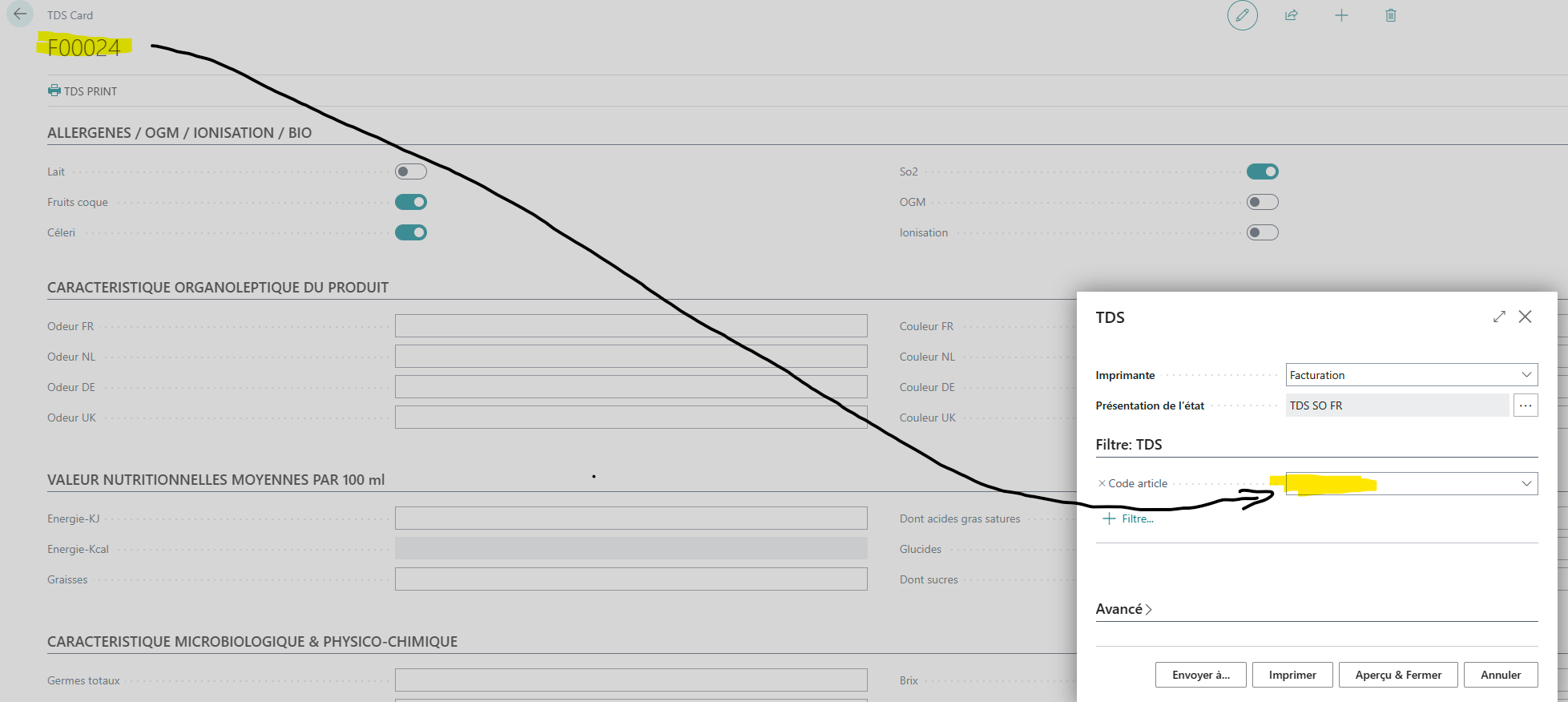
pastedimage1683582306429v1.png

My code in my main page

        // Add the action called "TDS PRINT" to the action menu
        area(Processing)
        {
            action("TDS PRINT")
            {
                Promoted = true;
                PromotedCategory = Process;
                ApplicationArea = All;
                Image = Print;
                RunObject = report TDS;
            }
        }

And the code on report page

report 95120 TDS
{
    DefaultRenderingLayout = "TDS-SO-FR";
    dataset
    {
        dataitem(TDS; TDS)
        {
            RequestFilterFields = "Code article";
            column(Acidite; Acidite)
            {
            }
            column(Bio; Bio)
    ...

Also, is it possible to add a second action ( next to "TDS print" action ) to save locally the report in pdf but with a custom filename ?

Thanks in advance for your help.

I have the same question (0)
  • Verified answer
    YUN ZHU Profile Picture
    98,498 Super User 2026 Season 1 on at

    Hi, Please try the following.
    Report.Run() Method: https://learn.microsoft.com/en-us/dynamics365/business-central/dev-itpro/developer/methods-auto/report/report-run-method

    pastedimage1683592150760v1.png

    pastedimage1683592162126v2.png

    pastedimage1683592171935v3.png

    Hope this helps.

    Thanks.

    ZHU

  • Neodep Profile Picture
    20 on at

    Thanks Zhu, and on your website i also find how to do with my multiple layout choice before print

    https://yzhums.com/25943/

Under review

Thank you for your reply! To ensure a great experience for everyone, your content is awaiting approval by our Community Managers. Please check back later.

Helpful resources

Quick Links

Introducing the 2026 Season 1 community Super Users

Congratulations to our 2026 Super Stars!

Congratulations to our 2025 Community Spotlights

Thanks to all of our 2025 Community Spotlight stars!

Leaderboard > Small and medium business | Business Central, NAV, RMS

#1
OussamaSabbouh Profile Picture

OussamaSabbouh 1,850 Super User 2026 Season 1

#2
YUN ZHU Profile Picture

YUN ZHU 1,084 Super User 2026 Season 1

#3
Dhiren Nagar Profile Picture

Dhiren Nagar 959 Super User 2026 Season 1

Last 30 days Overall leaderboard

Featured topics

Product updates

Dynamics 365 release plans
