web
You’re offline. This is a read only version of the page.
close
Skip to main content

Notifications

Announcements

No record found.

Community site session details

Community site session details

Session Id :
Microsoft Dynamics GP (Archived)

Files for this company have not been updated DB_Upgrade missing data Upgrade Issue

(0) ShareShare
ReportReport
Posted on by

Client is on GP 10 (10.00.1368) and upgrading to GP2010 SP4 and then eventually to 2015.

Initial upgrade is not occurring from GP 10 to GP 2010. When GP Utilities is run, it checks Dynamics version and passes through and does not prompt for any company updates. It seems like DB_Upgrade table has no information about Live company. I request some help and guidance on how to proceed and complete upgrade. Below are some additional details that I tried.

When trying to log into GP, I can see the Live company there however clicking on Live company give me the following error "Files for this company has not been updated"
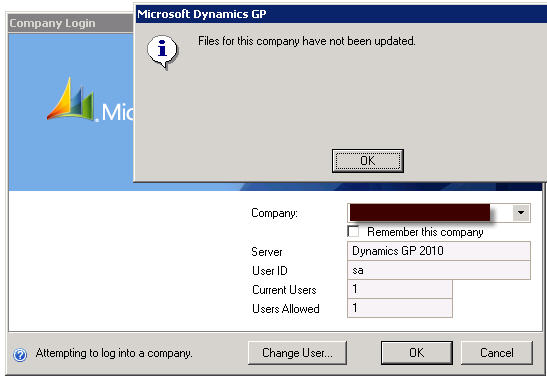
2450.GP2010_5F00_Login_5F00_Error.jpg

I ran the following scripts against the Dynamics db. Information for CompanyID 2 is populated in SY01500, DU000020 and DU000030 tables however there is no information for CompanidID 2 in DB_Upgrade table. 

SELECT CMPANYID,CMPNYNAM,INTERID from Dynamics..SY01500

SELECT * FROM DYNAMICS..DB_Upgrade where db_name = 'MyLiveCompany'
SELECT * FROM DYNAMICS..DU000020 where companyID = 2
SELECT * FROM DYNAMICS..DU000030 where companyID = 2

(FYI - MyLiveCompany is CompanyID=2)

*This post is locked for comments

I have the same question (0)
  • Verified answer
    coquisalsa Profile Picture
    2,725 on at

    The DB_Upgrade is the first table looked at when you run GP Utilities. This is the main version table reviewed during the upgrade process.

    If you have a backup restore this table or rebuild it using other company or companies in DB_Upgrade as reference.

  • Suggested answer
    Tom Cruse Profile Picture
    1,477 on at

    I second Jorge's suggestion. Restore a prior Dynamics DB backup and skim through it and see what db_names are available.

    select distinct db_name from dynamics.dbo.DB_Upgrade.

    Does your company show up here??

  • Community Member Profile Picture
    on at

    I did not have a prior back of the db so I rebuilt the db_upgrade using the same structure as the TWO company in there and took the product codes / modules from the DU00020 table for the Live company. It went past GPUtilities and has upgraded 1 company and awaiting upgrade for the other company. 

    Once companies are upgraded, have to review / validate date to confirm whether the conversion was successful.

    Next step is to upgrade to GP 2015 from here - lets see how that goes. 

  • Community Member Profile Picture
    on at

    Quick update on this. We were able to carry out remaining upgrades without issues.

    Jorge Mejia / Tom Cruse - appreciate your valuable comments.

Under review

Thank you for your reply! To ensure a great experience for everyone, your content is awaiting approval by our Community Managers. Please check back later.

Helpful resources

Quick Links

Responsible AI policies

As AI tools become more common, we’re introducing a Responsible AI Use…

Neeraj Kumar – Community Spotlight

We are honored to recognize Neeraj Kumar as our Community Spotlight honoree for…

Leaderboard > 🔒一 Microsoft Dynamics GP (Archived)

#1
Community Member Profile Picture

Community Member 2

#2
mtabor Profile Picture

mtabor 1

#2
Victoria Yudin Profile Picture

Victoria Yudin 1

Last 30 days Overall leaderboard

Featured topics

Product updates

Dynamics 365 release plans



