web
You’re offline. This is a read only version of the page.
close
Skip to main content

Notifications

Announcements

No record found.

Community site session details

Community site session details

Session Id :
Small and medium business | Business Central, N...
Suggested Answer

Login error: "We do not recognise you. Did you enter your credentials correctly?"

(0) ShareShare
ReportReport
Posted on by 24

Hey everyone,

we just signed up with Dynamics, and before we began our jump from our old ERP to BC, I thought we'd get a few licences to play around with it and see how things look.

Added and setup some users. Later swapped a couple of licences around. One user was on a team member licence and swapped them with another user who had a device licence. 

Now, the new "device" licence holder is unable to login with their credentials. Have reset password, but still the same. 
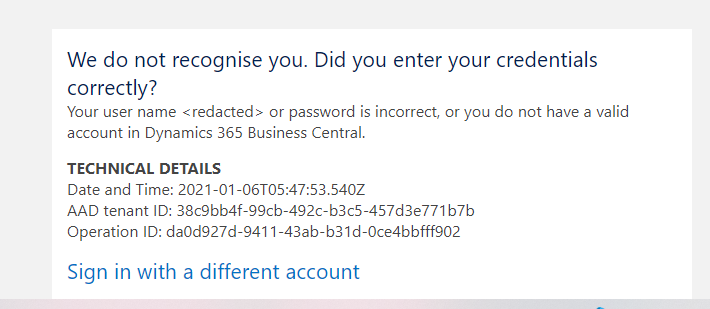
pastedimage1609912116348v1.png

The updated user with the "team member" licence does not have the above issue and when they log in is the appropriate role and licence.

Anything we are missing?

I have the same question (0)
  • Suggested answer
    Andy Sather Profile Picture
    on at

    Can you log into BC as a Super user and then go to the Users page, Highlight the problem user(s), and click Actions > Refresh User groups.  This should refresh the license from the Microsoft 365 Admin center to BC.

  • BilginOzkan Profile Picture
    24 on at

    I've logged into the Microsoft 365 Admin Center (as a Global Admin) and went to Active Users. I don't see any Actions or Refresh User Group options anywhere :/

    I've taken the user out of the group and added them back in. But the same error persists.

    pastedimage1610069401964v1.png

  • Andy Sather Profile Picture
    on at

    You will need to do this inside Business Central not the Microsoft 365 Admin Center.  You go to the Users page, Highlight the user,  and click Actions > Refresh User Groups.  When you do this BC reaches out to the admin center to check licenses.  This should refresh BC with the correct license from admin center.

  • BilginOzkan Profile Picture
    24 on at

    Thanks, Andy. Took me a while to find where the Users section was in BC

    I did as suggested. I noticed before I did refresh user groups, the user had the incorrect "Dynamics 365 for Team Members" under the licence section. After refreshing, it has the correct "Device" licence, however, when we log in as the user, the original error persists.

    I tried a different browser, just in case, it looked like it logged in (saw the BC dashboard, but I think it was missing the user name), but by the time I made myself a cup of coffee and came back to my desk, the same browser window now had the same error message.

Under review

Thank you for your reply! To ensure a great experience for everyone, your content is awaiting approval by our Community Managers. Please check back later.

Helpful resources

Quick Links

Responsible AI policies

As AI tools become more common, we’re introducing a Responsible AI Use…

Neeraj Kumar – Community Spotlight

We are honored to recognize Neeraj Kumar as our Community Spotlight honoree for…

Leaderboard > Small and medium business | Business Central, NAV, RMS

#1
OussamaSabbouh Profile Picture

OussamaSabbouh 2,066

#2
YUN ZHU Profile Picture

YUN ZHU 658 Super User 2025 Season 2

#3
Sumit Singh Profile Picture

Sumit Singh 595

Last 30 days Overall leaderboard

Featured topics

Product updates

Dynamics 365 release plans



