web
You’re offline. This is a read only version of the page.
close
Skip to main content

Notifications

Announcements

No record found.

Community site session details

Community site session details

Session Id :
Microsoft Dynamics GP (Archived)

Dynamics GP PDK Document Status set to 0

(0) ShareShare
ReportReport
Posted on by

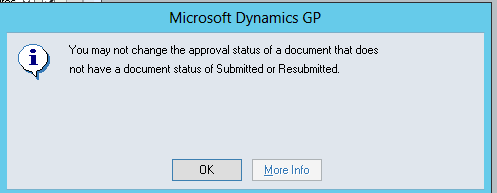
During the Timesheet Approval process in PDK we have noticed several times that the Status is empty.  When the Status is empty we are unable to drill down on the Document Number hyperlink and approve or return the timesheet.  If we attempt to change the Approvals status to Approved from the Timesheet Approval window we receive an error "You may not change the approval status of a document that does not have a document status of Submitted or Resubmitted".  The only workaround we have found is to enter another timesheet for this user in PDK and resubmit.   
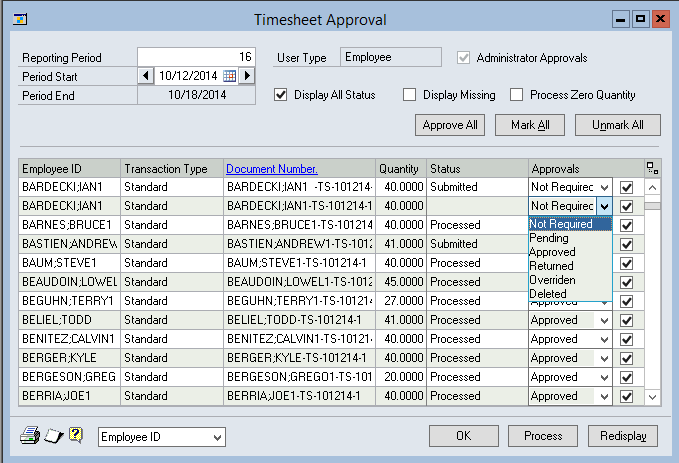
PDK-Timesheet-Approval-Document-Status-update.PNG

PDK10000-Document-Status.PNG

I understand I could likely update the PDK_Document_Status properly in SQL but I would like to understand the issue that is causing this.

*This post is locked for comments

I have the same question (0)
  • Bill Campbell Profile Picture
    12 on at

    Kerry did you ever find a solution to this problem - wondering if you would post any thing new on this matter - it appears similar to a situation we have with some timesheets we are trying to resubmit.

    Thanks.

  • kdraper Profile Picture
    on at

    Hi Bill,

    No, not really.  I spent over a month with Microsoft support and they finally gave up.  They created some SQL triggers to capture when it happened but they were unable to conclude what was going on.  It may be a complete coincidence but I noticed the BP server was running low on ram so I added another 8GB and I have not seen an error since.  That was November when I increased the ram.  I know SharePoint will have issues when it has a resource shortage but not sure.

  • Bill Campbell Profile Picture
    12 on at

    Interesting - will have to look at the Ram on the server and monitor the disk as well.

    Thanks - was not sure if the same issue - but I know that it is likely not to get much attention - but good to know anyway.

Under review

Thank you for your reply! To ensure a great experience for everyone, your content is awaiting approval by our Community Managers. Please check back later.

Helpful resources

Quick Links

Responsible AI policies

As AI tools become more common, we’re introducing a Responsible AI Use…

Neeraj Kumar – Community Spotlight

We are honored to recognize Neeraj Kumar as our Community Spotlight honoree for…

Leaderboard > 🔒一 Microsoft Dynamics GP (Archived)

#1
mtabor Profile Picture

mtabor 1

Last 30 days Overall leaderboard

Featured topics

Product updates

Dynamics 365 release plans