web
You’re offline. This is a read only version of the page.
close
Skip to main content

Notifications

Announcements

No record found.

Community site session details

Community site session details

Session Id :
Small and medium business | Business Central, N...
Suggested Answer

Integration Between Bussiness Central and Dataverse(CRM)

(0) ShareShare
ReportReport
Posted on by 2,100

Hi,

We face below Integration Synchronization Errors while we do the integration between the Business Central and Dataverse (CRM).

Table Name: Customer

Integration Table Name : Account

Error 1. The data could not be updated because of the following error: The record is not open.

Error 2. Cannot couple {GUID} to this Customer record, because the Customer record is already coupled to {GUID}.
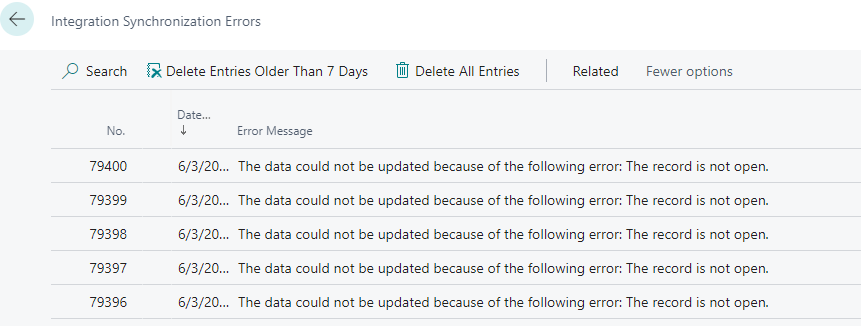
pastedimage1654265560966v2.png

We could not sync all the records because of these errors, Can anyone please provide a solution for this?

I have the same question (0)
  • Suggested answer
    S.Kawamura Profile Picture
    1,530 on at

    Hi,

    As the error message says, the cause of the error is that you tried to couple an Account record in CRM (relationship is Customer) to a Customer in BC, but the Customer in BC has already been coupled to another Account record in CRM.

    If the CRM Account record already coupled to the BC Customer record is an incorrect relationship, try decoupling it once and recoupling it again.

    I hope this helps you

    S.Kawamura

  • Inkey Solutions Profile Picture
    2,100 on at

    Hi, we Tried this solution, we did decoupling and recoupling it again but still we get some another errors.
    When we are trying to Run Dataverse Full Synch. Review Page we found the error in the field From Int. Table Job Status for a customer Name field.

    pastedimage1654508115317v1.png

    Now, When we drill down on the error page we found the below error that says Customer already has a Contact Business Relation with Contact.

    pastedimage1654508196312v2.png

    because of these errors,we can not sync all the records from the Dynamic CRM account table to the customer table in Business Central. please provide a solution for this?

  • Suggested answer
    Marco Mels Profile Picture
    on at

    Hello,

    The contact has a relation with a customer. You probably only decoupled the customer and now the contact is connected to another customer, etc.

    Some cleanup in the data must be done to resolve the issues. To do so, also uncouple the contact belonging to C99990, etc. Verify if the contact is linked to what account in CRM, etc.

    Thanks.

Under review

Thank you for your reply! To ensure a great experience for everyone, your content is awaiting approval by our Community Managers. Please check back later.

Helpful resources

Quick Links

Responsible AI policies

As AI tools become more common, we’re introducing a Responsible AI Use…

Neeraj Kumar – Community Spotlight

We are honored to recognize Neeraj Kumar as our Community Spotlight honoree for…

Leaderboard > Small and medium business | Business Central, NAV, RMS

#1
OussamaSabbouh Profile Picture

OussamaSabbouh 2,238

#2
YUN ZHU Profile Picture

YUN ZHU 773 Super User 2025 Season 2

#3
Sumit Singh Profile Picture

Sumit Singh 630

Last 30 days Overall leaderboard

Featured topics

Product updates

Dynamics 365 release plans