web
You’re offline. This is a read only version of the page.
close
Skip to main content

Notifications

Announcements

No record found.

Community site session details

Community site session details

Session Id :
Small and medium business | Business Central, N...
Suggested Answer

Dimension value is not showing in combo transactions like journal entries

(0) ShareShare
ReportReport
Posted on by 5

Hi,

The dimension value was entered in BC manually, but when it is searching on journals lines is like it doesn´t exist.

The following screenshot is the dimension value created

dimension-value.jpg

The following is the general journal and the dimension value is not showing:

journal-entries-error.jpg

Now we depurate in sandbox and it seem that the field globaldimension is empty, but this field is read-only field

global-dimension-is-empty.jpg

Pleae any idea to fixed this in production enviroment?

Regards,

Luz Maria

I have the same question (0)
  • Suggested answer
    MahGah Profile Picture
    15,529 on at

    Hi

    In general journal click on Line (Linea) then click on dimension. Do you see the dimension there?

    Also what is your dimension setup? Is it like Mandatory or same code or ...?

  • Luciernaga Profile Picture
    5 on at

    Hi,

    not seen in the list either.

    there is not set up on dimension values:

    Mandatory or same code is not an option on dimension anymore?

  • Suggested answer
    MahGah Profile Picture
    15,529 on at

    Sorry I should asked first.

    Where did you add the dimension? Chart of account or item or ...? In chart of account I still have those options. 

    pastedimage1657062562774v1.png

  • Suggested answer
    YUN ZHU Profile Picture
    95,595 Super User 2025 Season 2 on at

    Hi, I think I should have done the same thing as you, but it looks fine. Am I missing something?

    pastedimage1657070016703v1.png

    pastedimage1657070030042v2.png

    pastedimage1657070037638v3.png

    In API: 

    pastedimage1657072469416v4.png

    Hope this helps.

    Thanks.

    ZHU

  • Luciernaga Profile Picture
    5 on at

    Dimensions > Select the dimension, then Dimensiones VAlues >

  • Luciernaga Profile Picture
    5 on at

    Yes it is same. But in my case the dimension value doesnt appear. It is weird that this happen only with a few values.

  • Suggested answer
    YUN ZHU Profile Picture
    95,595 Super User 2025 Season 2 on at

    Hi, It's really weird, I'm not sure if this is related to dimension combinations. I think you can check.

    More details:

    https://docs.microsoft.com/en-us/dynamics365/business-central/finance-dimensions#to-set-up-dimension-combinations

    Also, to rule out a problem caused by customization, please try again in an environment with only Microsoft apps.

    Hope this can give you some hints.

    Thanks.

    ZHU

  • Suggested answer
    Rakesh Dobariya Profile Picture
    60 on at

    Hello Luz,

    I had understand your concern and tried at my level as per below,

    Step 1: Firstly cleared out the purpose to tag dimensions (Use for utilize dimension), and as i can see your snaps, you wanted to use Dimension for tracking cost/ value for any transaction with help of "General Journal",

    Step:2 I would say figure out total type of transaction/ Costs you wanted to track or need further analysis based on historical transaction.

    ( This is step is vital , reason is once you defined "Global Dimension" and "Shortcut Dimension" --> setup at "Gen. Ledger Setup" , and started to using it and later required to change , it is possible to not recommended , reason is it may affect historical transaction where it was used)    

    More ever as a solution please refer below snaps that my answer your concerns,

    Option -1 ( Defined and setup Dimension from Chart of account) 
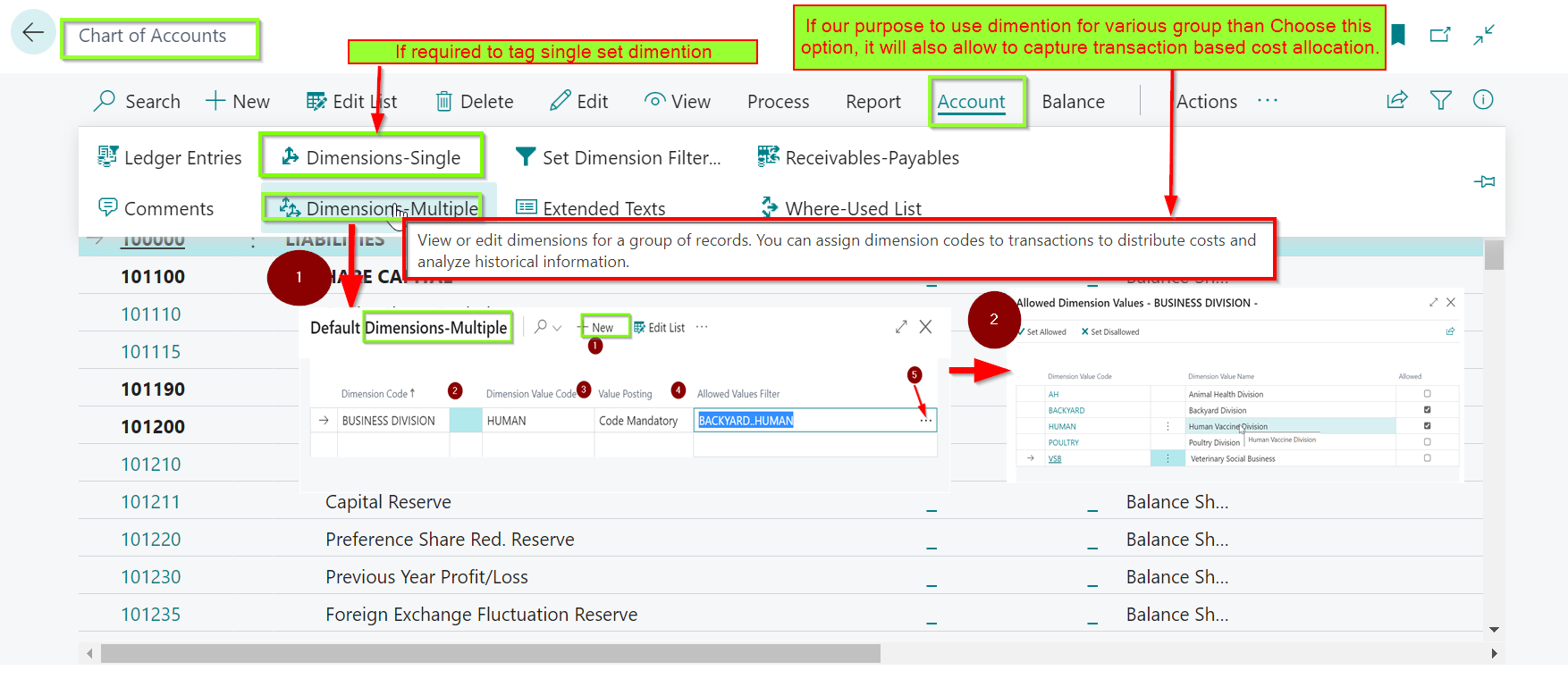
    pastedimage1657180096694v1.png

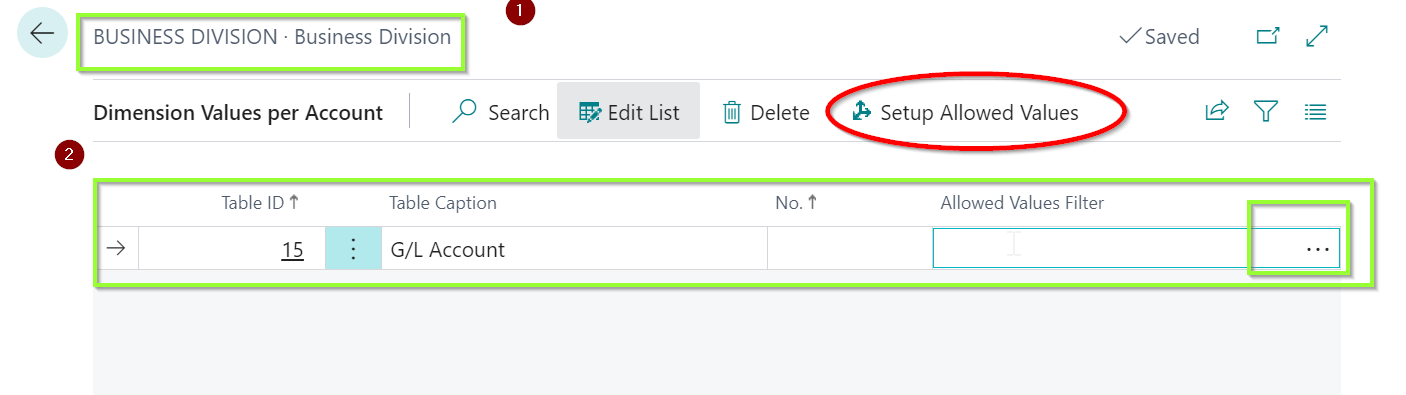
    Option 2: Table wise Account dimension setup 

    pastedimage1657180185284v2.png 

    pastedimage1657180203686v3.png

    Might above information will help it out in a another way.

    Knowledge sharing is kind of charity, so request to share and like this answer so other individuals may attain benefit from it. 

    Regards,

    Rakesh Dobariya

  • Suggested answer
    Rakesh Dobariya Profile Picture
    60 on at

    Hello Luz,

    Please refer this snaps, ( i also shared on your first comments)

    pastedimage1657180762580v1.png

    Regards,

    Rakesh Dobariya

  • Suggested answer
    Rakesh Dobariya Profile Picture
    60 on at

    Hello ZHU,

    Good to see you here,

    I agree with your suggested way,

    Might you had interact as per below  mentioned snaps,

    By using option "Dimension-Multiple"  ,might able to handle concern of  Luciernaga  

    pastedimage1657180992985v1.png

    Regards,

    Rakesh Dobariya

Under review

Thank you for your reply! To ensure a great experience for everyone, your content is awaiting approval by our Community Managers. Please check back later.

Helpful resources

Quick Links

Responsible AI policies

As AI tools become more common, we’re introducing a Responsible AI Use…

Neeraj Kumar – Community Spotlight

We are honored to recognize Neeraj Kumar as our Community Spotlight honoree for…

Leaderboard > Small and medium business | Business Central, NAV, RMS

#1
OussamaSabbouh Profile Picture

OussamaSabbouh 3,010

#2
Jainam M. Kothari Profile Picture

Jainam M. Kothari 1,270 Super User 2025 Season 2

#3
YUN ZHU Profile Picture

YUN ZHU 1,085 Super User 2025 Season 2

Last 30 days Overall leaderboard

Featured topics

Product updates

Dynamics 365 release plans