web
You’re offline. This is a read only version of the page.
close
Skip to main content

Announcements

No record found.

News and Announcements icon
Community site session details

Community site session details

Session Id :
Microsoft Dynamics AX (Archived)

Maximum buffer size

(0) ShareShare
ReportReport
Posted on by

Hi

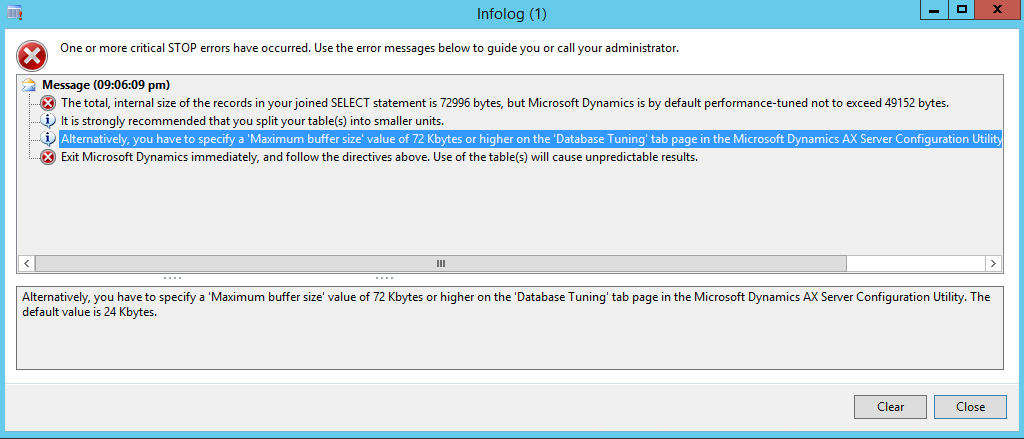
i'm facing an error " Alternatively, you have to specify a 'Maximum buffer size' value of 72 Kbytes or higher on the 'Database Tuning' tab page in the Microsoft Dynamics AX Server Configuration Utility. The default value is 24 Kbytes"

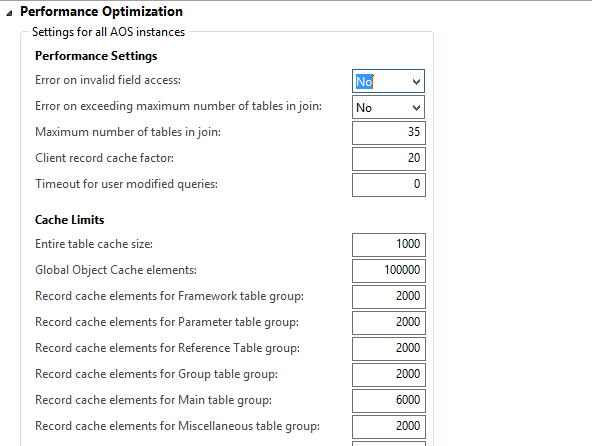
while i'm create new Vendor and i'm go to Server Configuration but i don't know any field do need change and  i need know reason this error

kindly assist me to solve this error
2016_2D00_11_2D00_29_5F00_21_2D00_07_2D00_28.png

2016_2D00_11_2D00_29_5F00_21_2D00_38_2D00_01.png

*This post is locked for comments

I have the same question (0)
  • Sohaib Cheema Profile Picture
    49,664 Super User 2026 Season 1 on at

    Hi,

    In AX Server configuration you can create a new configuration as you cannot modify standard configuration.

    muhammadnazim.blogspot.com/.../how-to-increase-maximum-buffer-size-in.html

  • Community Member Profile Picture
    on at

    New Server Configuration not enabled

    2016_2D00_11_2D00_29_5F00_22_2D00_41_2D00_05.png

  • Mea_ Profile Picture
    60,286 on at

    Server configuration is a stand alone utility and could not be opened from AX. Usually it could be found Start > Administrative Tools > Microsoft Dynamics AX 2012 Server Configuration.

    Please refer to this msdn article technet.microsoft.com/.../aa569618.aspx

  • André Arnaud de Calavon Profile Picture
    304,932 Super User 2026 Season 1 on at

    Hi Mohamed,

    Can you also indicate what query makes this large size? The default Maximum buffer size had been increased to 48 Kbytes as of AX 2012 R2. I have never seen a requirement for 72 Kbytes before. So I'm interested what causes this...

  • Community Member Profile Picture
    on at

    It was increased Maximum buffer size  and solve problem, but I am very concerned in terms of performance

  • André Arnaud de Calavon Profile Picture
    304,932 Super User 2026 Season 1 on at

    Hi Mohamed,

    The performance is also my concern. Can you review my previous question to provide some insights on this query?

  • ShaikhAtif Profile Picture
    201 on at

    Without create new configuration can increase buffer size ?

  • Verified answer
    Vilmos Kintera Profile Picture
    46,149 on at

    It is possible, you need to edit the registry key called sqlbuffer, since the client/server configuration tools are just editing the registry values.

    It would be somewhere here, using regedit:

    HKEY_LOCAL_MACHINE\SYSTEM\CurrentControlSet\Services\Dynamics Server\6.0\01\Original (installed configuration)\sqlbuffer

  • Suggested answer
    Ajit Profile Picture
    8,788 on at

    We should review the query and try to optimize before increasing the buffer size

Under review

Thank you for your reply! To ensure a great experience for everyone, your content is awaiting approval by our Community Managers. Please check back later.

Helpful resources

Quick Links

Introducing the 2026 Season 1 community Super Users

Congratulations to our 2026 Super Stars!

Meet the Microsoft Dynamics 365 Contact Center Champions

We are thrilled to have these Champions in our Community!

Congratulations to the April Top 10 Community Leaders

These are the community rock stars!

Leaderboard > 🔒一 Microsoft Dynamics AX (Archived)

#1
CP04-islander Profile Picture

CP04-islander 28

#2
Michel ROY Profile Picture

Michel ROY 14

#3
imran ul haq Profile Picture

imran ul haq 8

Last 30 days Overall leaderboard

Featured topics

Product updates

Dynamics 365 release plans