web
You’re offline. This is a read only version of the page.
close
Skip to main content

Notifications

Announcements

No record found.

Community site session details

Community site session details

Session Id :
Supply chain | Supply Chain Management, Commerce
Suggested Answer

How to JOIN INVENTDIM table to PurchLine table to pull INVENTBATCHID?

(0) ShareShare
ReportReport
Posted on by

Hi all, I'm working on creating a SQL query for a receiving label we use. All the data fields are easy enough to pull form the PurchLine table except for INVENTBATCHID (Batch numebr) from the InventDim table.

pastedimage1601391002306v1.png 

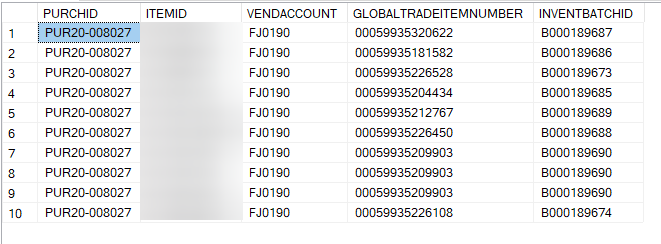
My current query is as follows. It works, but it takes over 3 minutes to pull the info and thus unusable. Is there a better JOIN I should be using?

I get pretty confused when it comes to any of these 3 tables: InventItemGTINStaging, InventDimStaging, InventTransOriginStaging. I understand they have to do with inventory transactions but I just can't seem to map it out in my head or SSMS...

SELECT
PrnPurchLineStaging.PURCHID,
PrnPurchLineStaging.ITEMID,
PrnPurchLineStaging.VENDACCOUNT,
InventItemGTINStaging.GLOBALTRADEITEMNUMBER,
InventDimStaging.INVENTBATCHID

FROM
PrnPurchLineStaging
INNER JOIN InventItemGTINStaging ON PrnPurchLineStaging.ITEMID = InventItemGTINStaging.ITEMID
LEFT JOIN InventTransOriginStaging ON InventTransOriginStaging.INVENTTRANSID = PrnPurchLineStaging.INVENTTRANSID
LEFT JOIN InventDimStaging ON InventDimStaging.INVENTDIMID = InventTransOriginStaging.INVENTDIMID


WHERE
PrnPurchLineStaging.PURCHID = 'PUR20-008027'
pastedimage1601391185068v2.png

I have the same question (0)
  • Community Member Profile Picture
    on at

    I may have just figured it out with this JOIN.

    LEFT JOIN InventDimStaging ON InventDimStaging.INVENTDIMID = PrnPurchLineStaging.INVENTDIMID

    This took 7 seconds to run (with Azure BYOD) and the Batch Numbers appear to be correct. This is workable.

    I really need to understand these inventory tables better... I can only assume that INVENTDIMID is the same across all tables?

  • Suggested answer
    Sergei Minozhenko Profile Picture
    23,093 on at

    Hi Joey8922,

    You need to check if you have proper indexes in BYOD for your query.

    In some cases, dimensions on purchase line and InventTransOriginStaging can be different and I would use 1st query to get this data.

  • Community Member Profile Picture
    on at

    Hi Sergei, thanks for the response.

    I'm sorry but I don't know what having proper indexes for BYOD means. The problem is that with the first query (which I inherited from someone else), it takes over 3 minutes to execute which is unacceptable for our receiving process. Any other suggestions?

  • Community Member Profile Picture
    on at

    I checked another Open PO and confirmed that it is correct Batch Number. This batch number - and I believe most others - are automatically generated by Master Plan.

  • Suggested answer
    Sergei Minozhenko Profile Picture
    23,093 on at

    Hi joey8922, 

    BYOD is just Azure SQL DB and if you run queries against it you need to be sure that your queries are well covered with indexes. 

    You can activate actual execution plan in SSMS to check where is the bottleneck in your query and sometimes it can give you suggestions about missing indexes. 

    https://docs.microsoft.com/en-us/sql/relational-databases/performance/display-an-actual-execution-plan?view=sql-server-ver15

    docs.microsoft.com/.../clustered-and-nonclustered-indexes-described

Under review

Thank you for your reply! To ensure a great experience for everyone, your content is awaiting approval by our Community Managers. Please check back later.

Helpful resources

Quick Links

Responsible AI policies

As AI tools become more common, we’re introducing a Responsible AI Use…

Neeraj Kumar – Community Spotlight

We are honored to recognize Neeraj Kumar as our Community Spotlight honoree for…

Leaderboard > Supply chain | Supply Chain Management, Commerce

#1
Laurens vd Tang Profile Picture

Laurens vd Tang 271 Super User 2025 Season 2

#2
Siv Sagar Profile Picture

Siv Sagar 171 Super User 2025 Season 2

#3
André Arnaud de Calavon Profile Picture

André Arnaud de Cal... 130 Super User 2025 Season 2

Last 30 days Overall leaderboard

Featured topics

Product updates

Dynamics 365 release plans



