web
You’re offline. This is a read only version of the page.
close
Skip to main content

Notifications

Announcements

Community site session details

Community site session details

Session Id :
Business Central forum

How to export data to CSV files

(1) ShareShare
ReportReport
Posted on by 505

I need to export payments from payment journal into CSV file.

What options are available in business central online for this? 

Can someone show me the right direction?

Categories:
I have the same question (0)
  • Suggested answer
    Stefano Demiliani Profile Picture
    37,166 Most Valuable Professional on at

    You can create an XMLport via extension:

    TempBlob.Blob.CREATEOUTSTREAM(FileOutStream);

    Xmlport.Export(Xmlport::MyXmlportImportCustomer, FileOutStream);

    TempBlob.Blob.CREATEINSTREAM(FileInStream);

    outputFileName := 'YourFile.csv';

    DownloadFromStream(FileInStream,'','','',outputFileName);  

  • Priyank Bhavsar Profile Picture
    505 on at

    Thanks Stefano.

    Can you share some link for creating xmlport via extension?

  • Suggested answer
    Andreas F. Günther Profile Picture
    on at

    I just had prepared this. The screenshot are from business central on premise but it should work similar in online. 

    ---

    How do I create a simple CSV payment export using the data exchange definition?

    Step 1 – Create a new Data Exchange definition. Mine is called “CSV”

    Make sure it is Type Payment Export.


    Reading/Writing Codeunti set to 1276, Reading/Writing XML Port to 1230 and Ex. Data Handling Codeunit to 1277.

    For testing my file will get 4 fields so I put those in the column definition and in the line definition, I set the number of columns to 4
    csv_5F00_9.jpg

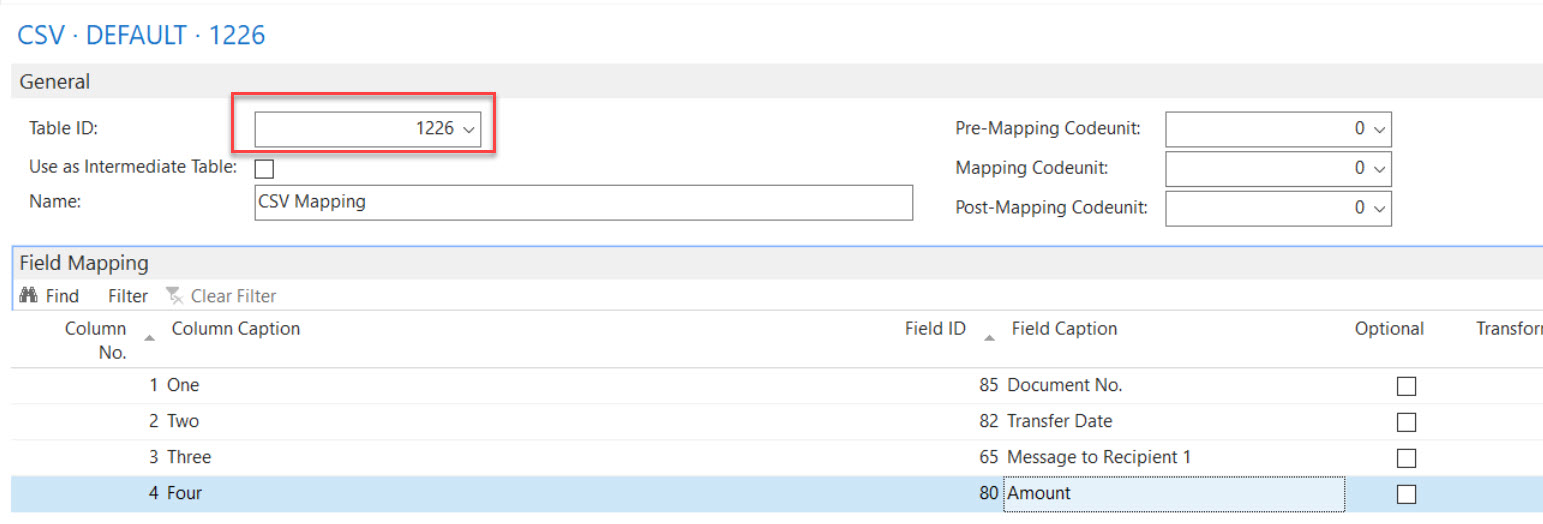
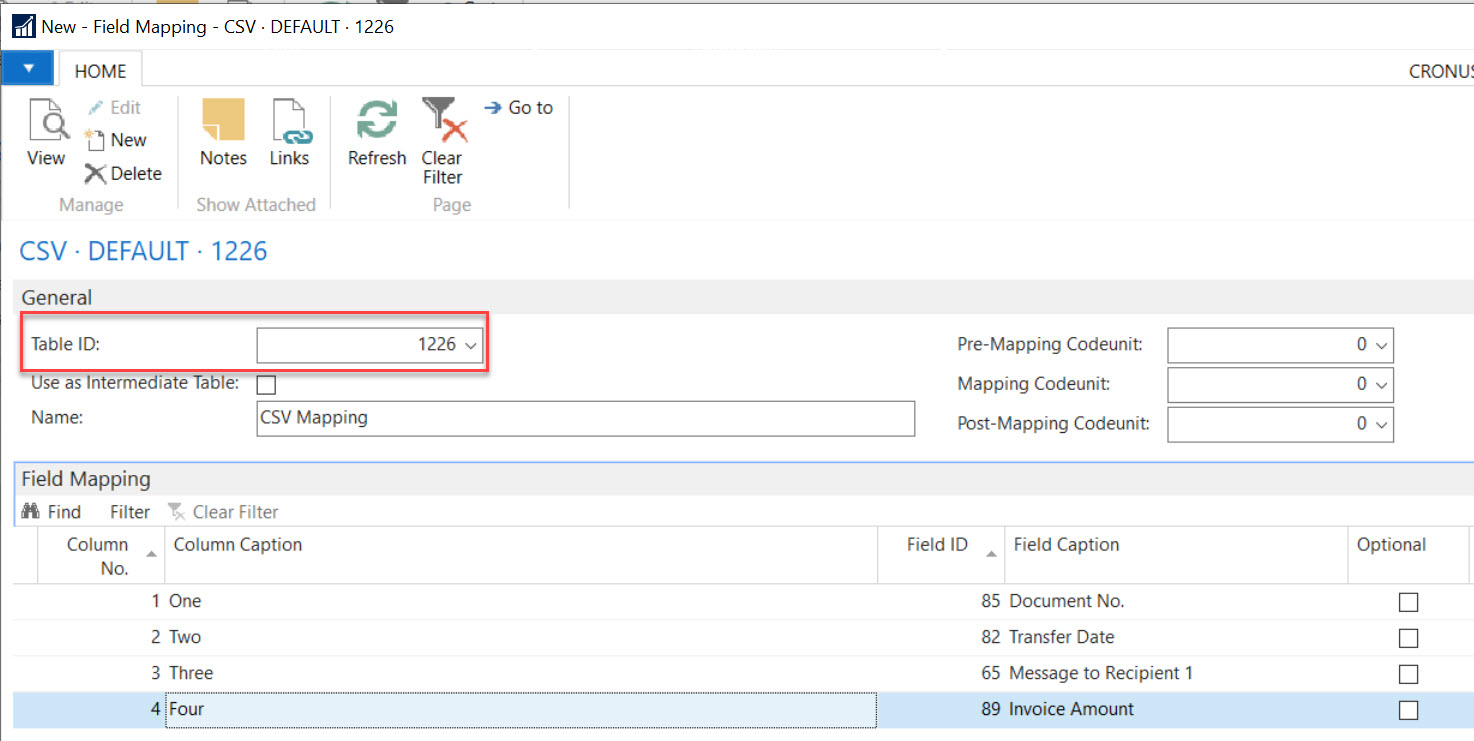
    Next is to set the field mapping. Important is here that we need to map to table 1226. And I map my fields to field from this table.

     csv_5F00_2.jpg


    That’s it for the data exchange definition, now we need to be able to use it and for that we need a Bank Export/Import Setup.

    Make sure you use the Processing Codeunit 1206.
    csv_5F00_3.jpg


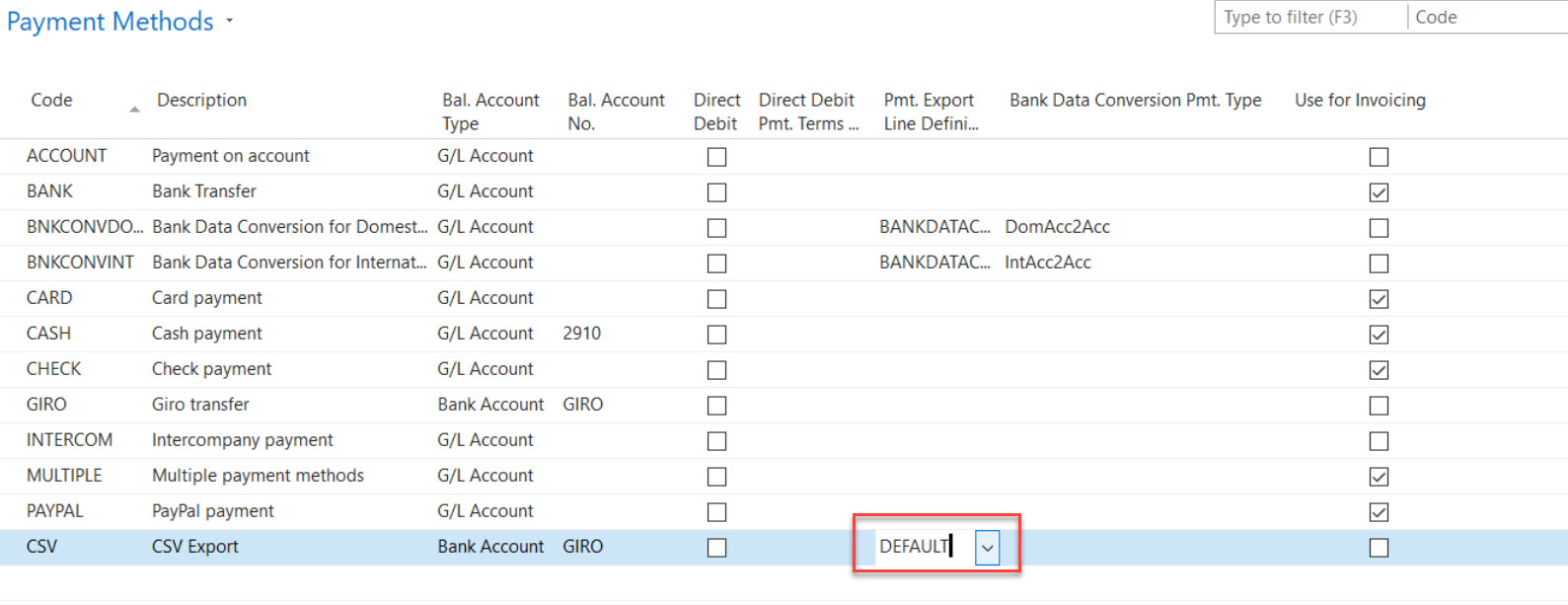
    Then we need a payment method. We need it in case we have multiple line definitions. In our case we just have one so we can set it to “DEFAULT”.
    csv_5F00_5.jpg

    Now we setup the bank so it knows how to use our export. I will use GIRO in this example. Set the Payment Export Format to CSV and make sure you also have set a Credit Transfer Msg. Nos.

    In the journal Batch make sure the bank is selected as balance account and that you allow payment export.

    csv_5F00_7.jpg


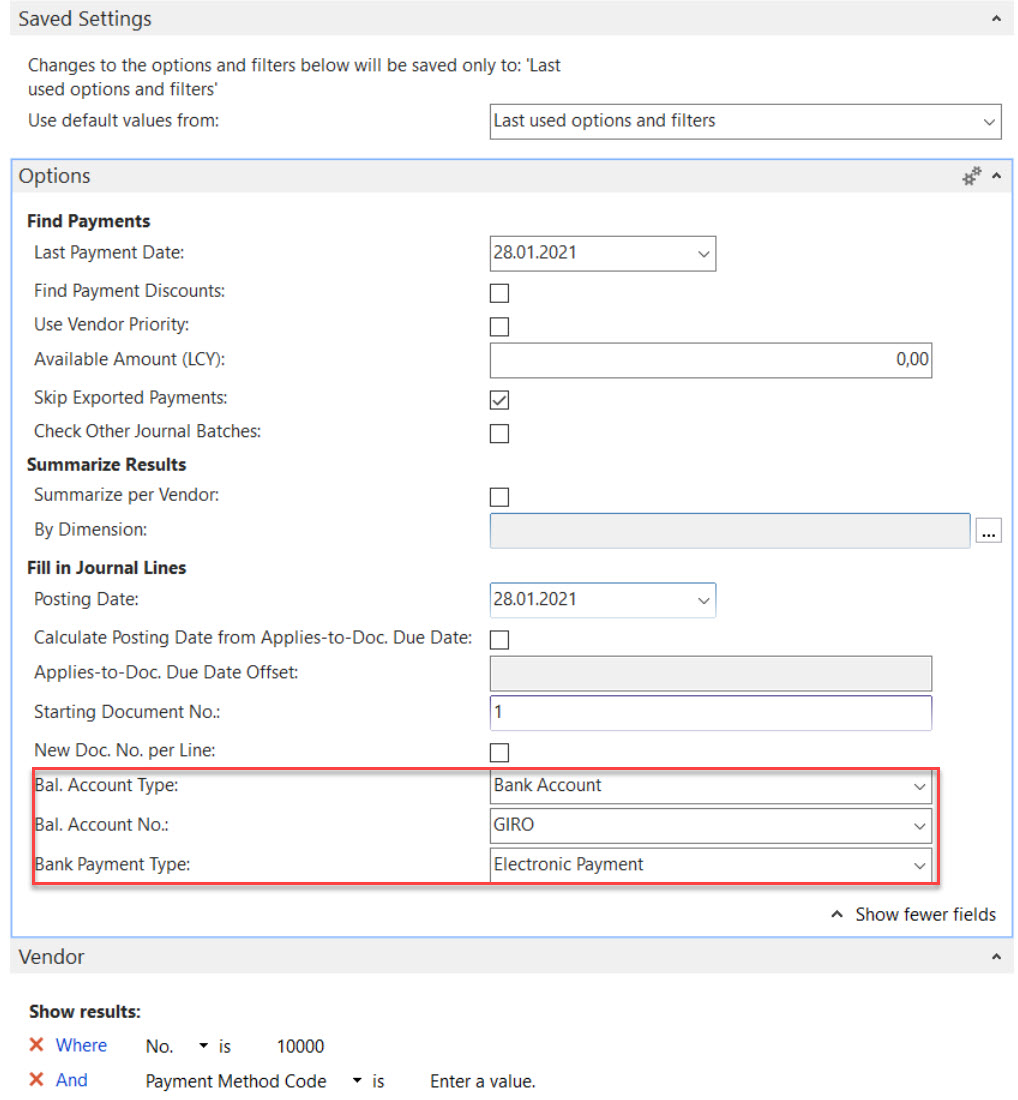
    Now in the payment journal add some data or do a payment suggestion. Make sure to use the bank we did setup and set the type to electronic payment. I also filtered to vendor 10000 to have less entries.
     csv_5F00_6.jpg


    Select a recipient bank account and set the payment method to what we have prepared:

    csv_5F00_8.jpg


    Now click “Export” and you will get the CSV file:
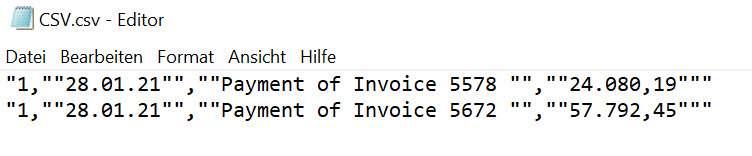
    csv_5F00_9.jpg

    Hope that helps.

  • Suggested answer
    Roberto Stefanetti Profile Picture
    12,998 on at

    hi,

    take a look here:

    XMLPorts RUNNER – DEMO

    I attached a code example (and an Ready-to-use APP) to launch XMLPorts from a page in a dynamic way, useful for Dynamics 365 Business Central SaaS.

    Objects in APP:

    - Page Pag50142.XMLPortsRunner (Page to launch XMLPorts with STREAMS)

    - XMLPort Xml50140.InventoryItems (XMLPort to import Inventory Adjustements)

    robertostefanettinavblog.com/.../xmlports-runner-for-business-central-saas

    Source and APP in MyGitHUb page

    github.com/.../XMLPorts%20Runner

    github.com/.../RS_XMLPorts%20-%20Runner_1.0.0.0.app

  • Priyank Bhavsar Profile Picture
    505 on at

    I need to fetch data from multiple tables.

    I believe it is not possible using data exchange definition. 

    Is it possible using xmlport?

  • Suggested answer
    Roberto Stefanetti Profile Picture
    12,998 on at

    hi,

    take a look here

    Import of .CSV file using Xmlport for Multiple Tables

    community.dynamics.com/.../215794

  • Surajvuk Profile Picture
    25 on at

    These instructions are very good. I did not know about the Payment Export Data table.

    However, i am struggling with find "Sort Code" this is an important field for BACS file in the UK. In the "Vendor Bank Account Card" this is the "Bank Sort Code" field. Without this field you cannot submit the file to the bank.

    Could someone please help me in location this field. (I have tried also filling Bank Clearing code to test if this field is being exported but is not.)

    I am also struggling with formatting a date field. NAV or Business Central is exporting the date field as 21/05/19. Now, i need this to be 21052019

    Thanks

    Suraj 

  • Priyank Bhavsar Profile Picture
    505 on at

    I have no idea about Sort code field but the below links should be helpful to you to format date.

    https://community.dynamics.com/nav/f/34/t/248439

    https://forum.mibuso.com/discussion/62160/change-date-format-to-yyyy-mm-dd

  • Joe B. Profile Picture
    60 on at

    Hello, you can also use Popdock to easily get data from any web service and then change that data to a CSV.  Here are a few shots of the sales invoives web service pulling into Popdock and then all I have to do is flip it from a list to text and it gives me the CSV format of the list:

    bcdemo_5F00_text.jpg

    bcdemo_5F00_text.jpg

    You can also have Popdock create an API Endpoint using the web service and the data can be formatted in CSV if you wanted to use it in like Power BI:

    https://popdock.com/knowledge-base/creating-a-popdock-api-endpoint-to-use-with-power-bi/

    Thanks,

    Joe

  • Surajvuk Profile Picture
    25 on at

    These are useful for reports. Not in Data Definition.

Under review

Thank you for your reply! To ensure a great experience for everyone, your content is awaiting approval by our Community Managers. Please check back later.

Helpful resources

News and Announcements

Season of Giving Solutions is Here!

Quick Links

November Spotlight Star - Khushbu Rajvi

Congratulations to a top community star!

Forum Structure Changes Coming on 11/8!

In our never-ending quest to help the Dynamics 365 Community members get answers faster …

Dynamics 365 Community Platform update – Oct 28

Welcome to the next edition of the Community Platform Update. This is a status …

Leaderboard > Business Central

Last 30 days Overall leaderboard

Featured topics

Product updates

Dynamics 365 release plans
